
Summary lede: Microsoft Teams Phone now has a conversational AI front door. Teams Phone Agent is a new, configurable out-of-the-box experience that greets callers in natural language and resolves common requests — questions and answers, appointment scheduling, and conversational routing across 60+ languages — without any custom code. When a request is specific to your business, a custom voice agent built in Microsoft Copilot Studio takes over, either through a seamless hand-off or by direct dial to a phone number. Both capabilities arrived through Microsoft’s Frontier program in June 2026, are tenant-gated, and the custom-agent path is billed by consumption.
Why read this article Teams Phone has always routed calls with auto attendants and call queues. What changed is that the routing layer can now understand spoken intent and act on it — answering questions from a knowledge base, booking an appointment, or completing a business-specific workflow such as a prescription refill or an outage report. This is not a forced change for every Teams user. It is a deliberate capability for Teams Phone administrators, contact-center-style teams, Copilot Studio makers, and finance and compliance stakeholders who need to review, preview, gate, bill, route calls, manage data sources, and define fallback paths before AI ever answers a live customer call. This guide ties those decisions to the configuration steps.
Three things define the current state of this feature set:
- Two layers, one call flow. Teams Phone Agent provides built-in skills you configure (Q&A, Appointments, conversational routing). Copilot Studio voice agents provide custom workflows you build. They are designed to work together inside a single call flow.
-
Frontier Public Preview, tenant-gated. Both capabilities entered Frontier Public Preview in mid-June 2026. The Copilot Studio integration is explicitly gated — Microsoft support must enable your tenant before the Teams Phone channel option appears.
- Consumption billing for custom agents. Copilot Studio voice agent experiences are billed consumptively at a rate based on the orchestration type selected when the agent is built. Billing rolls out by early July 2026; no usage will be charged before then.
Confidence and currency note. This article describes a preview feature set as documented in June 2026. Preview features are not intended for production use, may have restricted functionality, and are subject to change. Capabilities, gating, regional support, and especially pricing and service limits will change at general availability. Re-verify every commercial and technical detail against the current Microsoft Learn documentation and the Teams admin center before committing to a rollout.
Scope. This article covers Teams Phone Agent’s built-in skills, custom Copilot Studio voice agents (hand-off and direct-dial patterns), the supporting auto-attendant/call-queue model, setup in the Teams admin center and Copilot Studio, preview gating, and consumption billing. Detailed Power Platform / Copilot Studio licensing economics, contact-center seat licensing, and third-party agent SDKs are out of scope and referenced only where they intersect with setup.
Where this fits — use cases, and why it doesn’t cannibalize Dynamics 365 Contact Center
Possible use cases. Teams Phone Agent and Copilot Studio voice agents are aimed at organizations whose phone system is Teams Phone, and that want to add conversational self-service to their existing call flows. The natural fits are front-door deflection and after-hours coverage:
- a clinic answering hours, location, and insurance questions and handling appointment reschedules;
- a bank branch understanding intent and routing a mortgage caller to the right team with context;
- a pharmacy taking prescription-refill and order-status requests;
- a utility letting customers report an outage or get billing help at 2 a.m.;
- a home-services firm confirming or moving a booking without staff. Inside larger enterprises that already have Teams Phone, the same pattern serves internal lines:
- IT helpdesk, HR, facilities — and acts as an overflow or out-of-hours tier in front of human queues that would otherwise drop to voicemail. The common thread is high-volume, repetitive, rules- or knowledge-driven calls that don’t require a trained agent.
Why this isn’t cannibalizing Dynamics 365 Contact Center.
The two products serve different operating models, and Microsoft has deliberately built them as a continuum rather than competitors. Teams Phone Agent is an extension of the telephony layer — it modernizes auto attendants and call queues for businesses that don’t run, and don’t want to run, a dedicated contact center. Dynamics 365 Contact Center is a full CCaaS platform: unified omnichannel routing across voice, chat, email, and social; a managed agent desktop with Copilot assist; queue and workforce management; quality and compliance tooling; CRM-agnostic system-of-record integration; and the operational analytics a supervised contact-center team depends on. Teams Phone Agent delivers none of those agent-operations capabilities, and it isn’t trying to — so it can’t displace the customers who need them. Crucially, both rest on the same Copilot Studio agent foundation: the custom voice agents you attach to Teams Phone are built in Copilot Studio, and the AI agents inside Dynamics 365 Contact Center draw on that same agentic platform and consumption model. That shared base means an organization grows along the curve — start with a Teams Phone Agent front door, and when call volume, omnichannel scope, or staffed-agent operations outgrow it, step up to Contact Center without abandoning the agent investment. The commercial models reinforce the split: Teams Phone Agent is a consumption-billed add-on to existing Teams Phone, while Contact Center is a per-seat CCaaS subscription. Different problem, different buyer, different price shape — complementary tiers of one Microsoft voice-AI story, not overlapping bets.
1. What changed and why it matters
It is often difficult for businesses to serve every customer immediately during surges in call volume. Callers sit on hold while staff work through the backlog. Meanwhile, agentic voice AI is opening new ways to serve customers — answering questions, scheduling appointments, or even completing transactions over the phone, including after hours and on weekends.
Teams Phone Agent and the ability to bring custom Copilot Studio voice agents to Teams Phone address this directly. For customer-facing organizations using Teams Phone — healthcare clinics, bank branches, utilities, pharmacies, service businesses — these agents take repetitive calls off employees’ plates, so people can focus on the conversations that genuinely need a human touch, and customers reach resolution faster.
The goal is not to remove humans from every call. It is to reduce repetitive call handling so staff can focus on complex or sensitive conversations. Instead of relying solely on traditional auto-attendants, keypad menus, and human staff, organizations can now offer conversational phone experiences that understand spoken requests and respond naturally.
The design principle that matters most. Teams Phone Agent sits inside your call flow. It should be designed as a business process — greeting, knowledge sources, routing rules, escalation, after-hours behavior — rather than switched on as a generic AI receptionist. Every flow needs a deliberate happy path, escalation path, and after-hours path.
2. The out-of-the-box experience — Teams Phone Agent
Teams Phone Agent greets callers and resolves common requests using a set of built-in skills you configure rather than build. This is the new, preview, out-of-the-box layer: administrators enable it in the Teams admin center and point it at content and routing targets. Four capabilities ship in the box.
| Capability | What it does | Example use case |
|---|---|---|
| Questions & Answers | Answers caller questions from configured knowledge bases that support file uploads and URLs, in natural conversation. | A clinic answers questions about hours, locations, accepted insurance, and appointment preparation. |
| Appointment scheduling | Lets callers book, reschedule, or cancel appointments and look up upcoming appointment details. | A home-services company lets a customer change a plumbing or electrical repair booking without waiting for staff. |
| Conversational routing | The same tried-and-tested routing as traditional auto attendants — user or extension lookup, transfer to a user or call queue, and more — driven by what the caller says. | A bank caller asking about a mortgage application is understood and sent to the right team. |
| Context-aware transfer | When a human is needed, the caller is passed along with the full conversation context. | The customer does not have to repeat the entire issue after the transfer. |
| Multilingual | Supports conversations across 60+ languages, so callers interact naturally in their preferred language. | A branch or service desk supports callers in multiple languages at scale. |
The decisive practical point: callers skip cumbersome phone menus and do not have to repeat themselves, while the organization keeps the proven routing model underneath.
2.1 Real-world example — replacing a keypad menu
A regional clinic’s old line opens with “Press 1 for appointments, press 2 for billing, press 3 for hours and location…”. Most calls are about hours, directions, and appointment changes.
- Before: every caller navigates the menu; appointment changes route to a front-desk queue that is busy at peak.
- After (Teams Phone Agent): the agent answers hours and directions instantly from a knowledge base (uploaded files + the clinic website URL), handles reschedules and cancellations directly, and only conversationally transfers genuine billing questions to staff — with context attached.
Rule of thumb: if a question is answered from published content or a task is a structured booking change, it belongs in the built-in skills. If it requires a system of record (billing balances, prescription records), it belongs in a custom Copilot Studio agent — see §3.
3. The custom layer — Copilot Studio voice agents
The built-in Q&A and appointment tools cover common ground. When you need to automate processes unique to your business — letting a patient fill a prescription over the phone, a customer pay or query a bill, or a caller check order status — custom voice agents built in Microsoft Copilot Studio step in. This functionality is beyond what the built-in Appointments and Q&A tools provide.
There are two ways to bring a Copilot Studio voice agent into Teams Phone.
| Pattern | How it works | When to use it |
|---|---|---|
| Hand-off | Teams Phone Agent handles greeting and routine requests, then seamlessly hands the call to a custom Copilot Studio agent when a specialized skill is needed. You want a single conversational front door that escalates to specialized workflows. | |
| Direct dial | A Copilot Studio voice agent is attached directly to a phone number via a Teams Phone resource account, so callers reach it as the first point of contact. | You are upgrading an existing IVR or want a dedicated line for a specific workflow. |
3.1 What you can build
Copilot Studio is a platform for building custom workflows tailored to your business:
- Custom workflows — specialized voice topics and conversational logic (billing, refills, order/inventory status, and more).
- Extensible integrations — connect the agent to CRM systems, internal knowledge bases, and other line-of-business systems.
- Routing via Tags — pass dynamic transfer information from Teams to Copilot Studio so the agent can route to call queues, auto attendants, specific users, and more, without hardcoding values. Tags are what let one agent scale across many departments and transfer targets.
By front-ending a call flow with a Copilot Studio voice agent, the agent acts as an intelligent first point of contact, resolving issues independently before routing to a human using traditional Teams Phone routing if needed.
Supported agent types and one-way settings. Only basic voice agents are supported on this channel — real-time voice agents are not supported. Changing an agent’s voice type is an irreversible action. Under Settings → Generative AI → Orchestration, select classic orchestration; generative orchestration is not supported here and can introduce heavy latency (reported 5–6 second delays) and unexpected charges.
3.2 Real-world examples
- Pharmacy. A custom voice agent lets customers request a prescription refill by phone and check order status — a simpler way to manage routine needs without waiting for staff.
- Utility provider. A custom agent connected to Teams Phone lets customers report an outage or get billing help outside normal business hours.
4. The foundation — auto attendants, call queues, and “Agents and Queues”
None of this replaces the planning discipline Teams Phone already requires. Teams Phone Agent, auto attendants, and call queues are planned and licensed together as one family, and the classic building blocks still apply.
- Auto attendants redirect calls immediately or by dial option, allow dial-by-name or extension, route to voicemail / external numbers / other voice apps, and handle off-hours and holiday routing separately.
- Call queues hold callers until an agent is free and redirect on overflow, timeout, or agent availability — to other queues, attendants, voicemail, or external destinations.
Teams Phone Agent adds a conversational layer on top of and alongside these. Custom Copilot Studio agents that are published to the Teams Phone channel automatically appear in the Agents and Queues list in the Teams admin center, ready to be wired into a call flow.
4.1 Business decisions to settle first
Microsoft’s planning guidance asks you to document the same business decisions up front, now extended for AI voice. Capture the answers and hand them to whoever does the configuration:
- How do callers reach you? Internal only, external, or click-to-call on the web?
- Which languages are needed, and for which department or group?
- Voice or dial input — Do you allow spoken input, or keypad only?
- Off-hours and holiday routing — what are the hours and holidays?
- Knowledge sources — which files and URLs feed the Q&A tool?
- Fallback and escalation — where does an unresolved call go, and does the human handoff carry context?
- Compliance — are there call-recording or other regulatory requirements?
Authorized users. Day-to-day operational changes — business, after-hours, and holiday greetings; call routing; queue membership; reporting — can be delegated to authorized users who do not need Teams admin center access or a Teams Administrator role, with no extra licensing required.
5. Setup at a glance
5.1 Built-in Teams Phone Agent
Teams Phone admins configure Teams Phone Agent in the Teams admin center under Voice → Templates & resources → Agents and Queues, setting up the Q&A and Appointments tools, conversational routing, holidays, and greetings. Standard Teams Phone prerequisites apply, including a properly configured Teams Phone resource account.
5.2 Custom Copilot Studio agent — hand-off pattern
- Build the voice agent in Copilot Studio.
- Settings → Generative AI → Orchestration → Classic orchestration (generative is not supported here).
- Settings → Security → Authentication → No authentication (required so callers can reach the agent), then Save.
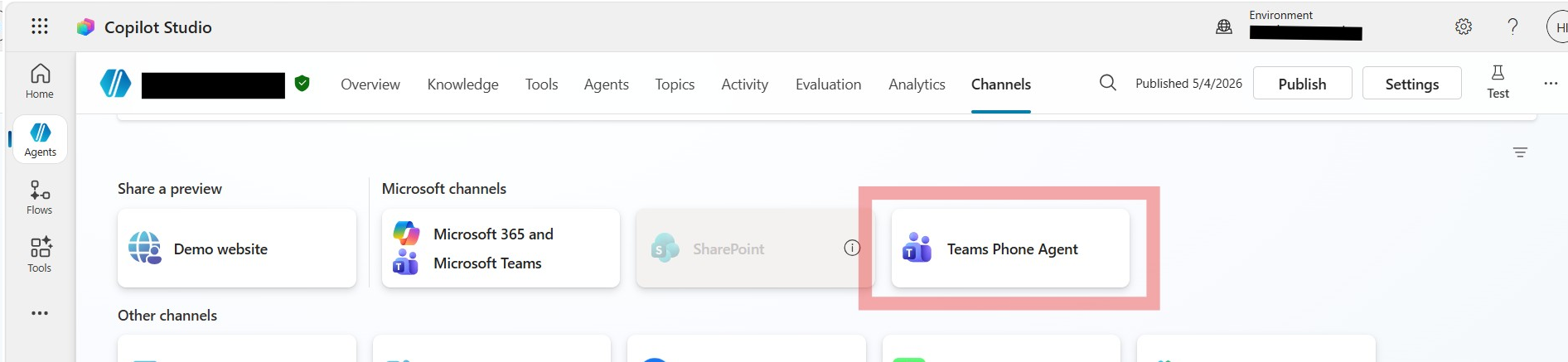
- Channels → Teams Phone Agent → Add channel, wait for confirmation, then Publish. (If the channel option is not visible, your environment is not enabled — see §6.)
- In the Teams admin center, open your Teams Phone Agent call flow, Assign a dial key → destination: Agents and Queues, enter a voice command and description, optionally link a Tag template, and select your published agent.
- Call in to confirm the hand-off works.
5.3 Custom Copilot Studio agent — direct-dial pattern
- Teams admin center → Voice → Resource accounts → Add. Create a resource account with type AI Agent, with a display name, username, and domain.
- License the resource account. In the Microsoft 365 admin center, assign the Teams Phone Resource Account license to that account and let the change propagate.
- Link the agent. Back in Resource accounts → Edit, set the Agent Source to your Copilot Studio voice agent. Optionally set a voice routing policy and assign a phone number (Calling Plans, Operator Connect, or Direct Routing). Optionally attach a Tag template.
- PowerShell cmdlets are available for scripted setup.
No phone number? If you do not assign a phone number to the resource account, only users in your tenant can reach the agent over VoIP via the Teams client.
5.4 Using Tags for Transfers
After attaching a tag template in the Teams admin center, configure the Copilot Studio agent to act on the tag values: add a topic with a “User says a phrase” trigger (for example, “transfer” or “escalate”), ask the caller to choose a department using the tag names as options, then use Topic Management → Transfer conversation → Transfer to agent, passing the caller’s choice as the transfer target. Publish the agent again. The agent can now transfer to the targets defined in your tag template.
Environment and regional constraints (Copilot Studio). Create the Copilot Studio environment in a supported region (for example, US, UK, Europe, Canada, Australia, Asia, Korea, Norway, Sweden, Switzerland, UAE). Voice agents are not supported in environments in France, Germany, India, Japan, or South Africa — though tenants based in those countries can still use voice agents hosted in a supported region. The Power Platform environment must have “Get new features early” = No and “Add a Dataverse data store” = Yes. Choose the region closest to your callers to minimize latency.
6. Availability, gating, and licensing
This is firmly a preview, and the access and commercial model matter before any pilot.
| Item | Current state (June 2026) |
|---|---|
| Program | Frontier Public Preview. Both Teams Phone Agent and the Copilot Studio integration entered Frontier Public Preview in mid-June 2026. |
| Gating | The Copilot Studio ↔ Teams Phone integration is explicitly enabled per tenant. Contact Microsoft support to enable it; until then, the Teams Phone channel option does not appear in Copilot Studio. |
| Teams Phone prerequisites | Standard Teams Phone prerequisites, including a properly configured resource account and the relevant Teams Phone licenses for your scenario. |
| Copilot Studio licenses | A Copilot Studio tenant license (to run and publish agents) and a Copilot Studio user license (to build them). |
| Built-in Teams Phone Agent | Available via the Frontier program; service limitations may apply. |
6.1 How custom agents are billed
Custom Copilot Studio voice agent experiences — whether reached through a Teams Phone Agent handoff or by direct dial — are billed consumptively, at a rate based on the orchestration type your organization selects when building the agent in Copilot Studio.
Billing timeline. Billing for Copilot Studio voice agent experiences in Teams Phone was set to roll out by early July 2026, and usage is not charged before that rollout. When billing goes live, all Frontier preview users must set up billing to keep using Copilot Studio voice agents for Teams Phone. All licensing, pricing, and service limits are subject to change, with more details expected at general availability.
6.2 Cost-control practices
- Use classic orchestration to avoid unexpected charges and reduce latency.
- Scope each agent narrowly to the processes it supports — overly broad agents produce unexpected responses and unpredictable costs.
- Test thoroughly with proper guardrails before exposing an agent to callers; how you build the agent significantly shapes the customer experience.
7. An expanding ecosystem
Microsoft is positioning this as a platform with choice across first- and third-party voice agents. Alongside first-party Teams Phone Agent and Copilot Studio agents, Microsoft is working with select solution developers to integrate their voice agents with Teams Phone. AudioCodes announced general availability of its voice agent for Teams Phone at launch, with additional solutions expected. Organizations can mix the built-in experience, custom Copilot Studio agents, and certified third-party agents within the same Teams Phone call flows.
8. Real-world example — a phased pilot
A 40-branch bank wants to reduce hold times on its retail support line without risking a poor first AI experience.
- Phase 1 — out-of-the-box only. Enable Teams Phone Agent on a single non-critical line. Configure Q&A from published FAQs (hours, locations, card-replacement steps) and conversational routing to existing queues, with context-aware transfer to a human for anything unresolved. No custom build, no consumption billing.
- Phase 2 — one custom workflow. Once the front door is proven, build a single, narrowly scoped Copilot Studio agent for one high-volume task (for example, “report a lost card”) integrated to the system of record, using classic orchestration. Validate the cost against the consumption meter before widening.
- Phase 3 — scale and route. Use Tags so one agent serves multiple departments, and add after-hours coverage where a human queue previously sent callers to voicemail.
Why this order: It separates the zero-cost, no-code value (Phase 1) from the consumption-billed custom value (Phase 2+), so the organization can prove customer experience and measure cost before committing.
9. Conclusion
Teams Phone Agent turns Teams Phone from a routing-and-queueing system into a conversational AI front door. The out-of-the-box experience — Q&A, appointment scheduling, conversational routing, context-aware handoff, and 60+ languages — covers routine calls with no code. Custom Copilot Studio voice agents extend it to the workflows unique to your business, accessible via handoff or direct dial. Underneath, the classic auto attendant and call queue model keeps escalation and after-hours paths intact.
For now, this is a gated Frontier preview with consumption-based billing for custom agents. The disciplined move is a scoped pilot: pick one high-volume, low-risk flow; deliberately design the happy, escalation, and after-hours paths; confirm the human handoff carries context; and validate cost with classic orchestration before widening. The technology is ready to trial — the discipline is in treating every voice agent as a designed business process, not a switch you flip.
This article will be revised as the feature set moves toward general availability. Expect changes to gating, regional support, supported agent types, and especially pricing and service limits.
Glossary - for those new to Teams Phone and Copilot Studio
| Term | Expansion |
|---|---|
| AI Agent (resource account type) | A Teams Phone resource account type used to attach a Copilot Studio voice agent directly to a phone number for direct dial. |
| Auto Attendant (AA) | A Teams Phone voice application that greets callers and routes them by menu, dial-by-name, or extension, with separate off-hours and holiday handling. |
| Call Queue (CQ) | A Teams Phone voice application that holds callers until an agent is available and redirects on overflow, timeout, or agent availability. |
| Classic orchestration | The Copilot Studio orchestration mode required for the Teams Phone channel; uses deterministic topic flows. Generative orchestration is not supported here. |
| Direct dial | Pattern where a Copilot Studio voice agent is attached directly to a phone number via a resource account, acting as the first point of contact. |
| Frontier program | Microsoft’s early-access program through which Teams Phone Agent and the Copilot Studio integration are currently delivered. |
| Handoff | Pattern where Teams Phone Agent passes a call to a custom Copilot Studio voice agent for a specialized workflow. |
| IVR | Interactive Voice Response — the automated voice menu or bot at the start of a call. |
| MCS | Microsoft Copilot Studio — the platform for building custom voice and chat agents. |
| Resource account | A licensed, non-user account in Teams Phone to which voice applications (auto attendants, call queues, voice agents) and phone numbers are assigned. |
| Tags | A mechanism to pass dynamic transfer information from Teams to a Copilot Studio agent, identifying next steps and transfer targets without hardcoding values. |
| Teams Phone Agent | The configurable, out-of-the-box conversational AI experience for Teams Phone, providing built-in Q&A, appointment, and routing skills. |
Sources and Links (primary)
- Engage customers with Teams Phone Agent and custom voice agents built in Copilot Studio — Microsoft Teams Blog (June 2026)
- Plan — Auto attendants and Call queues overview (Microsoft Learn)
- Plan — Agents and Queues for Teams Phone Agent (Microsoft Learn)
- Plan — Business decisions for Teams Phone Agent, Auto Attendant, and Call Queue (Microsoft Learn)
- Setup — Direct dial Microsoft Copilot Studio voice agents through Microsoft Teams Phone (Microsoft Learn)
- Setup — Teams Phone Agent — Agents and Queues (Microsoft Learn)
- Integrate voice agents with Teams Phone Agent (preview) — Microsoft Copilot Studio (Microsoft Learn)
- Plan — Authorized users for Teams Phone Agent, Auto Attendant, and Call Queue (Microsoft Learn)