

Table of Contents
- Every prompt library dies the same death
- A skill is a folder, and that is the point
- Microsoft just retired the way we taught this in 2025
- The agent only loads a skill when it needs it
- Scripts beat improvised code
- The knowledge travels with the behavior
- The comparison, stated plainly
- A normal user should never know what a skill is
- Five skills I would build first
- You do not need Copilot Studio for any of them
- The escape hatch that removes the last objection
- The honest caveats
- “Not shared” does not mean “only once”
- The thing about uploaded files
- Why this matters more than it sounds
- What I would check before shipping
- Sources
Every organization I work with has built a prompt library, and almost every one of them has watched it rot. Custom skills for declarative agents are the first mechanism in this ecosystem that fixes the cause rather than the symptom. This article explains what a skill really is, why it beats a prompt, and why you should build your first five in Agent Builder instead of reaching for Copilot Studio.
Every prompt library dies the same death
Most companies do the same thing in the same order. They buy Copilot licenses. They run training sessions. Then someone builds a prompt library.
It usually lives in SharePoint. It has a nice front page. It holds forty to four hundred prompts with names like Write executive summary or Create project kickoff.
For about six weeks, it works well.
Then it falls apart.
Someone improves prompt #17 and tells nobody. A second copy shows up in a Teams channel. A third gets pasted into an onboarding deck. A helpful colleague rewrites it for their own team. Now nobody knows which one is the real one, nobody tests any of them, and the quality a user gets depends on which copy they happened to find.
You cannot fix that with better folders. The problem is the thing itself. A prompt is just text.
A prompt library gives you reusable content. What it never gives you is reusable behavior — and behavior is what companies actually want to make consistent.
A skill is a folder, and that is the point
Custom skills for declarative agents are in preview right now, and the concept is almost disappointingly simple. A skill is a folder.
project-kickoff/
├── SKILL.md                 # required
├── templates/
│   └── kickoff-template.docx
├── references/
│   ├── project-methodology.md
│   └── governance-checklist.md
└── scripts/
    └── build-milestone-table.py
Only one file is required: SKILL.md. It holds the skill’s name and description in YAML front matter, plus the instructions that tell the model how to do the task. Those instructions must stay under 20,000 characters. Everything else — templates, reference material, scripts — is optional. And that optional part is where it gets interesting.
Microsoft describes a skill as “a modular capability that you add to a declarative agent to help it accomplish a specific task more reliably and repeatably.”
Look at those two words: reliably and repeatably. Not smarter. Not faster. Those are the words you use for a business asset, not a clever trick.
Microsoft just retired the way we taught this in 2025
There is a line in the documentation that deserves more attention than it is getting:
“Custom skills are a new, distinct component of a declarative agent. In earlier guidance, the word skills referred to task descriptions that you wrote inline within an agent’s instructions. Custom skills replace that approach.”
That is Microsoft ending the old habit of writing longer and longer instructions. Everything many of us taught last year — put the whole method in the instruction box, structure it with headings, hope the model keeps paying attention to all of it — is now the old way.
If you have ever written a long instruction block, you know the failure mode. The more you add, the more the earlier rules quietly stop being followed. There is a reason declarative agent instructions are capped at 8,000 characters.
The agent only loads a skill when it needs it
This is the most important technical reason a skill beats a prompt, and the one people skip past.
An agent does not load a skill until the task calls for it. The instructions and the files come into context on demand. Microsoft calls this progressive disclosure. The practical effect is that the agent stays focused even when you have many skills.
Here are the two shapes side by side:
Prompt library                 Skills
--------------                 ------
Agent instructions             Agent
  40 pages of method            ├── Contract Review
  loaded on every single turn   ├── Business Case
  all competing for attention   ├── Risk Assessment
                                ├── Project Charter
                                └── Executive Briefing
                                (loads only what it needs)
Each skill gets its own 20,000-character budget, on top of the agent’s 8,000-character instructions — and it only costs you context when it is actually in play. That is not a small convenience. It changes how far you can scale before quality degrades.
Scripts beat improvised code
If a skill includes a script, the agent runs that script. It does not write fresh code each time and hope the math comes out the same.
For an ROI model, a scoring matrix, or a chart that must look identical in every business case going to the board, this is the difference between “usually right” and “provable”.
The sandbox those scripts run in is deliberately narrow, and you should know the limits before you promise anything:
| Capability | Supported? |
|---|---|
| Internet or network access | No — no network access at runtime |
| Installing packages at runtime | No |
| Authenticated network calls | No |
| Packages already in the sandbox | Yes, but do not depend on one unless you confirmed it |
| Calling connectors, API plugins, MCP servers from a script | No — the agent can use them through the orchestrator, the script cannot |
Supported script types are .py, .js, .mjs, .cjs, .ts, .mts, .sh, and .bash.
Those limits look restrictive written out like that. In practice they are exactly what a security architect needs to hear before approving anything, and they rule out almost nothing that a document-producing skill wants to do.
The knowledge travels with the behavior
A prompt can describe your template. A skill can contain it.
The approved Word file, the wording list, the governance checklist, the KPI definitions — all inside the package, sitting next to the instructions that know how to use them. A skill can carry Office documents, PDFs, Markdown, CSV, images, and structured data files, up to 350 files across all skills on an agent.
Sensitivity labels on those files are retained and honored. A labeled template does not stop being labeled because it sits inside a skill. Uploaded skill files are stored in tenant-scoped SharePoint Embedded containers — inside your tenant, under your control. User-defined permissions and Double Key Encryption are not supported in the sandbox.
The comparison, stated plainly
| Prompt library | Skill |
|---|---|
| The user has to find the prompt | The agent finds the skill |
| The user pastes it in | Used automatically |
| Plain text | Instructions, files, and scripts |
| Hard to govern | A versioned package |
| Cannot be tested | Can be tested |
| Loaded every time | Loaded only when needed |
| Knowledge buried in text | Knowledge packed with behavior |
A normal user should never know what a skill is
This is the part I care about most, and the part that usually gets lost in architecture debates.
The whole experience should be this:
Create a project kickoff document.
That is all. No prompt library. No searching. No copy and paste. No wondering which version is current. The agent recognizes the task, loads the kickoff skill, and the user gets the right structure, the right terminology, the required sections, and the right tone — without learning anything new.
Every time we ask users to understand the system before they can get good output, adoption drops. Skills are the first thing in this ecosystem that reliably moves the complexity out of the user’s head and into the asset.
Five skills I would build first
1. Executive briefing
Background, current status, risks, decisions needed, recommendation. The same shape every time. Leadership stops receiving five different interpretations of the word “summary”.
2. Meeting outcome
Not notes. Outcomes: executive summary, decisions, actions with owner and due date, open risks, items for escalation. The difference between a record of what was said and a record of what was decided.
3. Business case
Current state, future state, benefits, risks, financial model, ROI. This one earns its script — the ROI calculation belongs in a .py file, not in a fresh guess inside every document.
4. Architecture decision record
Context, decision, alternatives, consequences, risks, review date. Architects will like this one most, because an ADR that keeps changing shape is an ADR nobody can read three years later.
5. Project health check
Schedule, budget, scope, risks, dependencies, stakeholders — with explicit rules for green, amber, and red in the reference files, so “amber” means the same thing in Hamburg and in Lisbon.
Notice what those five have in common. None of them are clever. They are consistent. That is the entire point.
You do not need Copilot Studio for any of them
Whenever I present this, someone from the platform team says: fine, we will build these in Copilot Studio so we can govern them properly.
For these scenarios, that is the wrong reflex — and Microsoft’s own guidance agrees.
Look at what those five skills actually do. They draft, structure, summarize, assess, and format content the user can already see in Microsoft 365. They do not raise tickets. They do not write into SAP. They do not run unattended overnight. They do not need to appear on a public website or in WhatsApp. They do not branch through approval flows.
Microsoft draws the line clearly. Choose Agent Builder when you want to quickly create an agent for yourself or a small team, using natural language and existing content. Choose Copilot Studio when you need a broader audience, multi-step workflows, custom integrations, autonomous behavior, or lifecycle management across environments.
All five skills above sit on the Agent Builder side of that line.
| Agent Builder | Copilot Studio | |
|---|---|---|
| Audience | Individuals or small teams | Department, organization, or external customers |
| Typical agent | Lightweight Q&A and content work on organizational knowledge | Multi-step workflows, business system integration, autonomous scenarios |
| Extra license | None beyond Microsoft 365 Copilot | Requires a Copilot Studio license |
| Governance home | Microsoft 365 admin center | Power Platform admin center, with finer-grained controls |
| Skills per agent | 8 | n/a |
| Skill package | .zip, up to 50 MB, 25 MB per file |
n/a |
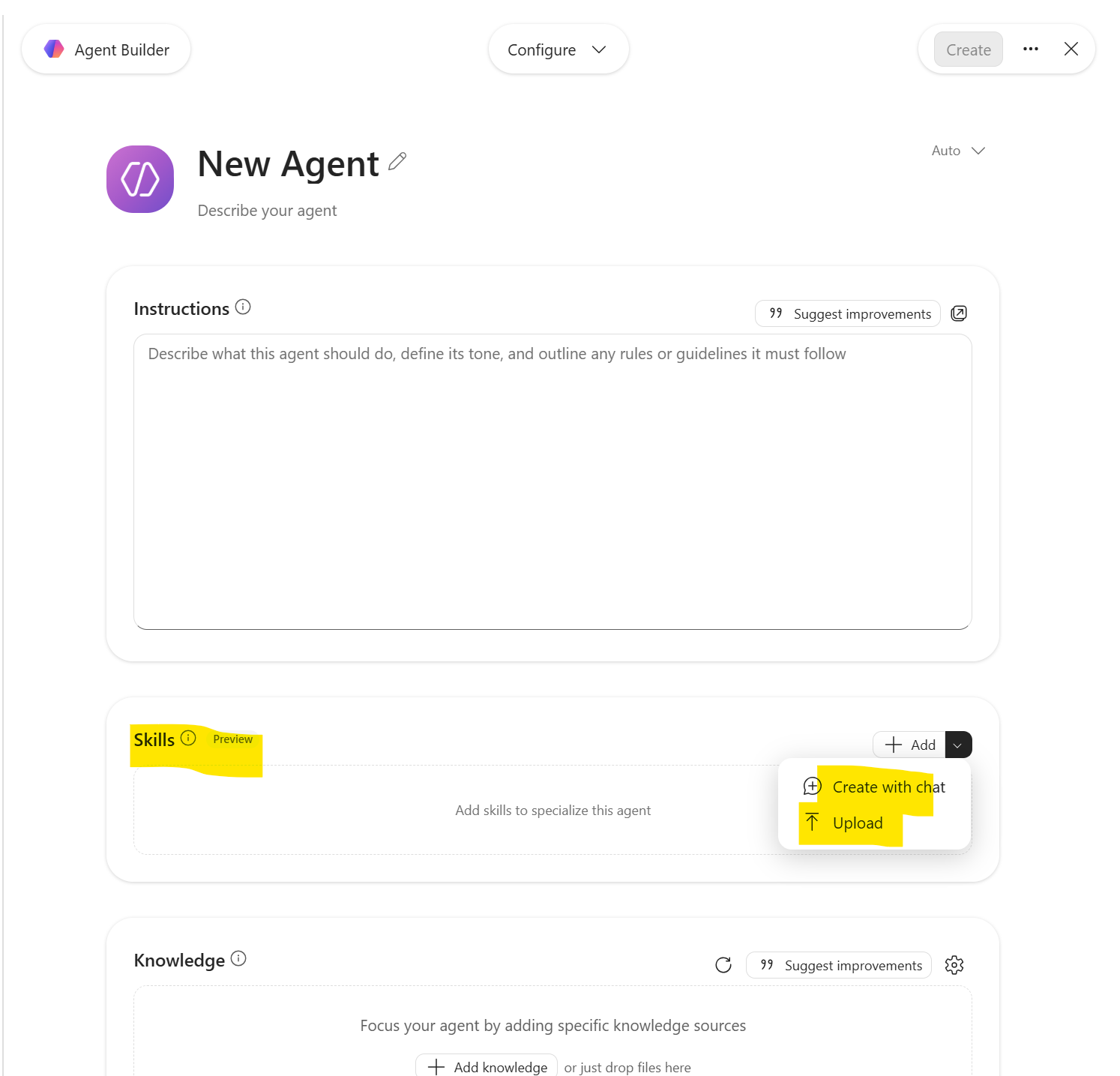
Two more practical points in Agent Builder’s favor. You can ask it to create a skill from a plain description — describe the repeatable workflow you want packaged, then check what it produced under Configure → Skills. And you can upload a complete .zip you built yourself, which is the route I would take for anything that carries a real template.
One warning on that upload: you must upload the complete .zip. Uploading SKILL.md on its own does not work, and building a skill from individual file uploads is not supported in Agent Builder. If you work in the Microsoft 365 Agents Toolkit instead, the rule inverts — there you add the skill directory, and .zip is not supported.
The escape hatch that removes the last objection
The strongest argument for starting in Agent Builder is that you can reverse it.
You can copy an agent created in Microsoft 365 Copilot into Copilot Studio when you need advanced capabilities or broader integration. The core configuration and instructions are preserved. You do not start over.
So choosing Agent Builder is not a decision you have to defend for the next five years. You revisit it the day a skill genuinely needs a connector, a workflow, or an external channel.
My rule, stated plainly:
If the skill produces a document, an assessment, or a decision record — Agent Builder. If the skill has to touch another system — Copilot Studio.
Pushing a business case skill through Copilot Studio does not make it better governed. It makes it slower to build, more expensive to license, and dependent on a team that has real integration work waiting.
The honest caveats
It would be unfair to sell only the good side. This is a preview, and it behaves like one.
Frontier Program required Custom skills are in preview for organizations in the Microsoft Frontier Preview. Not every tenant qualifies.
Not available with Information Barriers Custom skills are not available in tenants that use Microsoft Purview Information Barriers. The restriction applies to both admin-deployed and user-created declarative agents.
No ISV distribution yet Support for independent software vendors to publish declarative agents with custom skills through Partner Center is not available yet. Microsoft explicitly tells ISVs not to submit such packages.
Scripts have no network access Covered above, but worth repeating because it catches people who assumed a script could call an API.
Skills and uploaded files don’t mix yet More on that below.
Sharing one skill across several agents isn’t supported yet More on that below too, because it is the question I get in every room.
“Not shared” does not mean “only once”
Let me answer the question directly, because the documentation does not.
The support matrix has a single row — reuse across agents: not supported at this stage of the preview — for both Agent Builder and the Agents Toolkit. That is the whole statement. No rule says a .zip may only be uploaded once.
So: nothing stops you from uploading the same project-kickoff.zip to three different agents. You can do that today. What you get is three separate copies, not one shared skill. The row is about linking, not uploading. No central skill library that several agents point to. A skill belongs to the agent you uploaded it to.
Why that matters in daily life: fix a small mistake in the ROI script, and you have to upload the file again to every agent that uses it. Nothing tells you which agent carries which version. A few months later, one agent is on version 3, and another is still on version 1 — and you are back where the prompt library left you, just with tidier files.
So keep the master copy outside Copilot: in Git, or in one properly governed SharePoint library. Treat every upload as a delivery from that master, never as the original. When real sharing arrives, you reconnect instead of rebuilding.
The most exciting version of this story — one project-kickoff skill used by the HR onboarding agent, the PMO agent, the transformation agent, and the portfolio agent at the same time — is where this is going. It is not where we are today.
The thing about uploaded files
One more limit worth planning around. Right now, an agent cannot have both skills and uploaded files. Microsoft lists this under known issues and says support is planned.
“Uploaded files” means files you upload to the agent from your own computer, under Knowledge on the Configure tab. Microsoft calls them embedded files. The content is copied into the agent exactly as it is at that moment. That is different from pointing the agent at a file in SharePoint or OneDrive, where the agent keeps reading the live document and picks up your later changes.
So if your agent already has files uploaded that way, you cannot simply add a skill to it yet. You have two options: point the agent at the same content in SharePoint or OneDrive instead, or put those files inside the skill package.
The second option is the better design anyway. A template or a list of definitions belongs right next to the instructions that use it — not in a separate pile of knowledge the agent has to work out how to apply.
Why this matters more than it sounds
Power Automate did not become important because flows were technically novel. It became important because it gave business automation a packaging format — something you could name, version, own, hand over, and audit.
Skills are that moment for enterprise know-how in Copilot.
Champions stop being prompt authors and become capability authors. Instead of teaching a thousand people to use prompt #17 correctly, you publish project-kickoff once, and everyone who comes after benefits without being taught anything.
Prompt libraries standardize what users type. Skills standardize how the work gets done.
What I would check before shipping
If you are going to start this month, work through this list first.
Confirm you are in the Frontier Preview, and confirm you are not running Purview Information Barriers. Those two answers decide whether the rest of the list matters at all.
Pick one skill, not five Take the document your organization produces most often and argues about least. Executive briefing is usually the right first move.
Put the master in source control before the first upload This is the single habit that prevents the prompt-library failure from repeating itself.
Move the templates into the package If the agent currently has uploaded files, that is a blocker today — and moving them into the skill is the better design regardless.
Write the description as a trigger, not a label The description in the YAML front matter is how the agent decides to load the skill. “Create approved project kickoff documents, including objectives, scope, stakeholders, governance, risks, milestones, and success metrics. Use whenever a user wants to start a project” works. “Kickoff skill” does not.
Test it with a user who has never heard the word skill If they have to be told the skill exists, the description is wrong.
Do not route it through Copilot Studio because it feels more serious Route it there when it has to touch another system. Until then, Agent Builder, no code, no extra license.
If you take one sentence to your next steering committee, take this one: prompt libraries are reusable text, skills are reusable expertise.
One thing to verify in your own tenant: the entire feature is in preview and behind the Frontier Program, so the limits quoted here — 8 skills per agent, 50 MB per package, 350 files, 20,000 characters of skill instructions — are the numbers documented on 4 September 2026 and are the kind of thing that moves during a preview. Check them against Microsoft Learn before you build a rollout plan on top of them.
Sources
- Microsoft Learn, Custom skills in declarative agents (preview), last updated 4 September 2026: the definition of a skill, the “custom skills replace that approach” wording, progressive disclosure, the support matrix including the 8-skill and 50 MB limits, supported file and script types, the sandbox restrictions, sensitivity labels and SharePoint Embedded storage, the Frontier Preview and Information Barriers restrictions, the ISV note, the “reuse across agents: not supported” row, and the known issue about skills and embedded files
- Microsoft Learn, Add custom skills to your declarative agent in Agent Builder (preview), last updated 4 September 2026: creating a skill from a natural-language description, the upload flow under Configure, the requirement to upload the complete
.ziprather thanSKILL.mdalone, and the prerequisites - Microsoft Learn, Choose between Agent Builder in Microsoft 365 Copilot and Copilot Studio to build your agent, accessed 19 September 2026: the audience, agent type, capability, governance, and licensing comparison, and the ability to copy an agent from Microsoft 365 Copilot into Copilot Studio with configuration and instructions preserved
- Microsoft Learn, Choose the right tool to build your declarative agent, accessed 19 September 2026: the no-code, low-code, and pro-code positioning of Agent Builder, Copilot Studio, and the Microsoft 365 Agents Toolkit, and the licensing prerequisites for each
- Microsoft Learn, Add knowledge sources to your declarative agent, accessed 19 September 2026: embedded file content as a distinct knowledge source, supported in Agent Builder but not in the Agents Toolkit


