

Table of Contents
- Status first, because it moved
- What actually changed
- The agent node in practice
- Testing and evaluation, which is where the time goes
- Where determinism goes and where judgment goes
- Four ways to reach intelligence, and which caller owns the loop
- A worked example: unstructured intake
- Boundaries I check before shipping
- What I would tell a team starting today
- Sources
The earlier articles in this series dealt with agents: the orchestrator, the loop, skills, connected agents. This one is about the other half of the platform. The new workflows experience, the deterministic backbone, and the agent node, which lets a flow hand one step over to an agent that reasons instead of following hard-coded logic.
Status first, because it moved
On 3 August 2026 Ryan Cunningham announced that the capability previewed over the prior two months is “now generally available for production use” under a new name: the GitHub Copilot harness in Copilot Studio. The workflow designer came with it, giving “a visual canvas to understand and edit workflows, including adding agent nodes and running workflow evals”. So the accurate statement is not that a standalone workflow designer shipped GA, it is that the harness the new designer runs on is GA. The Learn page for the agent node says the same thing from the other direction: its features “are used by agents or workflows powered by the GitHub Copilot harness”.
That scoping matters when you plan. Copilot Studio now runs three harnesses side by side: Copilot Chat for customizing Chat experiences, Standard for conversational, topic-based agents, and the GitHub Copilot harness for complex agentic processes. Microsoft has committed to continued support for the first two, for existing agents and for new authoring. Nothing forces a migration.
Also GA: computer use since May 2026, with the August update embedding computer-using agents into multi-step workflows, and A2A since April 2026. Still preview: adding a workflow or an MCP server as a tool for an agent. Run-only agent sharing, which lets you give business users the ability to trigger an autonomous agent without maker access, is reported to be in preview, but I could not confirm it on Learn or the Copilot Studio blog, so check its status yourself before you plan around it. Classic agent flows remain GA.
Budget before you build. Agents on the GitHub Copilot harness “use usage-based billing for all work, regardless of Microsoft 365 Copilot licensing”, priced on the models you pick, the organizational context and tools you attach, and runtime. The maker-side work is billed too: natural language authoring, evaluations and testing fall under the same meter. That is a different economic model from the fixed rate card the Copilot Chat and Standard harnesses stay on, and it is the single most common thing I see teams miss.
What actually changed
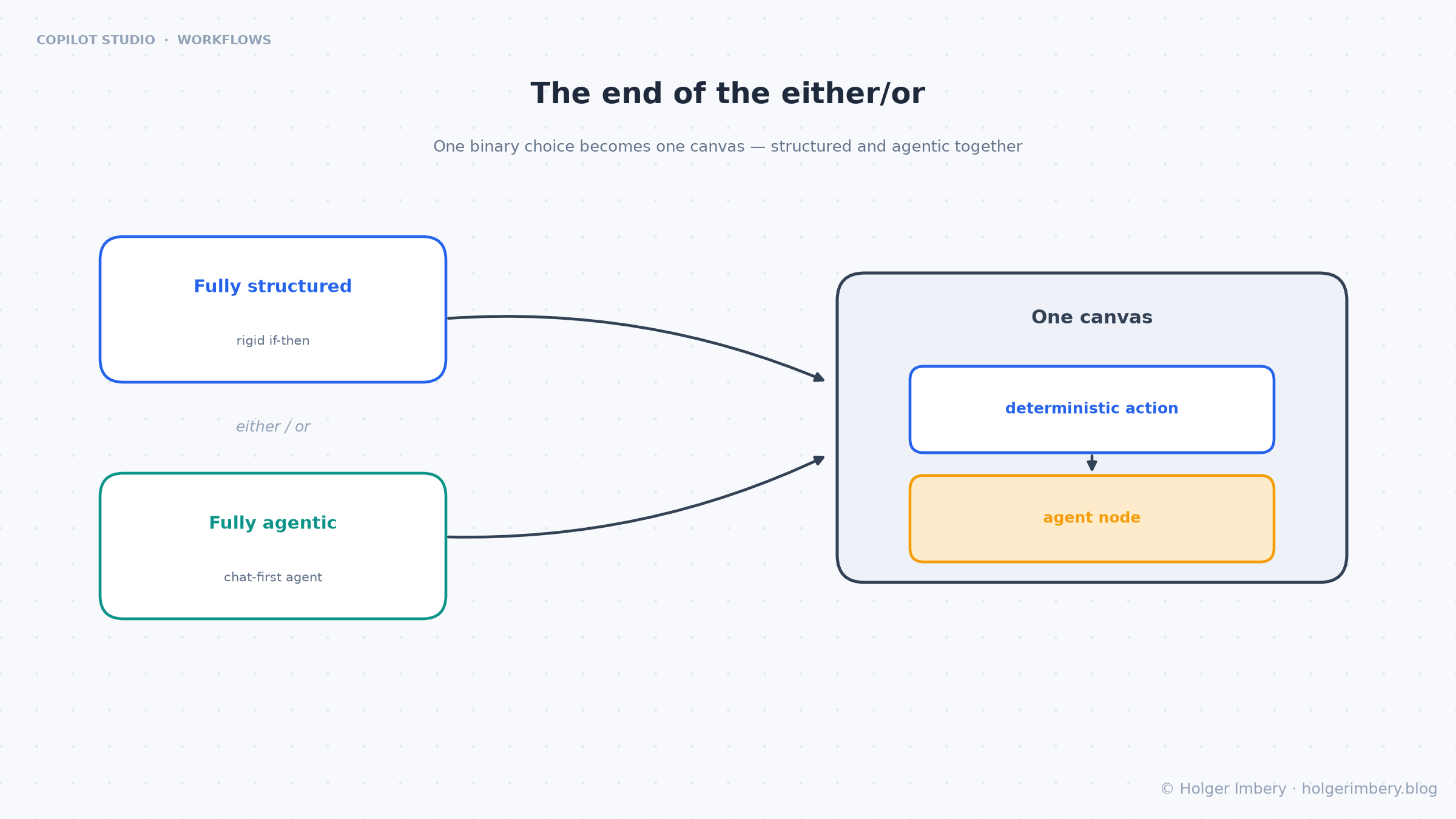
Figure 1: one canvas instead of a choice between fully structured and fully agentic.
The definition of a workflow has not moved. It is a trigger plus at least one action, running a rule-based path where the same input produces the same output. That predictability is why anyone lets a flow touch a financial record.
You could always call an agent from a classic agent flow. It was one line item in an AI-capabilities submenu, prose in and prose out. The flow was the star and the agent was a service it happened to phone. In the new designer the agent is a node on the canvas, sitting next to “read a SharePoint list” and “send an email”.
That sounds cosmetic. It is not, and the reason is the plumbing around the node rather than the node itself.
The agent node in practice
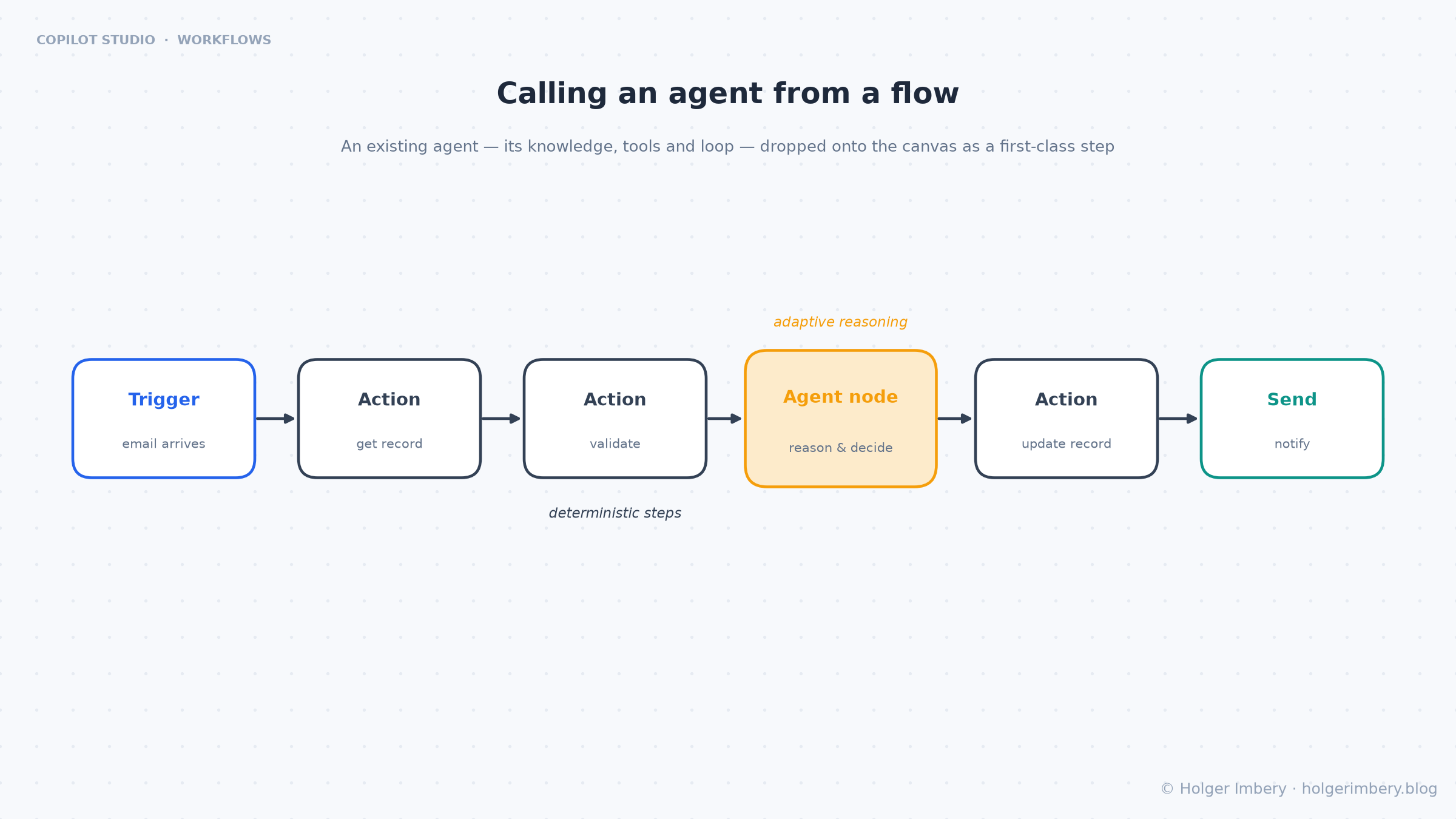
Figure 2: the agent node as a step among the deterministic actions.
When you drop an agent node you pick one of two things, and this is the part that surprised people who read the May announcements:
An existing published agent. It “runs with whatever instructions, tools, and knowledge it was already configured with”. You give it a Message for this run, with dynamic content from earlier steps.
A new agent for this workflow. An inline agent whose instructions, tools, knowledge and output shape are configured in the node itself and travel with the workflow. There is no separate Message field; the Instructions field doubles as the per-run prompt.
Inline agents are not reusable. The docs are blunt about it: an inline agent is scoped to its workflow, and if you build the same one twice you should promote it to a published agent and call that instead. My rule of thumb is that the second time I write the same inline instructions, it becomes a published agent.
Three settings on that node do more for reliability than anything else:
Output shape. You choose a text response, structured output with named fields, or custom structured output matching a JSON schema you define. Pick a structured shape and each field becomes its own dynamic-content token downstream. This is the whole game. A text response drops you back into string parsing. A schema lets the next node branch on priority == "high" or write straight to a Dataverse column.
Request human assistance when unsure. The agent emails the connection owner and waits for a reply before continuing. Turn it on where being wrong costs more than being slow.
Work IQ. Grounds the agent in the running user’s recent mail, Teams, calendar, OneDrive and SharePoint context. Useful when the workflow acts on behalf of a person. Note the naming drift: Microsoft now also uses Microsoft IQ for the organizational-data connection on the agent side, so do not assume a colleague means the same thing you do.
Testing and evaluation, which is where the time goes
Node-level testing is the feature I use most. You open the node’s Test tab, enter inputs manually or reuse inputs from a previous run, and inspect the output without executing the whole flow. Anyone who has debugged a fifteen-step flow by reading run-history JSON knows what that saves.
Evaluations build on top of a test run. You write test methods in natural language describing what a good response looks like, then get a pass or fail per grader with the evidence behind it. Failed results can come back with suggested improvements. The loop is configure, test, evaluate, improve.
Know the limits before you plan around them:
- Evaluations only work for new agents created in workflows, not for called published agents.
- You cannot select a custom model for evaluations.
- Up to five AI-generated test methods per node, and 20 evaluation runs per node per day.
- Evaluations run against the most recent test output, so change the instructions and you re-test before you re-evaluate.
That last constraint bites during a tuning session. Twenty runs a day disappears faster than you expect when three people are iterating on the same node.
Where determinism goes and where judgment goes
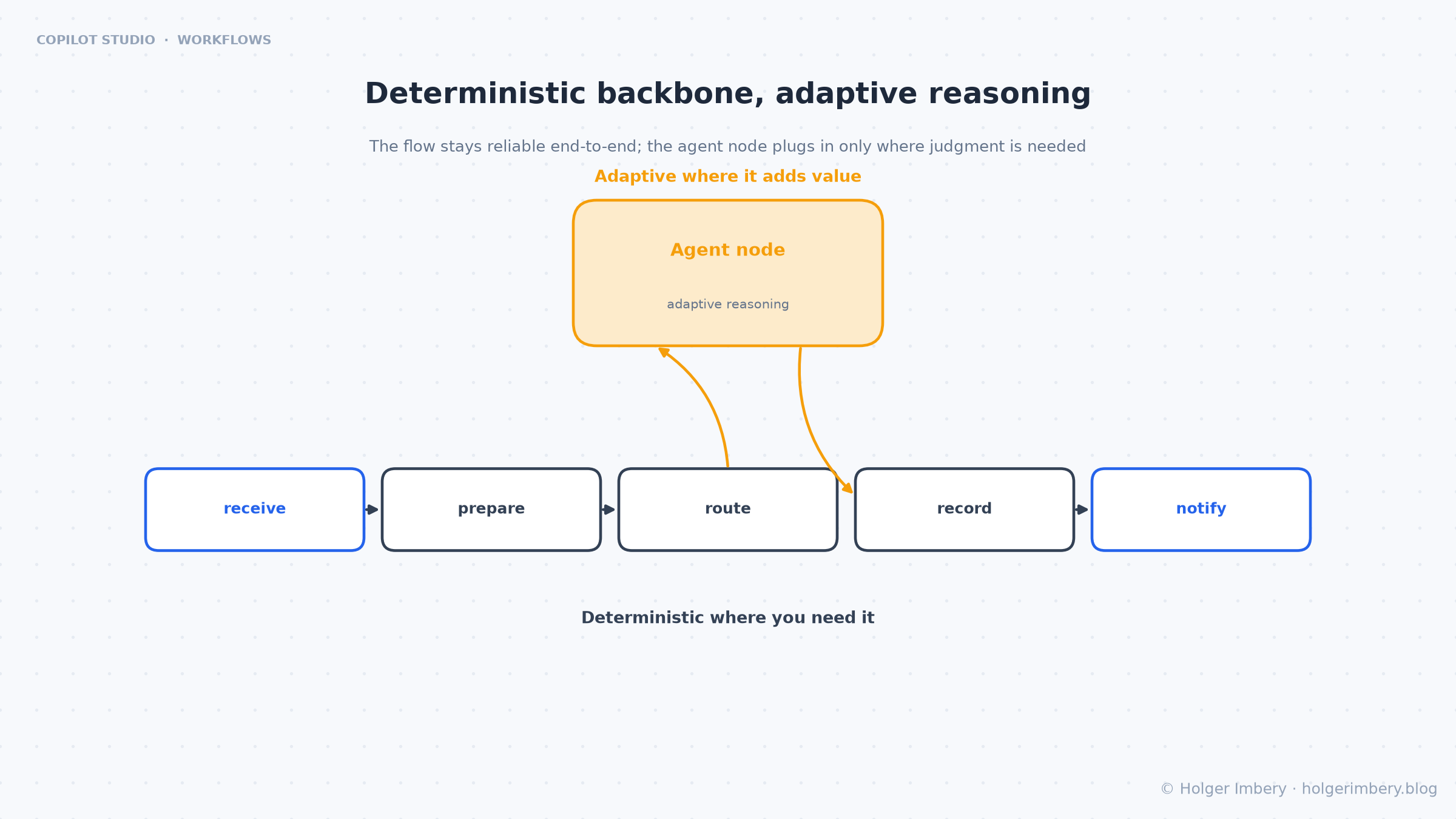
Figure 3: the backbone stays reliable; the node plugs in where judgment is needed.
This is the one decision the platform will not make for you.
| Deterministic action when | Agent node when |
|---|---|
| The rule is stable and expressible as if-then | The decision needs reasoning over unstructured input |
| The step writes to a system of record | The step must orchestrate several tools to decide |
| You need same input, same output | You must pull and combine several sources |
| Compliance requires a fixed, provable path | The input varies too much for a fixed path |
| Latency and cost must be predictable | A person would apply judgment, not a lookup |
The Graebel case Microsoft published is this rule in production. Relocation requests arrive as unstructured emails with unique instructions, attachments and edge cases, so a purely structured automation was too rigid. Their Service Order Agent, built with Copilot Studio and Azure AI, “transforms unstructured service order emails into compliant transactions within Graebel’s globalCONNECT platform, even where no workflow APIs were available”, and escalates exceptions through workflows when needed. Judgment where the input is messy, structure where the process must be governed.
Four ways to reach intelligence, and which caller owns the loop
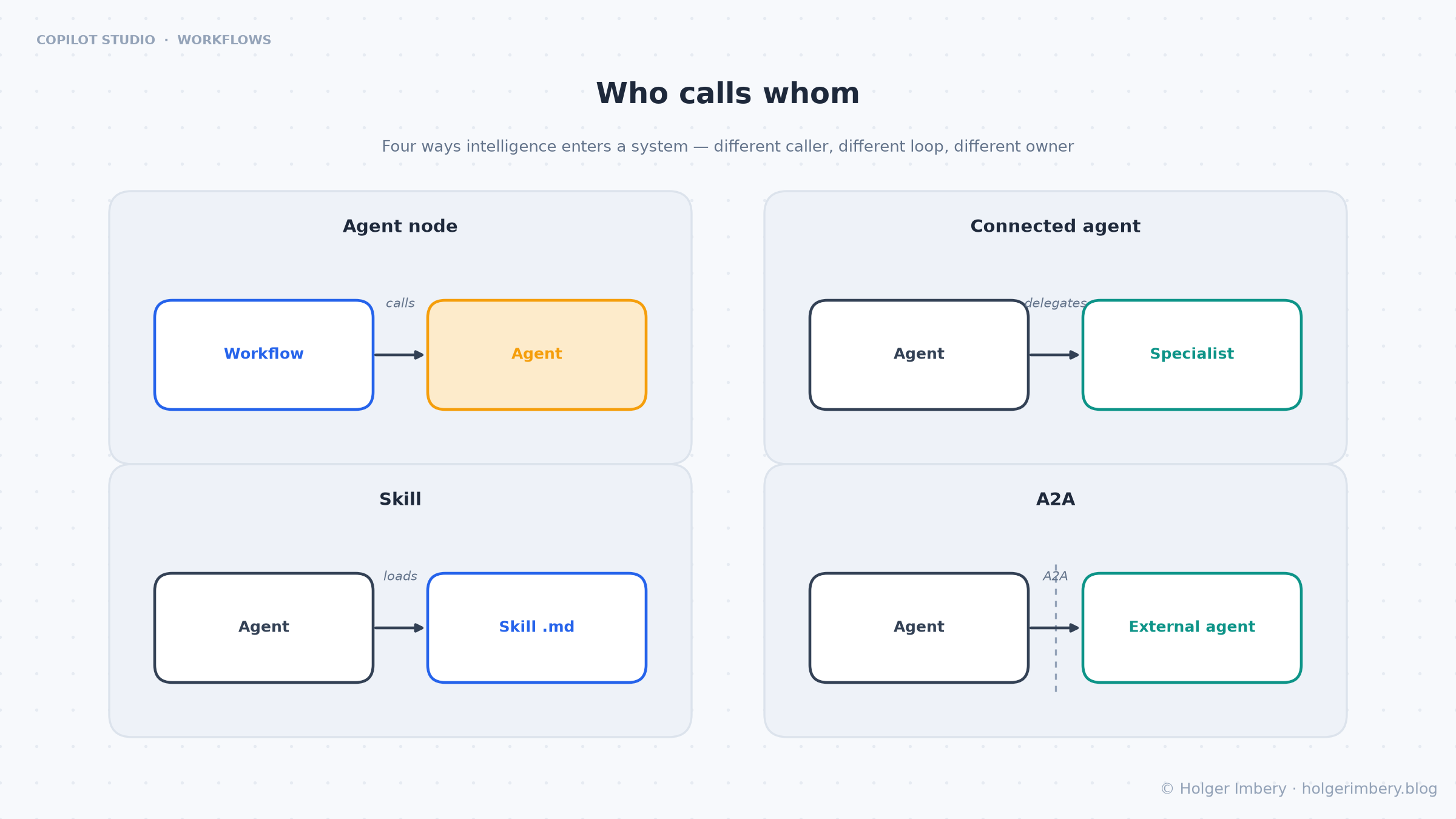
Figure 4: who calls whom.
Teams conflate these constantly. Ask who calls, whose loop runs, and who owns the callee.
| Mechanism | Caller to callee | Whose loop runs | Use for |
|---|---|---|---|
| Deterministic action | Flow to connector | None, rule-based | Provable, rule-expressible steps |
| Agent node | Workflow to agent | The called agent’s, bounded by the flow | A reasoning point inside a process |
| Connected agent | Agent to specialist agent | The specialist’s | Delegation inside the agent runtime |
| Skill | Agent to its own behavior | The calling agent’s | Behavior reused across agents |
| A2A | Agent to cross-platform agent | The remote agent’s | Foundry, SDK, third-party agents |
The short version: the agent node is the flow’s way to reach an agent, connected agents are an agent’s way to reach an agent. Get it backwards and you rebuild the god-agent problem on a new surface, either as a workflow encoding judgment in an ever-branching condition tree or as an agent stuffed with process logic that belonged in a flow.
Both directions are now available. Adding a workflow or an MCP server as a tool for an agent is in preview, so the agent-calls-flow half is not yet something I would design a production system around.
A worked example: unstructured intake
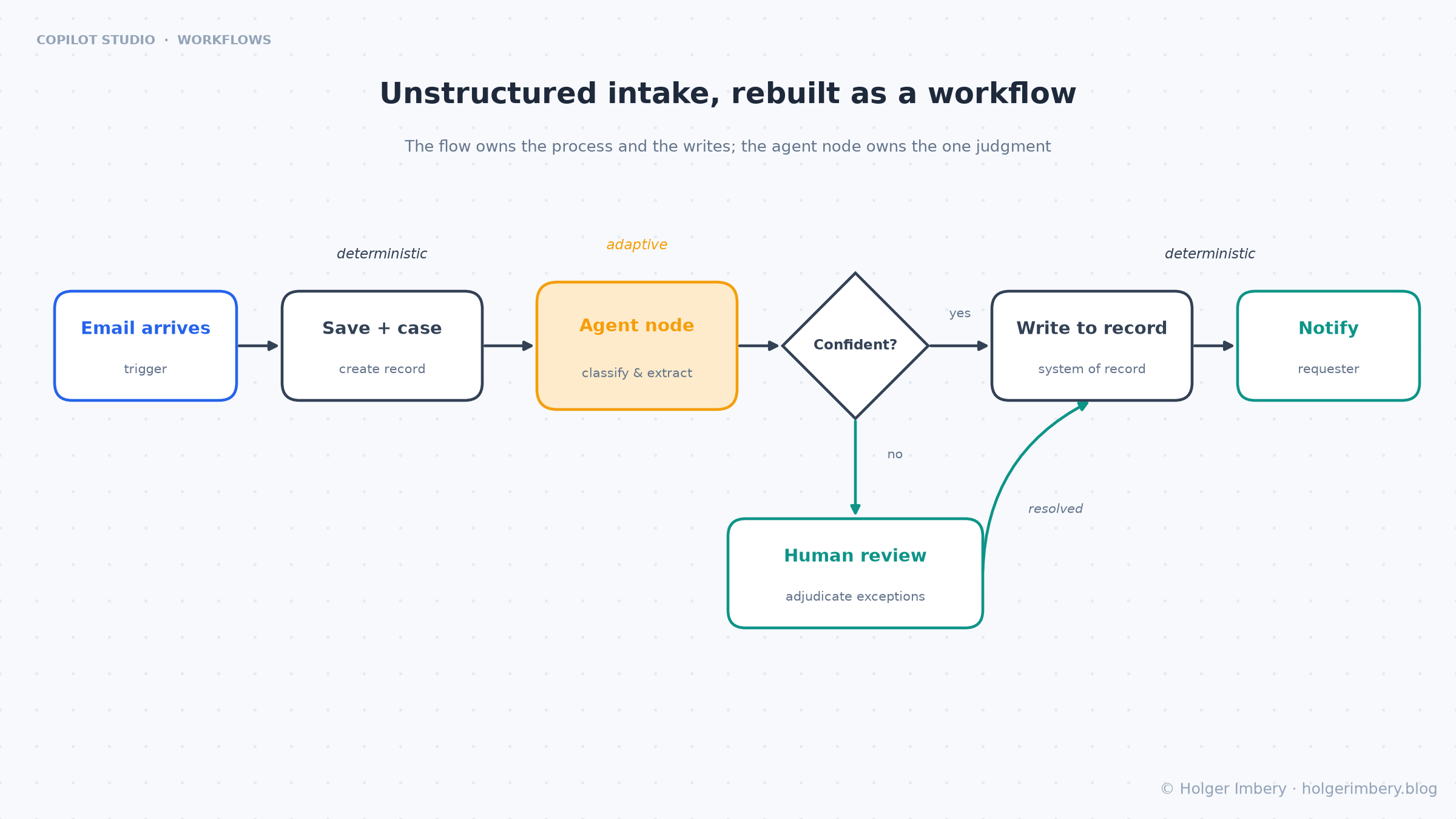
Figure 5: the flow owns the process and the writes, the node owns the one judgment, a person handles exceptions.
Relocation order, invoice, vendor contract. Same shape every time.
TRIGGER
  When an email arrives in the intake mailbox
     |
DETERMINISTIC ACTIONS  (provable, auditable)
  - Save the message and attachments to the case store
  - Create a case record in Dataverse (status = "received")
     |
AGENT NODE  (the one reasoning point)
  - Reads the email and attachments
  - Classifies the request, extracts fields, flags edge cases
  - Returns CUSTOM STRUCTURED OUTPUT against a schema:
    {category, fields[], exceptions[], confidence}
  - "Request human assistance when unsure" is on
     |
DETERMINISTIC BRANCH  (structure resumes)
  - High confidence and no exceptions -> file and advance
  - Otherwise -> human review node
     |
DETERMINISTIC ACTIONS
  - Write the outcome to the system of record (idempotent)
  - Notify the requester, close or route the case
Read the control flow. The flow owns the process and every write. The node owns the single judgment no condition tree could hold, and it hands back a schema-shaped result rather than prose. The human review node keeps a person on the branch that costs money.
The output schema is what makes this hold together. Without it, the next node is parsing free text and you have moved the fragility rather than removed it.
Boundaries I check before shipping
Everything from the earlier articles still applies: least privilege, idempotent writes, audit, treating imported agents and skills as supply-chain dependencies. The node adds four checks.
Do not claim determinism across the node. A workflow with an agent node is only as deterministic as its deterministic parts. Keep every side-effecting write in a deterministic action with an idempotency key, after the node returns and, where it matters, after a person has looked. The node decides, the deterministic step commits.
Untrusted content enters through the node. The node ingests whatever the flow hands it: an email body, an uploaded document, a portal field. That is the same surface as CVE-2026-21520, the “ShareLeak” indirect prompt injection rated CVSS 7.5, where an unauthenticated attacker planted a fake system-role instruction in a public SharePoint form field. Microsoft patched it on 15 January 2026, but in Capsule Security’s follow-up testing data still exfiltrated, which is the more useful lesson: treat the patch as a floor, not a control. Validate payloads, never let free-text content override instructions, keep human review on consequential branches.
Cost compounds. Usage-based billing covers building, testing and evaluating, not just running. An agent node in a loop over the day’s meetings is a different cost profile from one node on an intake trigger. Do not put a node where a deterministic action would do.
Identity and sharing. Starting in July 2026, Copilot Studio automatically creates an Entra Agent ID for every new agent and you can no longer opt out at the environment level. Plan for it rather than discovering it. If the point of the automation is to let business users trigger it, run-only sharing is the mechanism to watch, though I have not been able to confirm its status in Microsoft’s own documentation.
What I would tell a team starting today
Build on the new canvas if the work is a multi-step process with ambiguous decision points. That is what the GitHub Copilot harness is for, and it is GA. If you are customizing a Chat experience or shipping a topic-based conversational agent, the Copilot Chat and Standard harnesses are still the right answer and still supported. Pick the harness before you pick the canvas.
Start with the backbone. Write the deterministic steps first, run them, then find the one place a rule cannot express the decision and put the node there. Working the other way around produces an agent with a flow bolted on.
Define the output schema before you write the instructions. It forces you to state what the downstream steps actually need, and it usually shortens the instructions.
Use inline agents for the first version and promote to a published agent the moment a second workflow wants the same reasoning.
Test the node in isolation before you run the flow, and budget the evaluation limits into your tuning session.
The backbone stays boring. The reasoning plugs in where it earns its place. That is the whole design.
Sources
- Microsoft Learn, Add an agent node to a workflow, last updated 22 July 2026: existing versus inline agents, instructions and message fields, tools and knowledge, output shapes, Work IQ, request human assistance, node testing and evaluations with their limits, usage-based billing note
- Microsoft Copilot Studio Blog, More powerful agents and workflows for autonomous business processes: Introducing a new harness for Copilot Studio, Ryan Cunningham, 3 August 2026: GA of the GitHub Copilot harness, the workflow designer with agent nodes and workflow evals, the three-harness model, usage-based billing
- Microsoft Learn, What’s new in Copilot Studio: computer use GA May 2026, A2A GA April 2026, Microsoft IQ, automatic Entra Agent ID from July 2026, workflow and MCP server as agent tools in preview
- Microsoft Learn, Agent flows overview: the classic experience, trigger and action anatomy, the deterministic contract
- Microsoft Copilot Studio Blog, New and improved: Computer-using agents, a new workflows experience, and real-time voice experiences: the redesigned canvas, agent nodes, inline AI actions, remote MCP support, the Graebel Service Order Agent
- Microsoft Copilot Studio Blog, New and improved: Agent governance, intelligent workflows, and connected app experiences: the deterministic definition of workflows, embedding agents in them
- Microsoft Adoption, Graebel uses governed automation to modernize global relocation service orders with Microsoft Copilot Studio, last updated 21 July 2026
- VentureBeat, Microsoft patched a Copilot Studio prompt injection. The data exfiltrated anyway, Louis Columbus, 15 April 2026, and the NVD entry for CVE-2026-21520, for the ShareLeak disclosure timeline and severity
- Community coverage, treat as commentary and verify on Learn: RPABOTS.WORLD, Copilot Studio Rebuilt: Workflow Designer GA, CUA, and Run-Only Sharing Explained, August 2026, and WindowsForum’s thread on run-only agent sharing, which is the only place I found that capability described. Note that these also describe the 3 August release as a standalone Workflow Designer GA; Microsoft’s own announcement frames it as the GitHub Copilot harness reaching GA with the workflow designer included
- Prior articles in this series, for the agent-first model, the orchestration patterns, and the skills versus connected agents boundary