Table of Contents
- The architecture in one picture (logical view)
- Where this approach fits (and where it does not)
- Why Azure Local makes sense here (the use case drives locality)
- 1) The agent needs to live where the tools and data already are
- 2) Latency is a functional requirement, not a nice-to-have
- 3) Connectivity constraints are a design input
- 4) You can keep cloud-native operations without reinventing on‑prem deployment
- 5) Local inference forces you to manage capacity and hardware intentionally
- 6) The architecture stays incremental and reversible
- Step‑by‑step implementation runbook
- Phase 0 — Define boundaries: agent vs workflow, and what “done” means
- Phase 1 — Platform baseline: Azure Local + Arc + AKS on Azure Local
- Phase 2 — GitOps delivery (recommended even for pilots)
- 2.1 Repository layout pattern
- Phase 3 — Foundational services: state, memory, and observability
- Phase 4 — Install Foundry Local (preview) on inference nodes
- Phase 5 — Network, TLS, and identity between AKS and Foundry Local
- Phase 6 — Implement the inference adapter in your MAF service
- Phase 7 — Tool integration with constrained proxies
- Phase 8 — Observability: correlate agent → tools → inference
- Phase 9 — Hardening: safety, governance, regression testing
- Phase 10 — Operations: versioning, rollouts, and capacity planning
- A practical “day‑1 to day‑30” plan
- Conclusion
Summary Lede
Cloud-native architecture belongs on-premises too
On-premises and cloud-native are not contradictions — they are complementary. While enterprises have spent years building cloud-native practices in the cloud, those same principles—containerization, orchestration, API-driven integration, and infrastructure-as-code - deliver even greater value when deployed on-premises. This guide shows you how to build production AI agents that (must) run locally and using cloud native deployment schemas with Azure Local, Foundry Local, and Microsoft Agent Framework - this is proving that cloud-native excellence is not constrained by your network boundary.
If you operate in regulated industries, manage constrained connectivity, or face data residency requirements, this architecture gives you the operational consistency of the cloud without leaving your premises.
This article is the second in a series on Azure Local:
Azure Local, Foundry Local, and Microsoft 365 Local: A Comprehensive Guide for IT Architects and Decision-Makers.
Enterprise teams are moving beyond “chatbots” toward agents that can retrieve internal knowledge, call tools, orchestrate workflows, and produce outcomes aligned to real business processes. The challenge is that many agent reference designs assume always‑on cloud connectivity and cloud-hosted inference. That assumption does not hold everywhere.
In regulated industries, in plants and branches with constrained connectivity, or in environments where latency and data locality are non‑negotiable, the architecture has to follow the use case. This post describes a pragmatic design you can implement today by combining:
- Azure Local as the on‑prem infrastructure substrate, managed through Azure Arc.
- AKS on Azure Local as the standardized Kubernetes runtime for agent services and supporting components.
- Foundry Local (preview) as the local inference runtime exposing an OpenAI‑compatible REST interface for model calls.
- Microsoft Agent Framework (MAF) as the agent and workflow layer, including tool integration, session/state management, middleware, and telemetry patterns.
A critical insight: cloud-native architecture and practices are not limited to cloud deployments. The principles—containerization, orchestration, infrastructure-as-code, API-driven integration, observability, and declarative state management—are equally valuable on‑premises. In fact, they become more essential when your infrastructure cannot scale elastically or rely on the implicit redundancy of cloud regions. By applying cloud-native architecture to on‑prem agent deployments, you gain consistent operational models across locations, faster iteration, clear boundaries between layers, and the ability to treat infrastructure changes as routine rather than exceptional.
One design choice drives everything that follows: separate the agent runtime from the model runtime. You want the agent layer (routing, tools, workflows, state, observability) to evolve independently from inference, especially when local inference is in preview and can change.
The architecture in one picture (logical view)
A practical baseline pattern is “local inference, centralized orchestration.”
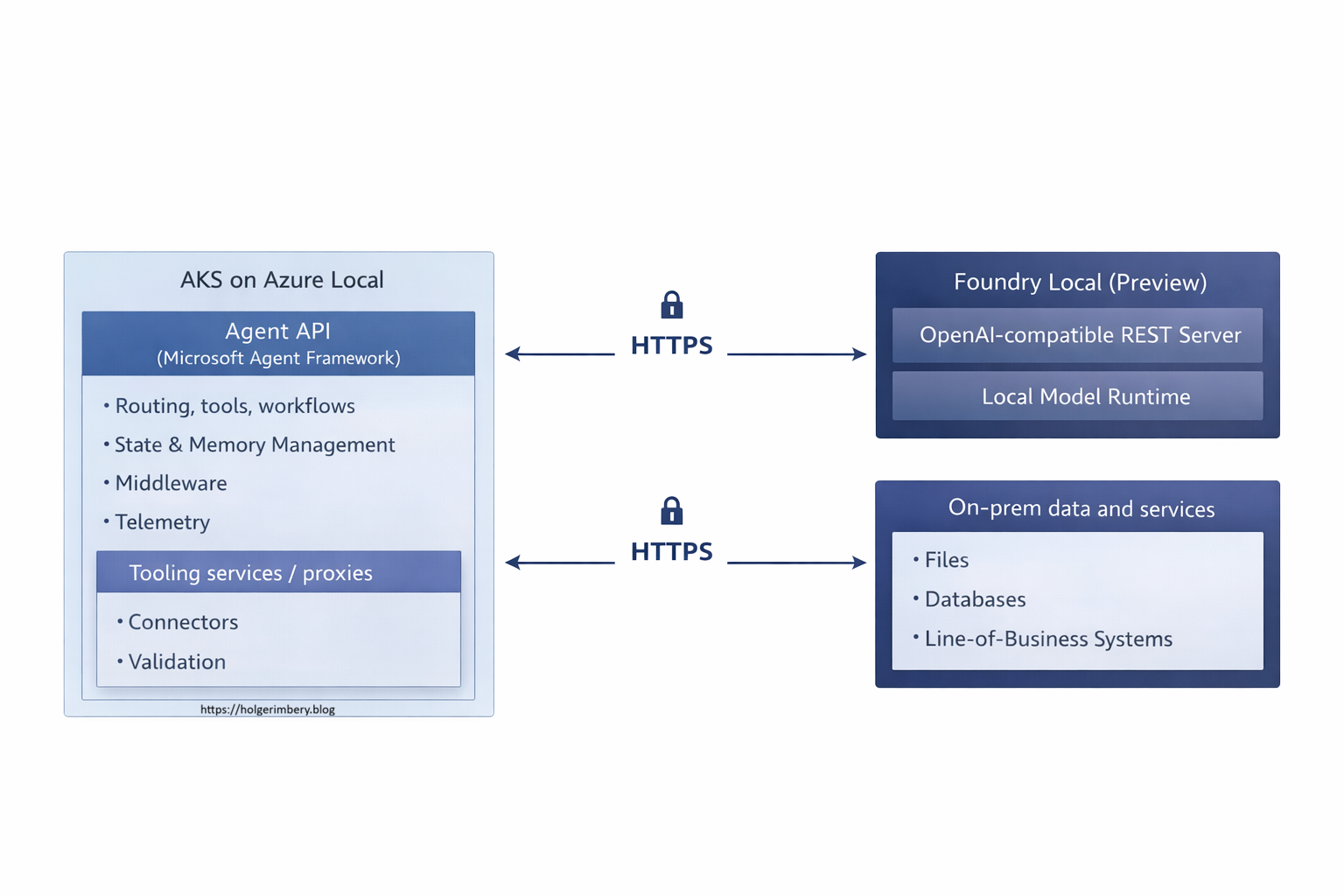
This separation keeps your application surface stable by establishing a clear boundary between stateless agent logic and stateful model inference. Because the agent layer and model runtime are decoupled, you can update agent code, refine routing logic, add new tools, or adjust middleware without touching the inference layer. Tools can be added safely behind constrained proxies or API gateways, allowing you to apply fine-grained network controls and audit trails at the integration boundary. Governance policies, observability hooks, and logging patterns remain consistent across agent operations regardless of where inference is placed. Simultaneously, inference becomes a managed dependency that can scale, relocate, or upgrade independently of application code. This architectural separation is particularly valuable in regulated environments where model serving and application logic often require separate operational controls, hardware isolation, or audit commitments. By decoupling these layers, you achieve the flexibility to place inference close to hardware accelerators (GPUs, NPUs) and data sources without forcing agent code to depend on infrastructure choices that are still evolving, especially when the inference runtime is in preview status and subject to API changes or performance tuning.
Where this approach fits (and where it does not)
This is a good fit when
This pattern becomes the right choice when one or more of the following constraints are fundamental to your deployment environment:
Data residency and regulatory compliance are hard boundaries. When regulations, industry standards, or organizational policy require that prompts, retrieved context, and inference results remain physically within an on‑premises boundary—whether for financial data, healthcare records, or proprietary intelligence—local inference becomes non‑negotiable. Cloud-based APIs, even with encryption and data-deletion assertions, may not satisfy audit requirements or legal obligations in certain jurisdictions. In these cases, the agent architecture must be designed to keep the full inference pipeline local while still benefiting from cloud-based observability and control planes, where appropriate, via segregated connections.
Latency is a direct measure of operational usability. In manufacturing plants, field service operations, retail branches, or other environments where agents serve human users on the shop floor or remote locations, response time is not a performance metric—it is a functional requirement that affects whether the agent is used at all. When users are waiting for a troubleshooting recommendation or a work instruction, a response that takes tens of seconds to traverse cloud networks is often abandoned. Local inference, combined with local agent orchestration, ensures that the slowest part of the response pipeline is your own internal network and compute capacity, not external connectivity.
Connectivity cannot be assumed to be always available and high-bandwidth. Many operational environments have constrained connectivity: scheduled outbound traffic windows, rate-limited connections, air-gapped subnets, or intentional network fragmentation for security isolation. The agent needs to function usefully within these constraints rather than degrade into a pass-through to cloud APIs. Azure Local supports this by enabling local execution and local state, while Arc provides a control-plane integration path when connectivity is available, rather than requiring continuous connectivity.
You want cloud-native operational practices applied on‑premises. This includes containerized deployments, Kubernetes orchestration for workload management, infrastructure-as-code for reproducibility, GitOps-driven delivery pipelines, policy enforcement at the runtime boundary, and standardized telemetry and logging. These practices are not exclusive to cloud deployments; they provide the same benefits on‑premises—clear separation of concerns, predictable deployments, and auditability—but require an infrastructure platform like Azure Local to realize them consistently.
When this pattern becomes problematic
Reconsidering a local-first architecture is warranted in several practical scenarios. If your inference workload demands elastic horizontal scaling and you cannot predict peak capacity without overprovisioning on-premises infrastructure, then chasing elastic scale with local hardware becomes economically and operationally inefficient. Building auto-scaling logic that manages standby capacity across stateful models would contradict the efficiency argument for locality. Similarly, if your operational environment requires production-grade stability guarantees from the inference API layer with minimal risk of breaking changes between deployments, the current maturity of local inference runtimes (such as Foundry Local, which remains in preview) presents a material risk. Preview components introduce uncertainty regarding backward compatibility, performance-tuning recommendations, and troubleshooting depth, which may not align with production SLAs. Finally, if the problem you are solving is fundamentally deterministic—where steps follow a fixed sequence, validation rules are static, and branching logic is known in advance—a structured workflow orchestration tool or a conventional microservice often provides clearer observability, simpler debugging, and lower operational overhead than an agent. Not every problem with tools and state management requires agentic behavior; sometimes explicit choreography is both simpler and more reliable.
These are the constraints that inform the “whether” decision. The next section moves to the “why Azure Local” specifically, grounded in use-case context rather than abstract on-premises philosophy.
Why Azure Local makes sense here (the use case drives locality)
Azure Local is not the point of the architecture. It is the platform choice that becomes rational when the agent pattern has to follow the environment: where data and tools live, what network rules allow, what latency targets are required, and what failure modes are acceptable.
1) The agent needs to live where the tools and data already are
High‑value agents are typically tool-heavy, and the distribution of that tooling directly affects where the agent runtime should run. The model call itself—the inference step that generates a response — is only one part of the agent interaction. The larger portion of the interaction involves retrieving documents from internal repositories, querying operational databases, validating business rules and constraints, and writing outcomes back to systems of record. Each of these operations carries a latency cost, integration overhead, and often data governance implications.
When the authoritative data sources and the systems that perform work live on‑premises—whether that is an ERP system, a manufacturing execution system, a document repository, or a service dispatch platform—moving the agent runtime closer to those systems becomes pragmatically necessary rather than architecturally optional. A remote agent calling back into on‑premises tools over the network incurs not only the latency of each call but also the operational complexity of maintaining secure, reliable network pathways between cloud and on‑premises infrastructure, managing retry logic for transient failures across that boundary, and reasoning about whether a failure in the agent’s response came from the model inference or from a tool integration issue.
Placing the agent runtime on‑premises reduces integration complexity by collapsing tool interactions into local function calls with minimal network hops. It also materially shrinks the trust boundary. Data that would otherwise traverse a cloud service boundary—even with encryption in transit and assertions of deletion—can remain inside the perimeter where it originated. Azure Local provides a consistent, repeatable substrate on which to host the runtime within the organizational boundary while still enabling cloud-native operational practices such as containerization, orchestration, and declarative configuration management that teams have come to expect.
2) Latency is a functional requirement, not a nice-to-have
In operational scenarios, predictable response time is not an optimization target—it is a functional requirement embedded in the task itself. When a field technician, floor supervisor, or support worker invokes an agent for a troubleshooting recommendation or work instruction, they are typically performing a task that cannot proceed until they receive guidance. A response that arrives within seconds fits naturally into human workflow and decision-making; the user can act on it immediately and move forward. A response that takes tens of seconds—or worse, becomes non-deterministic depending on cloud API load—exceeds the mental context window of the task. Users abandon the agent, fall back to phone calls or manual lookups, or proceed without the agent’s input entirely, making the agent operationally irrelevant regardless of its intelligence.
The latency problem compounds when the agent’s response is not a single inference call. A typical operational agent orchestrates multiple steps: retrieving context from a document repository, querying a database to validate prerequisites, calling an external service to fetch the current state, and then synthesizing a response. Each of these operations incurs round-trip time. When those dependencies live on-premises, and the agent runtime lives in a cloud region thousands of kilometers away, the baseline latency floor is determined by geography and internet backbone capacity, not by the execution speed of any individual component. You cannot optimize away the speed of light or your ISP’s rate limiting. Placing the agent runtime and its tooling in the same local environment—where internal networks typically offer latency in the single-digit millisecond range—ensures that the slowest element becomes your own infrastructure capacity, which you can measure, predict, and scale. This transforms latency from an externality you absorb to a variable you control.
Azure Local supports this placement strategy by providing AKS-hosted agent services and local model-serving infrastructure in a shared operational footprint. The inference engine, the agent orchestration layer, and the tool integrations all run in the same data center or facility where the authoritative systems live. This collapse of distance translates directly into a collapse of latency, which translates into usability in environments where response time affects task completion.
3) Connectivity constraints are a design input
Many environments are not “cloud-connected” as cloud reference architectures assume. The assumption embedded in most cloud-native architecture guidance is that outbound connectivity is available, reliable, and incurs acceptable latency and throughput. In practice, many operational environments operate under very different constraints. Outbound traffic to public cloud endpoints may be restricted by security policy or rate-limited by egress gateways. Connectivity may be scheduled—available only during specific windows or subject to maintenance blackouts. In other cases, network segments may be deliberately disconnected by design: operations technology networks in manufacturing facilities, isolated domains in financial institutions, or intentionally air-gapped environments in highly regulated sectors all follow this pattern. Even when connectivity exists, it may be mediated by proxies, firewalls, or VPNs, adding latency and complexity to troubleshooting when the agent’s inference or tool calls fail.
Azure Local enables local execution of the agent runtime and inference engine regardless of whether upstream cloud connectivity is available. Simultaneously, it aligns with Azure’s control-plane concepts and governance models via Azure Arc when connectivity is available. This dual capability means you can design and operate an agent system that functions reliably in disconnected or intermittently-connected scenarios without abandoning cloud-native operational practices. When connectivity is available, Arc can be used for centralized observability, policy enforcement, and update orchestration. When connectivity is unavailable, the local agent continues to function using local tools and data. This gives you an operational path that respects the actual constraints of your environment rather than forcing an architecture that assumes away those constraints or requires workarounds to compensate for them.
4) You can keep cloud-native operations without reinventing on‑prem deployment
Teams generally want repeatable delivery, policy enforcement, and consistent observability. The conventional tension between on-premises deployments and cloud-native operations has historically forced a false choice: either accept the operational discipline and automation of cloud platforms at the cost of moving workloads outside your perimeter, or keep infrastructure on-premises and revert to manual configuration management, bespoke deployment scripts, and fragmented observability tooling.
Azure Local plus AKS on Azure Local severs that coupling. Containerized deployments, GitOps-driven configuration management, Kubernetes namespaces, and declarative rollout strategies work identically whether your agent runtime is in a public cloud region or in your own data center. The infrastructure boundary becomes transparent to operational practices. Teams can maintain the same deployment pipelines, policy engines, and observability systems they have built for cloud workloads and apply them without modification to on-premises clusters. This continuity of tooling and process significantly reduces the operational friction that typically accompanies on-premises agent deployments. The “local” decision becomes a deployment location decision—a choice about where to run proven, familiar infrastructure patterns—rather than a return to bespoke server management, manual patching, and isolated monitoring infrastructure that would otherwise characterize traditional on-premises deployments.
5) Local inference forces you to manage capacity and hardware intentionally
If inference is local, capacity planning and acceleration hardware become first-class concerns that demand explicit decision-making rather than outsourced abstraction. When inference runs in a public cloud service, capacity is nominally infinite—or at least, the perception of infinity is maintained through multi-tenancy and auto-scaling tiers that obscure the underlying hardware realities. Costs accumulate by token count and API call frequency, but the physical infrastructure remains opaque. The tradeoff is acceptable if your workload is occasional or bursty; the cost volatility is a known variable you can budget for.
When inference runs locally, however, the hardware economics become tangible. A single GPU accelerator costs tens of thousands of dollars upfront, requires power and cooling infrastructure, and has a finite lifespan. Acquiring that hardware is no longer a usage-based charge smoothed into monthly billing; it is a capital expenditure that sits in your facility and has opportunity cost. This visibility forces intentional capacity planning: you must understand your typical inference load, peak throughput requirements, model sizes, and acceptable latency percentiles, and then purchase hardware that meets those requirements with some headroom for growth. You cannot simply add capacity by changing a tier or waiting for auto-scaling to provision more instances; you provision intentionally.
Azure Local provides a platform to run and govern those resources, allowing you to isolate inference nodes, stage updates, and enforce change control without coupling the inference lifecycle to the agent code lifecycle. You can reserve specific nodes for specific models, apply resource quotas to prevent one workload from starving another, and manage hardware refreshes independently from application deployments. This separation of concerns means you can upgrade your inference engine or swap model versions without draining the entire cluster, and you can plan hardware replacement without triggering emergency application refactorings. The operational rigor this imposes is not a burden—it is an alignment of technical decision-making with the actual cost structure of your infrastructure.
6) The architecture stays incremental and reversible
By separating agent runtime from model runtime, you establish a deployment boundary that allows you to make infrastructure decisions independently from application logic. This separation is critical in practice because it decouples two sources of change that typically move at different velocities: the agent orchestration layer (tools, workflows, routing, state management) tends to evolve rapidly as teams refine business logic and respond to operational feedback, while the inference runtime makes infrequent but high-impact decisions around model selection, hardware acceleration strategy, and inference node topology that are capital-intensive and difficult to reverse.
Starting small means you can pilot with a single inference node running a small quantized model, then grow to multiple specialized nodes—some optimized for latency-sensitive operations, others for throughput—without requiring changes to the agent code itself. The agent layer continues to interact with inference through the same OpenAI-compatible API boundary, indifferent to whether a single GPU or a distributed cluster backs that endpoint. You can keep your agent API stable while swapping models; if a new quantization or a different model family becomes available, you can stage it on a secondary node and route traffic to validate behavior before completing the migration. You can change inference node placement by adjusting scheduling constraints or moving nodes between racks without triggering a redeploy of agent services. This mobility is not possible when agent code and inference are tightly coupled—for example, when inference decisions are embedded in application code or when the agent layer depends on model-specific features or tokenization strategies.
Azure Local supports this incremental expansion by providing a consistent Kubernetes control plane and standard scheduling mechanisms that treat compute resources as fungible. Your initial pilot might span a single machine running AKS on Azure Local in a branch or regional office; as you validate the model and prove business value, you can expand to a small cluster in your primary data center. Each step remains operationally routine because you are not changing how workloads are deployed or managed—you are only changing the scale and distribution of resources. A pilot deployment and a production cluster follow the same GitOps patterns, use the same artifact promotion pipelines, and respond to the same observability signals, allowing you to graduate from proof-of-concept to production without a redesign of your delivery model or a learning curve on unfamiliar operational practices.
Practical decision test: Azure Local tends to be the right call when most of these are true: the authoritative tools/data are on‑prem, prompts and retrieved context must remain local, latency is a requirement, connectivity is constrained, and you want cloud-native operations in the same footprint.
With that context, we can move from “why” to “how”.
Step‑by‑step implementation runbook
Phase 0 — Define boundaries: agent vs workflow, and what “done” means
-
Write the outcome in business terms.
Define success in measurable outcomes, not in model features. Examples include reduced downtime, faster triage, fewer escalations, shorter handling time, or improved compliance auditability. - Classify steps as agent or workflow.
- Use an agent for open-ended interpretation, conversational assistance, flexible tool use, and summarization.
- Use a workflow for deterministic steps, routing, approvals, checkpoints, and auditable state transitions.
- Produce a tool inventory and trust boundary map.
For each tool, define authentication, authorization, validation, allowed destinations, and audit requirements.
Operational gotcha: Teams often prototype by giving agents broad access “to move fast.” That security debt becomes expensive later. Start with constrained proxies and allow-lists from day one.
Phase 1 — Platform baseline: Azure Local + Arc + AKS on Azure Local
1.1 Establish baseline assumptions
Decide upfront:
- Topology: pilot node, datacenter cluster, or distributed sites.
- OS mix: Linux nodes, Windows nodes, or mixed.
- Acceleration: CPU only vs GPU/NPU inference nodes.
- Connectivity mode: connected, constrained, or partially disconnected.
Operational gotcha: Constrained connectivity changes everything about artifact flow. Treat “how will nodes pull images and models?” as a first-class requirement (private registry, artifact promotion, caching).
1.2 Build a minimal AKS baseline (repeatable)
Include:
- Namespaces for separation (
platform,agents,tools,observability). - Ingress and certificate strategy.
- Secrets management strategy.
- Logging/metrics pipeline.
- Network policies and egress controls.
Example namespace baseline:
apiVersion: v1
kind: Namespace
metadata:
  name: agents
  labels:
    pod-security.kubernetes.io/enforce: "restricted"
---
apiVersion: v1
kind: Namespace
metadata:
  name: tools
  labels:
    pod-security.kubernetes.io/enforce: "restricted"
Operational gotcha: Without early namespace boundaries and baseline policies, your cluster becomes a collection of special cases that are hard to govern and hard to migrate.
Phase 2 — GitOps delivery (recommended even for pilots)
2.1 Repository layout pattern
A structure that scales:
clusters/<cluster-name>/for cluster-specific overlaysplatform/for shared add-ons (ingress, monitoring, policy)workloads/agents/for agent servicesworkloads/tools/for tool proxies and connectors
2.2 Kustomization pattern (example)
apiVersion: kustomize.toolkit.fluxcd.io/v1
kind: Kustomization
metadata:
  name: agents
  namespace: flux-system
spec:
  interval: 5m
  path: ./workloads/agents/overlays/prod
  prune: true
  sourceRef:
    kind: GitRepository
    name: platform-repo
  timeout: 5m
Operational gotcha: GitOps only reduces drift if “kubectl apply in production” is the exception with a documented break-glass process.
Phase 3 — Foundational services: state, memory, and observability
Make state explicit and intentional:
- Conversation state (threads, session context) belongs in agent stores designed for that purpose.
- Business state (work items, approvals, tickets) belongs in systems of record.
Common supporting components on AKS:
- Redis for caching and rate limiting
- PostgreSQL (or equivalent) for durable state
- A vector store if you implement local RAG
- OpenTelemetry collector for traces/metrics/logs
Operational gotcha: Agent telemetry can explode. Define retention, sampling, and content redaction policies early. In regulated environments, you often cannot log raw prompts or retrieved text.
Phase 4 — Install Foundry Local (preview) on inference nodes
Treat Foundry Local as a managed runtime dependency.
4.1 Placement and isolation
- Prefer dedicated inference nodes where possible.
- Place them where the acceleration hardware lives.
- Segment networking so AKS can reach them reliably while keeping exposure minimal.
4.2 Endpoint discovery (avoid hard-coded ports)
Prefer one of these:
- Discovery service pattern: publish the current base URL into a config store that your agent services read.
- Gateway pattern: place a stable internal proxy in front of Foundry Local to normalize routing and policies.
Operational gotcha: Hard-coded ports work in a lab and fail after reboots, upgrades, or runtime changes. Build discovery or stable routing into the design.
Phase 5 — Network, TLS, and identity between AKS and Foundry Local
5.1 Connectivity options
Common choices:
- Direct HTTPS from agent pods to Foundry node IP/DNS
- Internal L4/L7 proxy for stable routing and policy
- Service mesh for mTLS and telemetry (only if you already operate one)
5.2 TLS strategy
Use your standard PKI approach, if possible, and ensure that clients validate certificates by default.
Operational gotcha: “Works with curl -k” is a warning sign, not a milestone. Fix trust chains early so insecure shortcuts do not become permanent.
Phase 6 — Implement the inference adapter in your MAF service
Design goal: agent code calls a model client abstraction, not a concrete endpoint.
6.1 Configuration pattern (ConfigMap + Secret)
apiVersion: v1
kind: ConfigMap
metadata:
  name: agent-config
  namespace: agents
data:
  FOUNDRY_BASE_URL: "https://foundry-local.internal.example"
  FOUNDRY_MODEL: "local-chat-model"
  INFERENCE_TIMEOUT_SECONDS: "30"
  INFERENCE_MAX_RETRIES: "2"
---
apiVersion: v1
kind: Secret
metadata:
  name: agent-secrets
  namespace: agents
type: Opaque
stringData:
  FOUNDRY_API_KEY: "placeholder-if-required-by-client"
Deployment consuming it:
apiVersion: apps/v1
kind: Deployment
metadata:
  name: maf-agent-api
  namespace: agents
spec:
  replicas: 2
  selector:
    matchLabels:
      app: maf-agent-api
  template:
    metadata:
      labels:
        app: maf-agent-api
    spec:
      containers:
      - name: api
        image: registry.local/agents/maf-agent-api:1.0.0
        envFrom:
        - configMapRef:
            name: agent-config
        - secretRef:
            name: agent-secrets
        resources:
          requests:
            cpu: "250m"
            memory: "512Mi"
          limits:
            cpu: "2"
            memory: "2Gi"
        readinessProbe:
          httpGet:
            path: /health/ready
            port: 8080
          initialDelaySeconds: 10
          periodSeconds: 10
6.2 Client policy (timeouts, retries, circuit breakers)
Start with conservative defaults:
- Timeout: 20–60s depending on model/prompt size
- Retries: 1–2 for transient failures only
- Circuit breaker: open after repeated failures to prevent cascading latency
- Concurrency limits: protect inference nodes from overload
Operational gotcha: Without explicit backpressure, a single busy agent route can saturate inference and degrade every workload that shares the runtime.
Phase 7 — Tool integration with constrained proxies
Do not give agents direct access to sensitive systems.
Recommended approach:
- Deploy tool proxy services in a dedicated namespace.
- Restrict outbound connectivity to approved destinations only.
- Enforce authorization, validation, and allow-lists in the proxy.
- Log every invocation with correlation IDs.
A default-deny egress policy concept:
apiVersion: networking.k8s.io/v1
kind: NetworkPolicy
metadata:
  name: tools-default-deny-egress
  namespace: tools
spec:
  podSelector: {}
  policyTypes:
  - Egress
  egress: []
Operational gotcha: If you skip network controls early, you will discover “mystery dependencies” later when tools call endpoints that were never approved.
Phase 8 — Observability: correlate agent → tools → inference
Minimum requirements:
- Correlation ID propagated across inbound request, tool calls, inference calls, and response
- Latency breakdown (tool time vs inference time vs orchestration time)
- Error classification by category (tool failure, inference failure, policy block, timeout)
- Token/prompt size metadata if available
Operational gotcha: Decide what is safe to log. For many environments, metadata and hashes are acceptable, but raw prompts and retrieved snippets are not.
Phase 9 — Hardening: safety, governance, regression testing
Hardening checklist:
- Prompt and tool regression tests for critical flows
- Golden conversations for validation after runtime updates
- Tool schemas and allow-lists are enforced centrally
- Timeouts on every external call
- Rate limits per user and per route
- Graceful degradation when inference is unavailable (fallback to workflow/human)
Operational gotcha: Preview inference runtimes can introduce behavior changes that are not “errors” but still break user expectations. Without regression tests, you will find out in production.
Phase 10 — Operations: versioning, rollouts, and capacity planning
10.1 Independent update cadencess
Operate on separate cadences:
- Agent services: frequent updates via CI/CD
- Inference runtime: cautious updates via staged rollout
- Cluster/platform: regular maintenance windows
10.2 Rollout strategy
- Canary agent changes with a small traffic slice and compares latency/error rates
- Pin inference runtime versions and validate with representative load before expanding rollout
10.3 Capacity planning
Define explicit SLOs:
- p95 latency target for a representative prompt
- maximum concurrent sessions per inference node
- acceptable queueing delay under peak load
Operational gotcha: Size for peaks and recovery scenarios. A thundering herd is common when shifts start, sites reconnect, or batch processes trigger.
A practical “day‑1 to day‑30” plan
Day 1–3: Foundation
- Define business outcomes and agent/workflow boundaries
- Stand up AKS baseline namespaces, ingress, and GitOps scaffolding
- Deploy telemetry pipeline and basic dashboards
Day 4–10: Inference integration
- Install Foundry Local on inference nodes
- Implement endpoint discovery and TLS trust
- Add inference adapter in the MAF service with externalized configuration
Day 11–20: Tools and data
- Build constrained tool proxies with allow-lists and audit logs
- Implement retrieval paths that keep data inside the boundary
- Add correlation IDs end-to-end
Day 21–30: Hardening and operations
- Add regression tests and golden conversations
- Implement rollouts, version pinning, and canary strategy
- Load test and finalize a capacity plan and operational runbooks
Conclusion
This stack is not about “on‑prem versus cloud.” It is about aligning the agent pattern with the constraints imposed by the use case: data locality, tool proximity, latency targets, and network realities. Azure Local provides a consistent on‑prem platform for that pattern; AKS keeps operations cloud-native; Foundry Local enables local inference; and Agent Framework provides the application layer to build agents and workflows that map to real business outcomes. By following this architecture and implementation runbook, you can deliver production‑grade AI agents that run locally, proving that cloud-native excellence is not constrained by your network boundary.