Table of Contents
- Why Azure Local: Hyperconverged and Disconnected
- Typical Use Cases
- What Is Available
- Prerequisites and Planning for Deployment
- Deploying Azure Local: Steps and Best Practices
- Planning and Deploying VM Workloads
- Tryout and Evaluation Options
- Appendix: Building Agentic AI Solutions with Azure Local, Microsoft Agent Framework, and Foundry Local
- Conclusion
Summary Lede
Cloud Capabilities Without Leaving Premises
As regulatory demands tighten, latency requirements become critical, and data sovereignty moves from a nice-to-have to a must-have, Microsoft has engineered a comprehensive answer: Sovereign Private Cloud. This three-pillar platform—Azure Local infrastructure, Microsoft 365 Local productivity, and Foundry Local AI—enables organizations to operate complete, intelligent cloud systems entirely within their boundaries. Whether you’re managing classified government systems, running millisecond-critical manufacturing operations, sustaining teams in air-gapped locations, or processing sensitive AI workloads behind regulatory firewalls, this guide walks you through architectures, deployment strategies, and real-world patterns for implementing on-premises cloud at enterprise scale.
Reasons to Read This Article:
- Complete Platform Understanding: Grasp all three components of this Sovereign Private Cloud approach, how they integrate, and which combination matches your operational model (connected, intermittently connected, or fully offline).
- Deployment Confidence: Learn the hardware requirements, licensing models, connectivity tolerances, and planning phases required to deploy Azure Local (hyperconverged or disconnected), Microsoft 365 Local, and Foundry Local in production.
- Use Case Alignment: Identify whether your organization fits one of the key scenarios—government/defense data sovereignty, manufacturing low-latency control, retail edge compute, isolated locations, or confidential AI—with architectural patterns and reference implementations.
- Agentic AI on Premises: Discover how to build multi-agent AI systems using Microsoft Agent Framework + Foundry Local + Azure Local infrastructure, enabling autonomous reasoning and automation with zero cloud dependency.
- Risk Mitigation and Best Practices: Understand connectivity tolerance, failover strategies, backup approaches, and testing protocols to ensure your on-premises cloud operates reliably and compliantly.
- Evaluation Path: Explore trial options (60-day Azure Local eval, free Foundry Local, partner-delivered M365 Local pilots) tailored to your budget and risk profile.
Azure Local is Microsoft’s distributed infrastructure solution — formerly known as Azure Stack HCI — that extends Azure capabilities to customer-owned environments. It enables local deployment of both modern and legacy applications across distributed or sovereign locations, using Azure Arc as the unifying control plane. Azure Local is the foundation of Microsoft’s Sovereign Private Cloud offering, which unifies three components: Azure Local (infrastructure), Microsoft 365 Local (productivity), and Foundry Local (AI inference) to deliver a full-stack private cloud that operates at any connectivity level — connected, intermittently connected, or fully disconnected. This article provides a comprehensive overview of these offerings, their use cases, deployment options, and best practices for IT architects and decision-makers considering on-premises Azure solutions.
Why Azure Local: Hyperconverged and Disconnected
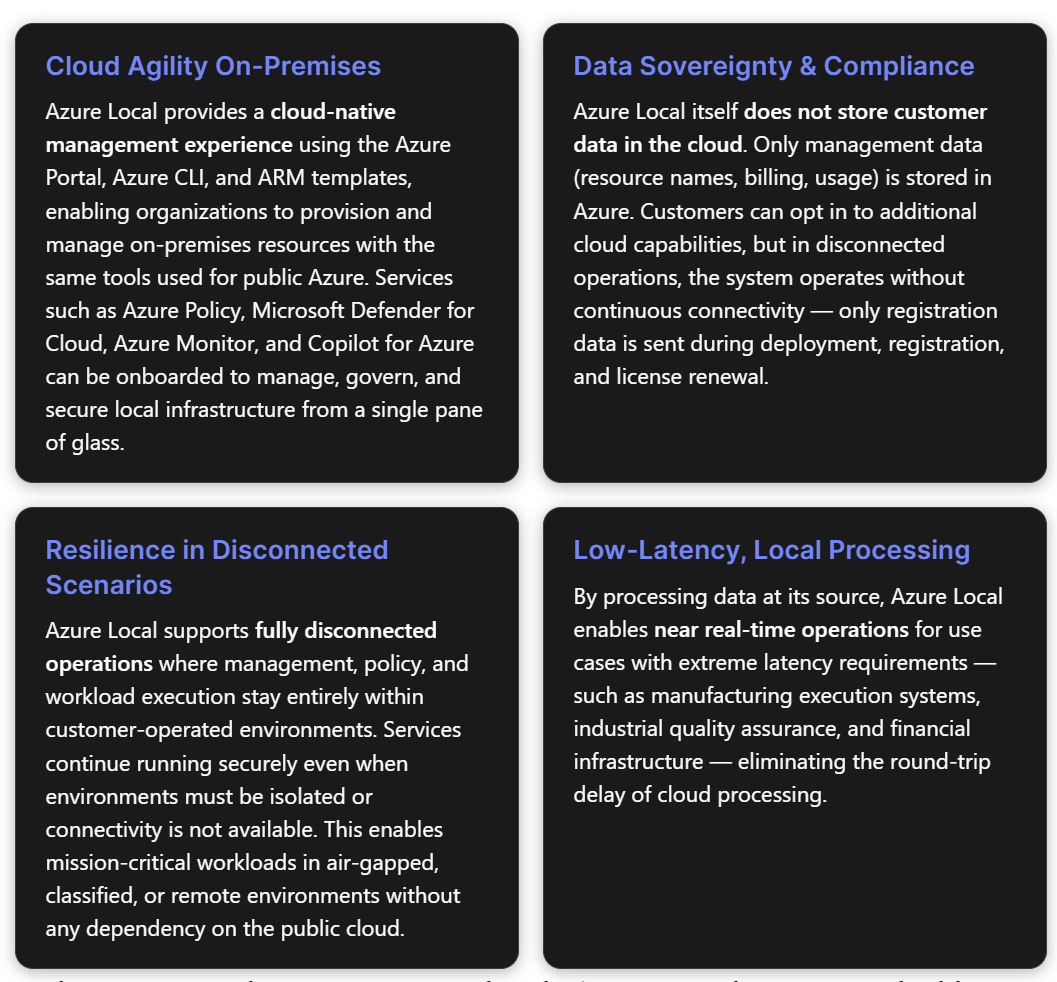
Azure Local addresses a set of business requirements for which the public cloud alone is insufficient: compute that must remain on-premises, mission-critical application resiliency, low-latency decision-making, and specific compliance mandates. Microsoft positions it as part of the adaptive cloud approach — bringing the cloud to the customer so they can build and innovate anywhere.
Hyperconverged Deployments (Connected Mode)
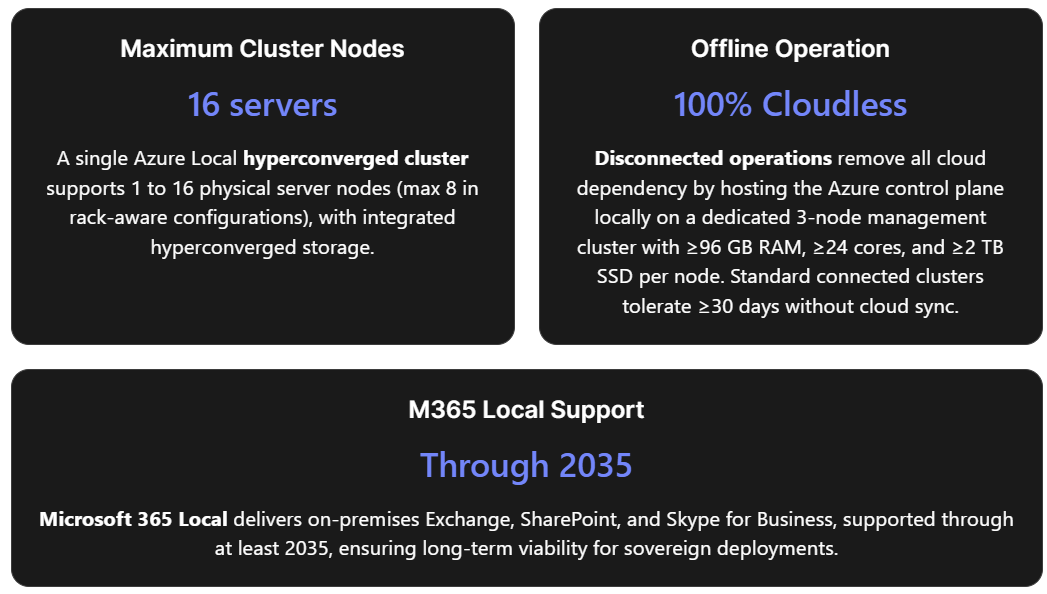
A hyperconverged deployment of Azure Local consists of one machine or a cluster of machines connected to Azure. Clusters support 1 to 16 physical machines with hyperconverged storage (up to 8 machines in rack-aware configurations). The architecture is built on proven technologies: Hyper-V, Storage Spaces Direct, and Failover Clustering. In connected mode, the Azure cloud serves as the management plane. Administrators use the Azure Portal, Azure CLI, or PowerShell to view, monitor, and manage individual Azure Local instances or an entire fleet. Azure Local includes a secure-by-default configuration with more than 300 security settings, providing a consistent security baseline and a drift-control mechanism. Connectivity tolerance: If internet connectivity is lost, all host infrastructure and existing VMs continue to run normally. However, features that directly rely on cloud services become unavailable. Azure Local must successfully sync with Azure at least once every 30 consecutive days. If that window is exceeded, the cluster enters a reduced-functionality mode — existing VMs continue running, but new VMs cannot be created until connectivity is restored.
Disconnected Operations (Full Offline Mode)
For environments where any cloud connectivity is undesired or impossible, disconnected operations bring the entire Azure control plane on-premises. Organizations can deploy and manage Azure Local instances, build VMs, and run containerized applications using select Azure Arc-enabled services from a local control plane that provides a familiar Azure Portal and Azure CLI experience — all without a connection to the Azure public cloud. Key constraint: Disconnected mode requires extra capacity for a dedicated management cluster to host the local control plane appliance.
This management cluster has the following minimum hardware requirements:
| Specification | Minimum Configuration |
|---|---|
| Number of nodes | 3 nodes |
| Memory per node | 96 GB (appliance alone needs ≥64 GB) |
| Cores per node | 24 physical cores |
| Storage per node | 2 TB SSD/NVMe |
| Boot disk drive storage | 960 GB SSD/NVMe |
Disconnected operations are intended for organizations that cannot connect to Azure due to connectivity issues or regulatory restrictions. To procure this capability, a valid business justification and a Microsoft Customer Agreement for Enterprises (MCA-E) (or other eligible agreement type) are required.
Connected vs. Disconnected: Decision Framework
| Decision Factor | Connected (Hyperconverged) | Disconnected |
|---|---|---|
| Cloud dependency | Requires outbound HTTPS to Azure ≥ once per 30 days | Zero cloud dependency; local control plane |
| Management plane | Azure public cloud (Azure Portal, Arc) | On-premises Azure Portal and CLI replica |
| Hardware overhead | Workload cluster only (1–16 nodes) | Workload cluster + dedicated 3-node management cluster |
| Eligibility | Any Azure subscription | Requires MCA-E and business justification |
| Best for | Hybrid scenarios, branch offices, edge with periodic connectivity | Air-gapped facilities, classified environments, remote sites without Internet |
Typical Use Cases
Azure Local, Foundry Local, and Microsoft 365 Local serve scenarios in which the traditional public cloud alone cannot meet operational, regulatory, or latency requirements. The following use cases emerge from Microsoft’s documentation and partner ecosystem:
Government and Defense (Data Sovereignty)
Organizations in government, defense, and intelligence sectors require that data, operations, and control remain within organizational boundaries. Azure Local enables sovereign private clouds in which all workloads run locally. Microsoft 365 Local adds core collaboration tools — Exchange Server, SharePoint Server, and Skype for Business Server — that run entirely within the customer’s sovereign operational boundary, keeping teams productive even when disconnected from the cloud. In disconnected mode, data residency and sovereign requirements are met without relying solely on public sovereign cloud controls.
Manufacturing and Industrial Operations (Low Latency & Reliability)
Azure Local targets control systems and near real-time operations with extreme latency requirements — manufacturing execution systems, industrial quality assurance, and production line operations that must continue through network outages. On-premises compute clusters enable decisions in milliseconds without cloud round-trip delays. Azure Local’s integration with Azure IoT Operations (deployed on AKS clusters enabled by Azure Arc on Azure Local) provides a turnkey approach for managing and processing IoT data at the edge.
Retail and Branch Offices (Edge Compute)
Azure Local supports single-machine deployments through full clusters, making it suitable for distributed retail or branch scenarios where local AI inference at the source is needed — for example, self-checkout systems and loss-prevention applications in retail stores. The hyperconverged design ensures that even if WAN connectivity to central services drops, local operations continue uninterrupted.
Remote and Isolated Locations
Industries operating in areas with limited network infrastructure — oil rigs, mining sites, rural clinics, and vessels at sea — benefit from operating in disconnected environments. Azure Local lets them use Azure Arc services and run workloads without relying on internet connectivity. Foundry Local extends this by enabling on-device inference of AI models in offline or bandwidth-constrained environments.
Confidential AI and Data Processing
Organizations that need to run AI on sensitive data without exposing it to third-party clouds can combine Azure Local with Foundry Local. This enables local AI inferencing, where data is processed at the source. Foundry Local supports chat completions (text generation) and audio transcription (speech-to-text) through a single runtime that runs entirely on-device, with no cloud dependency for inference. Foundry Local now supports large multimodal models on Azure Local infrastructure, using the latest GPUs from partners like NVIDIA, so you can run advanced AI inference in sovereign environments.
What Is Available
Azure Local Core Infrastructure
Azure Local is a full-stack infrastructure software running on validated hardware in customer facilities. It supports VMs, containers, and select Azure services locally while maintaining Azure-consistent management through Azure Arc.
Features and architecture of hyperconverged deployments:
| Feature | Description |
|---|---|
| Hardware | Validated hardware from Microsoft partners; 1–16 machines per instance (max 8 for rack-aware clusters) |
| Storage | Storage Spaces Direct; external SAN storage in preview for qualified opportunities |
| Networking | Customer-managed with physical switches and VLANs; optional software-defined networking (SDN) |
| Azure Local Services | VMs for general-purpose workloads; AKS enabled by Azure Arc for containerized workloads |
| Azure Management | Azure Policy, Azure Monitor, Microsoft Defender for Cloud, and others via Azure Arc |
| Observability | Metrics and logs sent to Azure Monitor and Log Analytics for infrastructure and workload resources |
| Management Tools | Azure Portal, CLI, ARM/Bicep/Terraform (cloud); PowerShell, Windows Admin Center, Hyper-V Manager, Failover Cluster Manager (local) |
| Disaster Recovery | Azure Backup, Azure Site Recovery, and non-Microsoft partners |
| Security | 300+ security settings for consistent baseline and drift control; Trusted Launch for VMs; Microsoft Defender for Cloud integration |
Common Azure services on Azure Local:
| Use Case | Service |
|---|---|
| Virtual machines | Azure Local VMs enabled by Azure Arc (Windows/Linux, with Trusted Launch support) |
| Virtual desktops | Azure Virtual Desktop (AVD) session hosts on-premises |
| Container orchestration | Azure Kubernetes Service (AKS) enabled by Azure Arc |
| Arc-enabled services | Select Azure services for hybrid workloads via Azure Arc |
| High-performance databases | SQL Server on Azure Local with extra resiliency |
| Media analytics | Azure AI Video Indexer enabled by Azure Arc |
| AI chat assistants | Azure Edge RAG (Preview) — turnkey RAG solution for custom chat over private data |
| IoT management | Azure IoT Operations on AKS clusters on Azure Local |
Disconnected operations support a subset of these services via the local control plane:
| Service | Description |
|---|---|
| Azure Portal | Local portal experience similar to Azure Public |
| Azure Resource Manager (ARM) | Subscriptions, resource groups, ARM templates, CLI |
| RBAC | Role-based access control for subscriptions and resource groups |
| Managed identity | System-assigned managed identity for supported resource types |
| Arc-enabled servers | VM guest management for Azure Local VMs |
| Azure Local VMs | Windows or Linux VMs via disconnected operations |
| Arc-enabled Kubernetes (Preview) | CNCF Kubernetes cluster management on Azure Local VMs |
| AKS enabled by Arc (Preview) | AKS on Azure Local in disconnected mode |
| Azure Local device management | Create and manage instances, add/remove nodes |
| Azure Container Registry | Store and retrieve container images and artifacts |
| Azure Key Vault | Store and access secrets |
| Azure Policy | Enforce standards and governance on new resources |
Deployment types include hyperconverged deployments, multi-rack deployments (in preview), Microsoft 365 on Local, and disconnected operations. Multi-rack deployments support larger configurations with prescriptive hardware BOMs featuring pre-integrated racks containing SAN storage, servers, and network devices; re-use of existing hardware is not supported for multi-rack at this time.
Microsoft 365 Local
Microsoft 365 Local runs Exchange Server, SharePoint Server, and Skype for Business Server on Azure Local infrastructure that is entirely customer-owned and managed. It supports both hybrid and fully disconnected deployments and provides an Azure-consistent management experience with a unified control plane.
Core capabilities:
- Exchange, SharePoint, and Skype for Business: Enterprise-grade email, document management, and unified communications on-premises, addressing stringent data residency requirements.
- Certified and validated solutions: Deployed on Azure Local Premier Solutions from hardware partners, guaranteeing compatibility for sovereign deployments.
- Full-stack validated reference architecture: Prescriptive guidance for networking, storage, compute, and identity integration based on best practices for optimal performance and resiliency.
- Sovereign Private Cloud capabilities: Azure-consistent management with enhanced security features (encryption, access controls, compliance mechanisms) aligned with local regulatory frameworks.
- Hybrid or fully disconnected support: Connected mode uses Azure as the cloud control plane; disconnected mode uses a local control plane for complete isolation and air-gapped operations.
Example large-scale server role allocation (connected mode):
- 3 servers configured as a three-node Azure Local instance for SharePoint Server and SQL Server workloads.
- 4 servers each as single-node Azure Local instances for Exchange Server mailbox roles.
- 2 servers each as single-node Azure Local instances for Exchange Server edge transport roles.
Microsoft 365 Local is now generally available and must be deployed through a Microsoft-certified solution partner. Microsoft has committed to supporting these on-premises productivity server workloads through at least 2035.
Foundry Local
Foundry Local is an on-device AI inference solution (currently in public preview) that enables local execution of AI models through a CLI, SDK, or REST API. It provides an OpenAI-compatible REST endpoint running entirely on-device, meaning prompts and model outputs are processed locally without being sent to the cloud.
System requirements:
| Requirement | Details |
|---|---|
| OS | Windows 10 (x64), Windows 11 (x64/ARM), Windows Server 2025, macOS |
| Minimum hardware | 8 GB RAM, 3 GB free disk space |
| Recommended hardware | 16 GB RAM, 15 GB free disk space |
| Optional acceleration | NVIDIA GPU (2000 series+), AMD GPU (6000 series+), AMD NPU, Intel iGPU, Intel NPU (32 GB+ memory), Qualcomm Snapdragon X Elite (8 GB+ memory), Qualcomm NPU, Apple silicon |
Supported AI capabilities:
| Component | Description |
|---|---|
| Foundry Local Service | An OpenAI-compatible REST server providing a standard interface for inference. The endpoint is dynamically allocated when the service starts. |
| ONNX Runtime | Executes optimized ONNX models on CPUs, GPUs, or NPUs; supports multiple hardware providers (NVIDIA, AMD, Intel, Qualcomm) and quantized models for faster inference. |
| Model Management | CLI and cache system for downloading, listing, and managing AI models locally. |
Key architectural components:
- Foundry Local Service: An OpenAI-compatible REST server providing a standard interface for inference. The endpoint is dynamically allocated when the service starts.
- ONNX Runtime: Executes optimized ONNX models on CPUs, GPUs, or NPUs; supports multiple hardware providers (NVIDIA, AMD, Intel, Qualcomm) and quantized models for faster inference.
- Model Management: CLI and cache system for downloading, listing, and managing AI models locally.
No Azure subscription is required to use Foundry Local on a device; it runs on local hardware with no recurring cloud costs for inference. For sovereign environments requiring heavier AI workloads, the integration of Foundry Local with Azure Local supports large-scale models utilizing the latest GPUs from NVIDIA, with Microsoft providing comprehensive support for deployments, updates, and operational health.
Prerequisites and Planning for Deployment
Hardware and Catalog Selection
Azure Local runs exclusively on validated hardware configurations listed in the Azure Local Solutions Catalog. Hardware solutions fall into three categories: Validated Nodes, Integrated Systems, and Premier Solutions. Premier Solutions delivers deep integration and validation for a smooth end-to-end experience. For hyperconverged deployments, you can reuse existing hardware only if it matches a supported configuration in the catalog; otherwise, upgrades or new hardware are required.
Each Azure Local machine in a hyperconverged cluster must meet system requirements for CPU, memory, storage, and network. For planning, the Azure Local Catalog and available sizing tools help estimate hardware requirements for the intended workload profile. Networking must be designed for redundancy and performance—typically using 10–25 GbE or higher links, physical switches, and VLANs. Optional SDN services can be enabled for software-defined networking.
For disconnected operations, plan additional capacity for the management cluster as detailed in Section 1 (3 nodes, 96 GB RAM/node, 24 cores/node, 2 TB SSD/node, 960 GB boot disk/node).
For Microsoft 365 Local, hardware must be an Azure Local Premier Solution that specifically meets the M365 Local requirements listed in the Azure Local Solutions Catalog. Please work with your authorized Microsoft partner to size the deployment appropriately. We have reference architectures for small-, mid-, and large-scale configurations tailored to your needs.
Azure Subscription and Licensing
An Azure subscription is required for Azure Local. The billing model charges a per-physical-core fee on on-premises machines, plus consumption-based charges for any additional Azure services used. All charges roll up to the existing Azure subscription. For disconnected operations, an eligible enterprise agreement (such as MCA-E) is also needed, and qualification must be discussed with the Microsoft account team before procurement.
Additional licensing considerations include:
- OS licenses for workload VMs (e.g., Windows Server)
- Microsoft 365 server licenses if deploying M365 Local (Exchange, SharePoint, Skype)
- Foundry Local requires no Azure subscription and has no RBAC role requirements when running solely on-device.
Network Connectivity Planning
In connected mode, each machine must have outbound HTTPS connectivity to well-known Azure endpoints at least every 30 days. If SDN is planned, review the SDN overview before deployment. Network and host requirements must be met per Microsoft’s published specifications.
In disconnected mode, the local management cluster must be networked to the workload clusters within the customer’s environment, but no external internet is required post-deployment (only registration data is exchanged during initial deployment, registration, and license renewal).
Assessment and Planning Phases
A structured planning process reduces risk. Microsoft and its partners typically follow phased engagement for Azure Local projects, especially for M365 Local:
| Phase | Description |
|---|---|
| Assessment | Analyze organizational requirements, compliance needs, and desired outcomes |
| Planning | Define hardware configurations, software solutions, migration, and integration strategies |
| Acquisition | Procure necessary hardware, software, and licenses |
| Deployment | Execute the planned rollout in accordance with best practices |
For disconnected operations, organizations must additionally identify workloads and application requirements for disconnected operation, and staff (or partners) with the capability to deploy and operate disconnected environments.
Deploying Azure Local: Steps and Best Practices
Cluster Installation and Registration
For hyperconverged deployments, the Azure Local operating system can be downloaded from the Azure Portal, which includes a free 60-day trial. Alternatively, pre-integrated systems from OEM partners arrive with Azure Local pre-installed. After installing the OS on each server node and configuring the cluster (using Storage Spaces Direct for storage and Failover Clustering for high availability), the cluster must be registered with Azure Arc to enable cloud management through the Azure Portal and Arc tools.
Hardware can be purchased from any Microsoft hardware partner listed in the Azure Local Catalog, and the available sizing tool can help estimate hardware requirements before purchase.
Post-Deployment Configuration
Once registered, the Azure Local instance appears in the Azure Portal as a manageable resource. Post-deployment steps include:
- Enabling Arc-enabled services: Configure AKS clusters, Arc-enabled data services, or other platform services as needed for workload requirements.
- Applying governance policies: Use Azure Policy to enforce compliance standards across the on-premises environment, and configure Microsoft Defender for Cloud to assess and improve security posture.
- Setting up monitoring: Configure Azure Monitor and Log Analytics for metrics and log collection from both infrastructure and workloads.
- Keeping the environment current: Azure Local provides Solution Updates that simplify keeping the entire stack up to date across OS, firmware, and drivers.
For disconnected deployments, these management services are configured on the local control plane appliance rather than through Azure public endpoints. The local Azure Portal and CLI provide an equivalent experience for managing policies, deploying VMs, and monitoring infrastructure within the isolated environment.
Deploying Microsoft 365 Local
M365 Local must be deployed through a Microsoft-certified solution partner. The partner follows the reference architecture to provision the required Azure Local instances and configure Exchange, SharePoint, and Skype for Business server roles. The reference architectures include prescriptive guidance for networking and security — covering virtual networks, network security groups, and load balancers to segment, isolate, and secure access to workloads. In connected mode, architectures use Azure as the cloud-connected control plane; in disconnected mode, they use a local control plane.
Organizations can contact their Microsoft account team or visit the Microsoft 365 Local General Availability sign-up page for information about authorized partners.
Testing and Validation
Thorough validation after deployment is critical:
- Cluster validation: Run the built-in validation tools to confirm hardware, storage, and network configurations meet requirements.
- VM and failover testing: Create test VMs, perform live migrations between nodes, and simulate node failures to verify high availability.
- Connectivity resilience (connected mode): Simulate internet outages to confirm workloads continue uninterrupted and that the cluster correctly reconnects and syncs within the 30-day window.
- Disconnected mode testing: Verify that the local management portal supports all required operations (VM provisioning, policy enforcement, monitoring) without any external connectivity.
- Backup and recovery validation: Test backup and restore procedures using Azure Backup, Azure Site Recovery, or third-party solutions.
Planning and Deploying VM Workloads
Capacity Planning
Unlike the elastic scaling of public Azure, on-premises capacity is finite. IT architects must right-size VMs based on the physical resources available in the Azure Local cluster, while maintaining headroom for peak loads and failover overhead. Consider future growth when sizing: adding capacity requires purchasing and deploying new server nodes — a slower process than cloud scaling. The Azure Local Catalog and sizing tools assist with estimating how many VMs of given sizes a cluster configuration can support.
Creating VMs via Azure Arc
Azure Local manages VMs as Azure resources through the Azure Arc Resource Bridge. VMs can be created using the Azure Portal, Azure CLI, ARM templates, Bicep, or Terraform. The creation workflow through the Azure Portal involves:
- Navigate to the Azure Local cluster resource and select + Create VM.
- Specify project details: subscription, resource group.
- Configure instance details: VM name, custom location (associated with the Azure Local cluster), security type (Standard or Trusted Launch), storage path, OS image, administrator account, vCPU count, memory allocation (static or dynamic — cannot be changed post-deployment).
- Optionally enable Guest Management for Arc extensions integration, Domain Join for Active Directory, and additional data disks.
- Configure networking: attach at least one network interface with appropriate IP allocation (DHCP or static).
- Review and create.
This information is based on the documented VM deployment process for Azure Local environments.
- Image management: Custom VM images (VHDs) can be uploaded or imported as templates. Preparing golden images — pre-hardened with security agents, configurations, and required software — streamlines consistent provisioning across the fleet.
Security for VM Workloads
- Trusted Launch: Supported for Azure Local VMs, enabling secure boot and virtual TPM (vTPM). The vTPM state automatically transfers within a cluster, and attestation confirms whether the VM started in a known-good state.
- Microsoft Defender for Cloud: Can assess and improve the security posture of both the Azure Local instance and individual VMs.
- Arc guest management: Extensions can be deployed inside VMs for configuration management, monitoring, and security agent installation.
GPU Workloads
For AI or graphics-intensive workloads, Azure Local supports GPU-equipped servers. GPUs can be made accessible to VMs through direct pass-through or shared via GPU partitioning (GPU-P), which allows a single physical GPU to be divided into multiple virtual GPUs for different workloads simultaneously. This is valuable when multiple AI inference services, rendering tasks, or data processing workloads need GPU acceleration concurrently. NVIDIA GPUs (such as A-series models) are validated for Azure Local deployments.
Tryout and Evaluation Options
| Option | Details |
|---|---|
| Azure Local 60-Day Trial | Download the Azure Local OS from the Azure Portal for a free 60-day evaluation for proof-of-concept deployments on your own hardware. Even a single validated server can be used to test core features. Microsoft’s Azure Arc Jumpstart project provides step-by-step demo scenarios. |
| Foundry Local (Preview) | Free, no Azure subscription required. Install via winget install Microsoft.FoundryLocal (Windows) or brew tap microsoft/foundrylocal && brew install foundrylocal (macOS). Run a model immediately: foundry model run qwen2.5-0.5b. Experiment with text generation and speech-to-text on existing hardware. Alternatively, download the installer from the Foundry Local GitHub repository. |
| Microsoft 365 Local | No standalone trial download; engagement through Microsoft or a certified solution partner is required for proof-of-concept or pilot deployments. Contact your Microsoft account team or visit the M365 Local GA sign-up page. Hardware requirements are significant (enterprise-scale server configurations), so evaluations typically take place in partner labs or test environments. |
| Learning Resources | Microsoft Learn modules, tutorials, and the Azure Arc Jumpstart provide guided lab experiences. Community blogs, partner solution briefs (from Dell, HPE, Lenovo, etc.), and the Microsoft Tech Community contain implementation case studies and architectural guidance. |
Tradeoff consideration for trials: The 60-day Azure Local trial enables self-service evaluation of the core hyperconverged platform and VM management. However, testing disconnected operations requires the dedicated management cluster hardware and MCA-E eligibility, which limits ad hoc experimentation. For M365 Local, the partner-delivered model ensures proper configuration, but it means organizations cannot independently test before engaging commercially. Foundry Local, by contrast, offers the lowest barrier to entry — it runs on a standard laptop or desktop with no cloud dependencies.
Appendix: Building Agentic AI Solutions with Azure Local, Microsoft Agent Framework, and Foundry Local
Conceptual Overview
Modern AI applications increasingly follow an agentic pattern — multiple specialized AI agents that reason, communicate, and act to perform complex tasks. Microsoft provides tools to develop and run these solutions entirely on local infrastructure by combining three components:
- Azure Local — the on-premises infrastructure providing compute, storage, networking, and (optionally) GPU acceleration.
- Foundry Local — the on-device AI inference runtime serving LLM and other models via an OpenAI-compatible API endpoint.
- Microsoft Agent Framework (MAF) — an open-source framework (Python and .NET SDKs) for building, orchestrating, and deploying AI agents and multi-agent workflows.
The Agent Framework was introduced as an open-source project by Microsoft and is hosted on GitHub at microsoft/agent-framework with over 8,300 stars and 1,400 forks. The latest release at the time of research was python-1.0.0rc5 (dated 2026-03-19).
Architecture Pattern
A concrete reference implementation was published on the Microsoft Developer Community Blog, demonstrating real-world AI automation with Foundry Local and MAF — described as running with “no cloud subscription, no API keys, no internet required”. The system uses four specialized agents orchestrated by MAF:
| Agent | Function | Latency |
|---|---|---|
| PlannerAgent | Sends user commands to the Foundry Local LLM and produces a structured JSON action plan | 4–45 seconds |
| SafetyAgent | Validates actions against workspace bounds and schema constraints | < 1 ms |
| ExecutorAgent | Dispatches validated actions to the target system (e.g., robotics simulator for inverse kinematics and gripper control) | < 2 seconds |
| NarratorAgent | Produces a template-based summary of actions taken (with optional LLM elaboration) | < 1 ms |
The orchestration flow follows a sequential pipeline: User → Orchestrator → Planner → Safety → Executor → Target System, with the Narrator providing observability.
In this reference, the PlannerAgent uses Foundry Local as its AI backend, invoking a local model (e.g., qwen2.5-coder-0.5b) via the standard OpenAI Python client pointing to the Foundry Local endpoint:
from foundry_local import FoundryLocalManager
import openai

manager = FoundryLocalManager("qwen2.5-coder-0.5b")
client = openai.OpenAI(
    base_url=manager.endpoint,
    api_key=manager.api_key,
)
This pattern — structured JSON output from an LLM, validated by a safety layer, dispatched to a domain-specific engine — generalizes beyond robotics to home automation, game AI, CAD, lab equipment, and any domain requiring safe, structured control.
Deployment Patterns on Azure Local
For production deployment of agentic AI on Azure Local infrastructure, the following layered architecture applies:
- Layer 1 — AI Model Hosting: One or more Azure Local VMs (or containers) running Foundry Local to serve AI models. For small models, a standard CPU-equipped VM suffices. For large multimodal models, VMs with dedicated GPU access on Azure Local infrastructure leverage the latest NVIDIA GPUs for high-throughput inference. Foundry Local automatically selects the best execution provider (NPU > GPU > CPU) for the available hardware.
- Layer 2 — Agent Orchestration: The Microsoft Agent Framework runs as a service (in a container on AKS or in a VM) and orchestrates the multi-agent pipeline. It handles agent-to-agent communication, memory management, tool integrations, and calls to the Foundry Local inference endpoint. Domain-specific engines (simulation environments, database connectors, control system APIs) can be integrated as tools that agents invoke during execution.
- Layer 3 — Application Interface: A custom frontend (web application, dashboard, CLI, or API gateway) through which users submit tasks and receive results. This can be hosted on the same Azure Local cluster. All inter-layer communication occurs over the cluster’s internal network, keeping data fully on-premises and latency to a minimum.
Applicable Scenarios
The combination of Azure Local + Foundry Local + MAF enables agentic AI solutions where:
- Industrial automation: Agents interpret natural-language operator commands, plan machine actions, validate safety constraints, and execute robotic or process-control operations — all on the factory floor without cloud dependency.
- Sovereign AI assistants: Multi-agent systems that collate local data, reason using on-device LLMs, and provide decision support in classified or regulated environments (defense, finance, healthcare) where data must never leave the premises.
- Edge intelligence: IoT-connected environments where agents monitor sensor data streams, use local AI for anomaly detection and root-cause analysis, and actuate responses in real time — applicable to energy infrastructure, transportation systems, or smart facilities.
- Offline automation: Field operations, shipboard systems, or disaster-response scenarios where internet connectivity is unavailable but sophisticated AI reasoning and automation are still required.
Key Advantages and Tradeoffs
- Advantages: Running agentic AI entirely on Azure Local provides data sovereignty (all prompts, model outputs, and orchestration data remain local), low latency (no network hops to cloud endpoints), deterministic cost (no per-token API charges), and operational resilience (functions without internet).
- Tradeoffs: On-device models are constrained by local GPU memory and compute — the largest cloud-hosted models (e.g., GPT-4 at full scale) may not be runnable locally without significant GPU investment. Model updates require manual download and deployment rather than automatic cloud-side updates. Additionally, Foundry Local remains in public preview, meaning features and supported models are still evolving and may have limitations before general availability. Organizations should evaluate whether the models available for local inference meet their quality bar for production use, and plan for a path to larger models as Foundry Local’s support for large-scale models on Azure Local with NVIDIA GPUs matures.
Conclusion
Azure Local, Foundry Local, and Microsoft 365 Local together form a cohesive platform for organizations seeking sovereign, on-premises cloud capabilities without compromise. As data residency, regulatory compliance, and operational resilience become non-negotiable requirements across industries, Microsoft’s investment in distributed infrastructure and local AI inference reflects a fundamental shift in how enterprises architect their digital ecosystems.
The combination of Azure Local (providing edge-aware infrastructure and hybrid compute), Microsoft 365 Local (delivering productivity and collaboration on-premises), and Foundry Local (enabling local LLM inference) addresses the long-standing tension between cloud agility and data sovereignty. Whether your organization operates in a connected, intermittently connected, or fully disconnected environment, these solutions let you innovate locally without sacrificing the governance, scale, or intelligence that cloud-native architectures offer.
For IT architects and decision-makers, the path forward is clear: evaluate your specific regulatory, latency, and data residency requirements; prototype on a small cluster or Azure Local Appliance; and progressively expand as organizational confidence and operational maturity grow. The learning curve is manageable, the economics are favorable for regulated industries, and the competitive advantage in markets demanding data sovereignty is significant.
As Foundry Local and Azure Local move toward general availability and mature their feature sets, the case for Sovereign Private Cloud becomes stronger. The future of enterprise computing is not “cloud vs. on-premises” — it is a thoughtfully designed hybrid architecture that respects both business logic and the regulatory terrain in which that logic operates.