
Table of Contents
- Why This Matters Technologically
- Business Benefits: From Experimentation to Operability
- A Detailed Overview of the VS Code AI Toolkit Extension
- Model Tools
- Development Workflow: From YAML to Code and Back
- Evaluation, Quality, and Operability
- Model Strategy and Local Execution
- Practical Onboarding
- YAML to Code Example: Customer Support Agent with MCP Tools
- Key Takeaways
- Conclusion
Technical overview and configuration guide (December 2025)
Summary Lede The Visual Studio Code AI Toolkit Extension Pack now delivers a complete local-to-cloud development workflow for intelligent, agentic applications—from interactive prototyping and multi-agent visualization to single-click deployment on Microsoft Foundry.
Recent updates expand the model catalog (including Anthropic Claude variants), introduce graph-based workflow visualization, and enable seamless conversion between declarative YAML and code-first agent implementations.
Combined with integrated tracing, evaluation frameworks, and MCP tool support, the toolkit transforms VS Code into a production-grade environment for building AI systems that are observable, testable, and operationally ready.
Why read this article?
If you’re building AI agents or intelligent applications, this deep dive shows you how to move from local experimentation to production deployment without changing tools or rewriting workflows.
You’ll learn the technical architecture behind:
- Model selection
- Agent orchestration
- MCP tool integration
- Evaluation pipelines
- Runtime tracing
Complete with concrete YAML-to-code examples in Python and C#.
Whether you’re prototyping your first agent or scaling multi-agent systems, this guide maps the capabilities that reduce friction, improve quality assurance, and accelerate time-to-value.
Why This Matters Technologically
Modern intelligent applications are rarely monolithic; they are composed of multiple agents, external tools, datasets, and evaluation loops. The latest update explicitly targets this reality by enabling local-to-cloud continuity: developers can author agents, run and trace them locally in VS Code, and then deploy to Microsoft Foundry with one click—preserving workflow context for orchestration, visualization, and evaluation in the cloud.
This unification reduces friction between prototyping and production, so the same artifacts (YAML workflows, agent code, test scaffolds, traces) remain coherent across environments.
The Intelligent Apps documentation complements that with a detailed breakdown of:
- Model Tools
- Agent & Workflow Tools
- MCP Workflow
This makes it clear how the extension organizes:
- Resources (models, agents, MCP servers)
- Operations (playground, bulk runs, evaluation, fine‑tuning, conversion, tracing)
The effect is a predictable, composable development experience built on VS Code conventions, so teams can adopt AI features without retooling their entire stack.Download the extension
Business Benefits: From Experimentation to Operability
Faster Time-to-Value:
Local debugging, hosted agent playgrounds, unified visualization, and single‑click deployment shorten the path from experimentation to a hosted, observable agent system. This reduces handoffs and rework, which are typical cost centers in AI projects transitioning to production.
Governance and Evaluability:
The toolchain supports structured evaluation (metrics, tasks, datasets) and integrates tracing and graph visualization for multi‑agent workflows. This makes quality assessment and incident response more systematic, improving confidence in releases and reducing operational risk.
Model Choice and Portability:
The model catalog spans hosted providers and local runtimes (ONNX, Ollama) and includes recent Anthropic models. Organizations can align model selection to privacy constraints, latency targets, and cost envelopes without changing development surfaces.
Incremental Adoption:
YAML‑based declarative workflows can be converted into code aligned with the Microsoft Agent Framework—enabling teams to start simple and progressively customize. This staged path mitigates the risk of over‑engineering early while preserving the option to extend later.
A Detailed Overview of the VS Code AI Toolkit Extension
The extension exposes a structured VS Code view with distinct sections that map cleanly to an AI app’s lifecycle. Below is a technical tour of the major components.
Resources
Models: Lists deployed and available models you can use in projects. It is the anchor for selecting runtime backends before entering playgrounds or builders.
Agents: Displays agents you have created or deployed through the toolkit. This centralizes agent artifacts used by downstream tools such as bulk runs and tracing.
MCP Servers: Enumerates Model Context Protocol servers you’ve added, which provide tool‑use capabilities (databases, APIs, services). This turns agents from pure language generators into action‑taking systems.
Model Tools
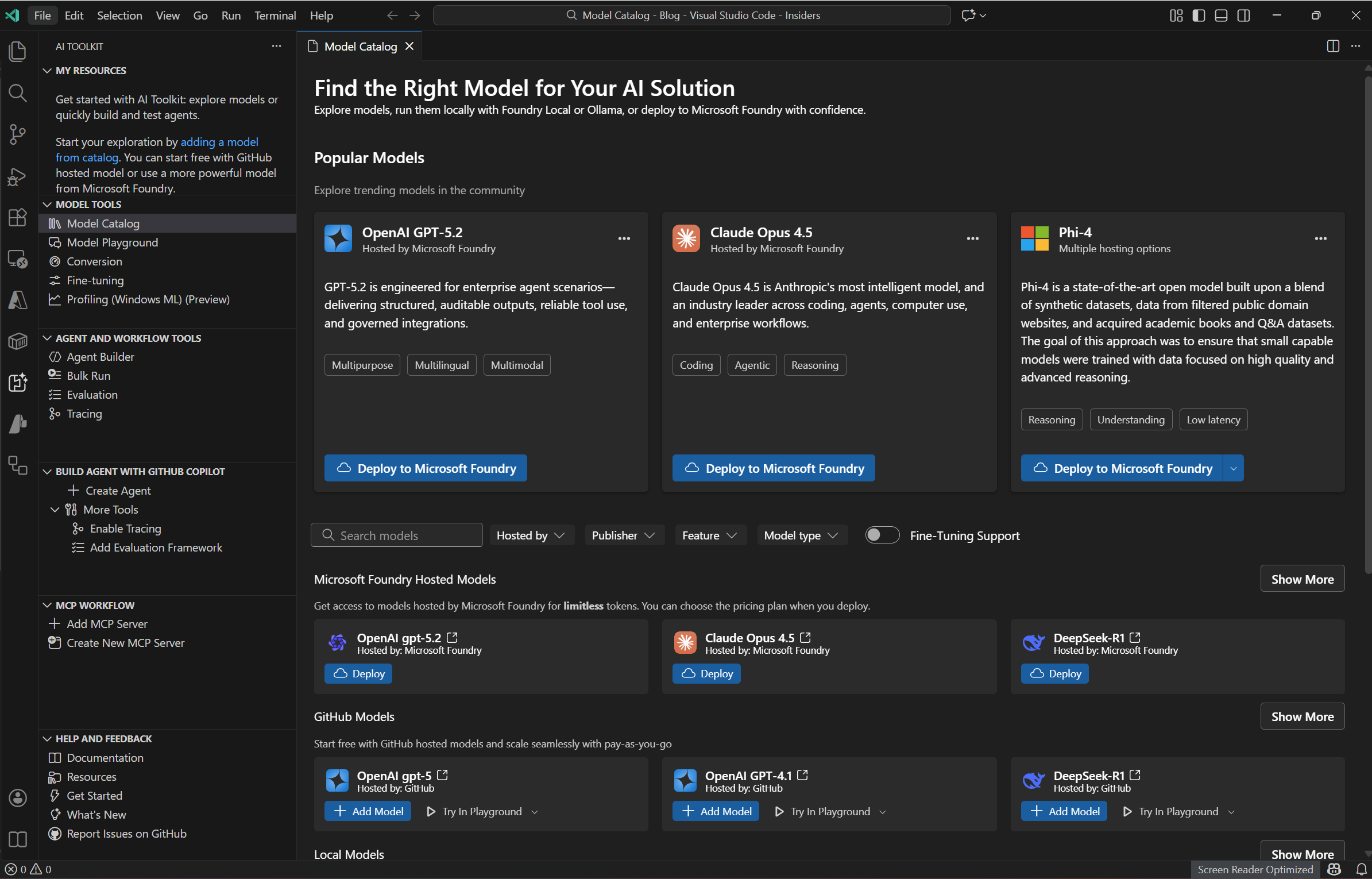
Model Catalog: A unified browser over models from GitHub, ONNX, Ollama, OpenAI, Anthropic, Google, and others. Engineers can compare options and evaluate tradeoffs before binding a model to an agent. The Ignite update explicitly calls out Anthropic Claude variants now accessible here.
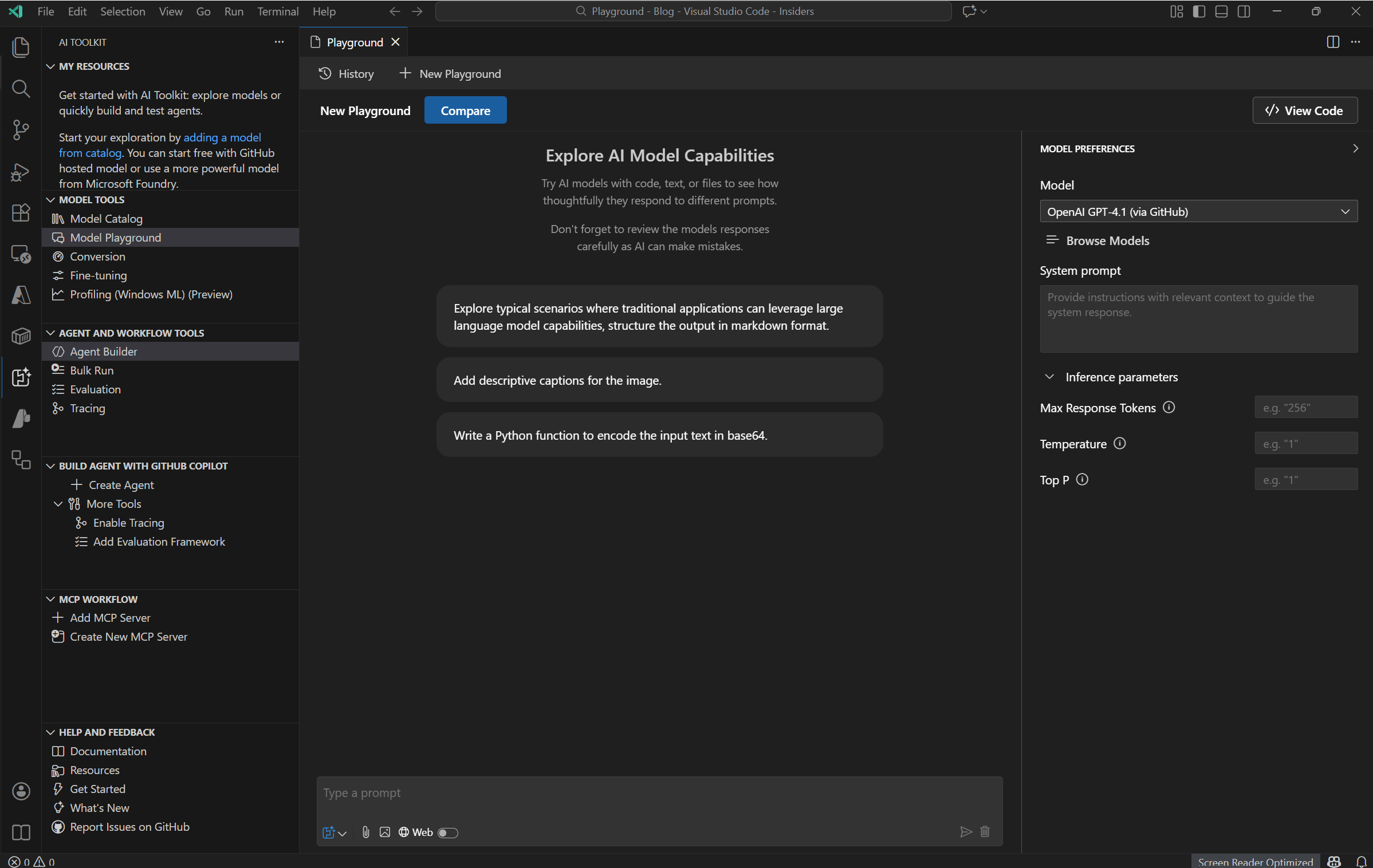
Model Playground: An interactive chat/test surface for prompts, parameters, and multimodal inputs. It’s designed for rapid hypothesis testing—ideal before formalizing agent instructions.
Conversion: Utilities for converting, quantizing, and optimizing pretrained models for local execution (CPU/GPU/NPU). This aids portability and cost control, particularly for edge scenarios.
Fine‑tuning: Workflows to adapt foundation models using custom datasets either locally (GPU) or in Azure Container Apps (GPU). This allows domain specialization without abandoning the VS Code environment.
Agent & Workflow Tools
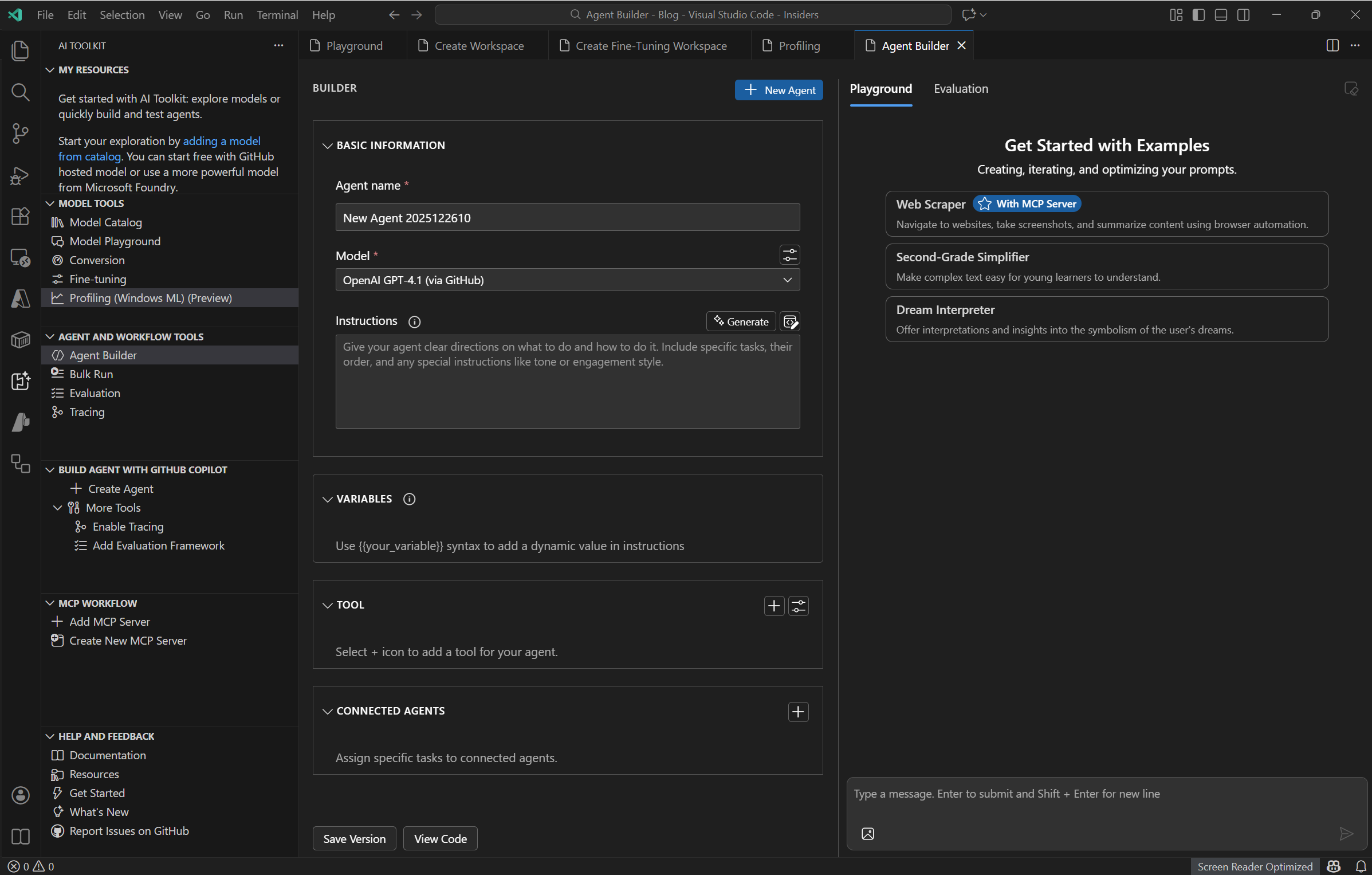
Agent Builder: Previously known as Prompt Builder, this now emphasizes agent construction—authoring instructions, integrating tools (MCP servers), and emitting production‑ready code with structured outputs. Engineers can scaffold agents in Python or .NET, add function/tool calls, and iterate interactively.
 Bulk Run: Batch execution across multiple models or prompts to compare outputs at scale. This is essential for regression testing and prompt robustness analysis.
Evaluation: Dataset‑driven assessment using metrics such as relevance, similarity, coherence, and task‑specific criteria. It complements bulk runs to form a measurable confidence baseline.
Tracing: Runtime telemetry over reasoning steps, tool calls, and latency hotspots. When paired with multi‑agent visualization, tracing enables efficient root‑cause analysis and performance tuning.
MCP Workflow
Add MCP Server / Create New MCP Server: Discover featured MCP servers, validate local Node/Python environments, and scaffold new servers. This extends agents with secure, composable capabilities to query systems, invoke APIs, and manipulate external state.
Visualization and Round‑Trip Development
Graph Visualizer: The Ignite update introduces interactive visualization of multi‑agent workflows, illuminating node execution and connections. This makes debugging and understanding complex orchestration feasible within the editor.
Local‑to‑Cloud Roundtrip: Seamless switching between VS Code and the Foundry portal for YAML workflows, playgrounds, and templates—plus single‑click deployment. This aligns dev, ops, and evaluation artifacts without format drift.
Development Workflow: From YAML to Code and Back
A pragmatic pattern for teams is to begin with declarative YAML workflows in Foundry for clarity and quick iteration. When customization demands increase—e.g., custom tool‑use, advanced control flow, or instrumentation—convert YAML to Agent Framework code and continue in Agent Builder. GitHub Copilot scaffolding helps produce maintainable code with tracing hooks and test scaffolding. This reduces context switching and preserves lineage from declarative prototypes to code‑first implementations.
Evaluation, Quality, and Operability
Robust AI systems demand measurable quality. The toolkit’s Evaluation module standardizes dataset‑based comparisons and metric computation, and the Tracing module surfaces runtime behaviors, tool invocations, and timing. In multi‑agent setups, the graph visualizer further supports operational debugging. Collectively, these capabilities enable repeatable tests, incident triage, and performance baselining before and after deployment.
Model Strategy and Local Execution
The extension’s catalog allows mixing hosted providers with local execution via ONNX and Ollama. Local modes are valuable for privacy (data residency), latency (edge), and cost (avoiding per‑token charges for specific workloads). Where domain‑specific performance is needed, fine‑tuning in local GPUs or Azure Container Apps helps align responses to proprietary data without a wholesale platform shift. Model conversion ensures the operational footprint matches target hardware, including NPU acceleration paths.
Practical Onboarding
Installation is straightforward through the Marketplace; once installed, the AI Toolkit icon appears in the Activity Bar. The Get Started walkthrough introduces you to playground usage and guides you through key views. From there, the usual order of operations is: pick a model in the Catalog, validate prompts in the Playground, construct an agent in Agent Builder (adding MCP tools where necessary), test at scale with Bulk Run, evaluate with datasets and metrics, trace runtime behavior, and finally deploy to Foundry for managed orchestration and visualization.
YAML to Code Example: Customer Support Agent with MCP Tools
A minimal, illustrative example that shows how a declarative YAML workflow (as you’d author in Microsoft Foundry and open in VS Code) can be “converted” into a code-first agent implementation in Python using the same concepts—model selection, agent instructions, tool use via MCP servers, tracing, and structured outputs.
Note: The YAML schema for Foundry agent workflows can evolve; the sample below is intentionally simplified to make the mapping clear. In practice, you’d open YAML workflows in VS Code and iterate or move to code using the AI Toolkit’s Agent Builder with Copilot-assisted scaffolding. The latest update explicitly highlights YAML workflows and code-first customization, MCP tool integration, and multi-agent visualization.
YAML (declarative) — simplified agent workflow
# file: customer_support_agent.yaml
version: 0.3
workflow:
  name: customer_support_agent
  description: >
    Respond to customer queries by retrieving account/order context
    and grounding the answer in internal knowledge and web documentation.

runtime:
  model: anthropic/claude-sonnet-4.5          # Example model from the catalog
  temperature: 0.2
  max_tokens: 1024
  trace: true

inputs:
  - name: user_query
    type: string
    required: true
  - name: user_id
    type: string
    required: true

instructions:
  role: system
  content: |
    You are a customer support agent. Always ground answers in retrieved data.
    If data is missing or uncertain, ask a clarifying question.
    Return a structured JSON with fields: `answer`, `sources`, `confidence`.

tools:
  - type: mcp
    name: mcp-postgres
    title: "Customer DB"
    actions:
      - id: fetch_user_context
        description: "Get profile, subscription status, recent orders."
        parameters:
          user_id: string
  - type: mcp
    name: mcp-knowledgebase
    title: "Internal KB"
    actions:
      - id: kb_search
        description: "Search internal support articles"
        parameters:
          query: string
  - type: http
    name: web_docs
    base_url: "https://example-docs.company.com/api/search"
    actions:
      - id: external_doc_search
        parameters:
          query: string

orchestration:
  steps:
    - id: get_context
      call: fetch_user_context
      with:
        user_id: ""
    - id: kb
      call: kb_search
      with:
        query: ""
    - id: docs
      call: external_doc_search
      with:
        query: ""
    - id: answer
      llm:
        prompt: |
          User question:
          Context:
          KB hits:
          External docs:
          Compose an actionable answer. Include citations and confidence score.
      output_schema:
        type: object
        properties:
          answer: { type: string }
          sources: { type: array, items: { type: string } }
          confidence: { type: number }

policies:
  grounding: required
  pii_handling: redaction

outputs:
  from_step: answer
What this conveys:
- Model/runtime settings (model name, temperature, tracing).
- Inputs the agent needs (user query, user ID).
- System instructions guiding behavior.
- Tools (two MCP servers + an HTTP tool) and action signatures.
- Orchestration that calls tools, then composes a final LLM answer with a structured schema.
- Policies for grounding and PII handling.
These elements align with the AI Toolkit guidance on agent instructions, MCP tool use, and structured outputs; YAML workflows are explicitly highlighted in the latest update to facilitate easy editing and conversion for code-first customization.
Equivalent code (Python) — agent, tools, tracing, structured output
Below is a conceptual Python implementation that mirrors the YAML’s behavior. It registers tools (including MCP-backed actions), defines agent instructions, handles orchestration, and returns a typed result. In VS Code, you’d typically scaffold this in Agent Builder and refine it with Copilot.
# file: customer_support_agent.py
from dataclasses import dataclass
from typing import List, Dict, Any, Optional

# --- Model wrapper (conceptual) ---
class LLM:
    def __init__(self, name: str, temperature: float = 0.2, max_tokens: int = 1024, trace: bool = True):
        self.name = name
        self.temperature = temperature
        self.max_tokens = max_tokens
        self.trace = trace

    def invoke(self, system: str, prompt: str, tools_context: Dict[str, Any]) -> Dict[str, Any]:
        """
        Invoke the model with system instructions + composed prompt.
        Tracing hooks would capture tool calls, token usage, latency, etc.
        In AI Toolkit, tracing is integrated; here we show conceptually.
        """
        # ... integrate with your runtime (e.g., Anthropic/OpenAI via AI Toolkit)
        # Return a structured JSON per output schema.
        return {
            "answer": "Here is a grounded response with steps and references...",
            "sources": tools_context.get("sources", []),
            "confidence": 0.82
        }

# --- MCP tool interfaces (conceptual stubs) ---
@dataclass
class MCPAction:
    id: str
    description: str

class MCPServer:
    def __init__(self, name: str, title: str, actions: List[MCPAction]):
        self.name = name
        self.title = title
        self.actions = {a.id: a for a in actions}

    def call(self, action_id: str, **kwargs) -> Dict[str, Any]:
        # In VS Code, you configure MCP servers in Agent Builder; the runtime validates
        # your Node/Python environment and lets agents call tools programmatically.
        # Here we simulate dispatch.
        # e.g., fetch_user_context(user_id=...), kb_search(query=...), etc.
        if action_id == "fetch_user_context":
            return {"user": {"id": kwargs["user_id"], "tier": "Pro"}, "orders": [{"id": "O-1001", "status": "shipped"}]}
        if action_id == "kb_search":
            return {"hits": [{"id": "KB-42", "title": "Reset password"}, {"id": "KB-7", "title": "Refund policy"}]}
        raise KeyError(f"Unknown action: {action_id}")

# --- HTTP tool (simplified) ---
class HttpTool:
    def __init__(self, base_url: str):
        self.base_url = base_url
    def get(self, endpoint: str, **params) -> Dict[str, Any]:
        # Replace with real HTTP calls or use an MCP wrapper that performs HTTP.
        return {"hits": [{"url": "https://example-docs.company.com/articles/abc", "title": "Policy overview"}]}

# --- Structured output schema ---
@dataclass
class AgentOutput:
    answer: str
    sources: List[str]
    confidence: float

# --- Agent implementation ---
class CustomerSupportAgent:
    def __init__(self, model_name: str = "anthropic/claude-sonnet-4.5"):
        self.llm = LLM(name=model_name, temperature=0.2, max_tokens=1024, trace=True)
        # Tool registry mirrors YAML:
        self.db = MCPServer(
            name="mcp-postgres",
            title="Customer DB",
            actions=[MCPAction(id="fetch_user_context", description="Get profile, subscription status, recent orders.")]
        )
        self.kb = MCPServer(
            name="mcp-knowledgebase",
            title="Internal KB",
            actions=[MCPAction(id="kb_search", description="Search internal support articles")]
        )
        self.web = HttpTool(base_url="https://example-docs.company.com/api/search")

        # System instructions (from YAML 'instructions'):
        self.system_instructions = (
            "You are a customer support agent. Always ground answers in retrieved data. "
            "If data is missing or uncertain, ask a clarifying question. "
            "Return a structured JSON with fields: `answer`, `sources`, `confidence`."
        )

    def run(self, user_query: str, user_id: str) -> AgentOutput:
        # Orchestration steps:

        # 1) fetch_user_context
        context = self.db.call("fetch_user_context", user_id=user_id)

        # 2) kb_search
        kb_hits = self.kb.call("kb_search", query=user_query)

        # 3) external_doc_search (HTTP, simplified)
        docs_hits = self.web.get("/search", query=user_query)

        # Compose prompt (YAML step 'answer.llm.prompt')
        prompt = (
            f"User question: {user_query}\n"
            f"Context: {context}\n"
            f"KB hits: {kb_hits}\n"
            f"External docs: {docs_hits}\n"
            "Compose an actionable answer. Include citations and confidence score.\n"
        )

        # Invoke the LLM with tracing enabled (per runtime.trace)
        result = self.llm.invoke(
            system=self.system_instructions,
            prompt=prompt,
            tools_context={
                "sources": [
                    *(h.get("id") for h in kb_hits.get("hits", [])),
                    *(hit.get("url") for hit in docs_hits.get("hits", []))
                ]
            }
        )

        # Validate against the expected schema
        return AgentOutput(
            answer=result["answer"],
            sources=result.get("sources", []),
            confidence=float(result.get("confidence", 0.0))
        )

# --- Example usage ---
if __name__ == "__main__":
    agent = CustomerSupportAgent()
    output = agent.run(user_query="How do I update my billing address?", user_id="U-12345")
    print(output)
Key Takeaways
System Instructions and Runtime Configuration
The system instructions and runtime parameters (model selection, temperature, tracing) translate directly from YAML declarations into code constructor arguments or instance state.
MCP Tool Integration
MCP tools defined in YAML become instantiated server objects with callable actions in your code. VS Code’s Agent Builder validates the execution environment and assists with configuring featured MCP servers.
Orchestration Flow
The orchestration steps declared in YAML map to explicit, ordered method calls in code. These calls retrieve context from tool results and ultimately compose an LLM invocation.
Structured Output Enforcement
The YAML output schema corresponds to a typed data structure (such as an AgentOutput dataclass in Python or record in C#), ensuring type safety and schema compliance at the agent boundary.
How you’d do this inside VS Code AI Toolkit
-
Open the YAML workflow in VS Code (via Foundry extension) and review steps, tools, and instructions. The latest update enables round‑trip editing and single‑click deployment between VS Code and Foundry.
- Use Agent Builder to scaffold an agent:
- Paste the system instructions
- Set model/runtime parameters
- Attach MCP servers (featured MCP servers are discoverable and validated)
- Translate orchestration steps:
- For each YAML step, create corresponding code functions/method calls
- Copilot can generate the scaffolds and function signatures aligned with best‑practice patterns
- Run locally with tracing and iterate in the Hosted Agents Playground:
- Use the graph visualizer to understand multi‑agent flows
- Debug step execution with integrated tracing
- Evaluate using datasets and metrics:
- Test relevance, similarity, coherence, or task‑specific criteria
- When the agent meets acceptance criteria, deploy to Foundry to manage orchestration and enterprise hosting
Optional: C# skeleton for the same agent
If your runtime preference is .NET, here’s a skeleton showing the exact mapping. In VS Code, you’d choose the language when scaffolding the agent.
// file: CustomerSupportAgent.cs (conceptual)
public sealed class CustomerSupportAgent
{
    private readonly Llm _llm;
    private readonly McpServer _db;
    private readonly McpServer _kb;
    private readonly HttpTool _web;
    private readonly string _systemInstructions =
        "You are a customer support agent... Return JSON with `answer`, `sources`, `confidence`.";

    public CustomerSupportAgent(string modelName = "anthropic/claude-sonnet-4.5")
    {
        _llm = new Llm(modelName, temperature: 0.2, maxTokens: 1024, trace: true);
        _db = McpServer.Create("mcp-postgres")
                       .WithAction("fetch_user_context", "Get profile, subscription status, recent orders.");
        _kb = McpServer.Create("mcp-knowledgebase")
                       .WithAction("kb_search", "Search internal support articles");
        _web = new HttpTool("https://example-docs.company.com/api/search");
    }

    public AgentOutput Run(string userQuery, string userId)
    {
        var context = _db.Call("fetch_user_context", new { user_id = userId });
        var kbHits  = _kb.Call("kb_search", new { query = userQuery });
        var docs    = _web.Get("/search", new { query = userQuery });

        var prompt = $@"User question: {userQuery}
Context: {Serialize(context)}
KB hits: {Serialize(kbHits)}
External docs: {Serialize(docs)}
Compose an actionable answer. Include citations and confidence score.";

        var result = _llm.Invoke(_systemInstructions, prompt, toolsContext: new {
            sources = ExtractSources(kbHits, docs)
        });

        return new AgentOutput(result.answer, result.sources, (double)result.confidence);
    }
}
Mapping cheat‑sheet (YAML → Code)
| YAML Element | Code Mapping |
|---|---|
runtime.model, temperature, max_tokens, trace |
LLM constructor/fields |
instructions.role: system / content |
Agent’s system prompt string passed as system |
tools.type: mcp and actions |
MCP server objects with callable actions |
orchestration.steps |
Ordered function/method calls culminating in llm.invoke(...) |
output_schema |
Dataclass/DTO enforcing structured return types |
Conclusion
The VS Code AI Toolkit Extension Pack, especially with the latest update, provides a comprehensive environment for building intelligent, agentic applications that span local experimentation to cloud deployment.
By supporting declarative YAML workflows alongside code-first implementations in Python and C#, it offers flexibility for teams at different maturity levels.
The integration of MCP tools, tracing, evaluation, and multi-agent visualization addresses key challenges in operability and quality assurance.
This deep dive illustrated how to leverage these capabilities effectively, empowering developers to create robust AI systems with confidence and efficiency.