Table of Contents
- Introduction: Why Enterprise Context Is the New AI Differentiator
- Work IQ - Personalizing AI with User & Collaboration Context
- Fabric IQ - Turning Enterprise Data into Business-Meaningful Intelligence
- Foundry IQ - Unified Knowledge Retrieval and Reasoning for AI Agents
- How the Three IQ Layers Work Together - A Practical Scenario
- Practical Guidance for Copilot Studio and Agent Framework Developers
- Use Case Summary
- Addressing the Runtime and Governance Layer: Agent 365
- Conclusion: Turning Enterprise Context into Competitive Advantage
Summary Lede Microsoft’s new IQ layers - Work IQ, Fabric IQ, and Foundry IQ - are unified intelligence systems that give enterprise AI agents deep organizational context. Rather than relying solely on general knowledge, these layers ground agents in your company’s real data, workflows, and knowledge domains, enabling them to make decisions with the credibility and awareness of experienced employees.
Why read this: If you’re building or deploying AI agents in enterprise environments, understanding these three intelligence layers is essential. Learn what each layer does, the business value they unlock, practical developer integration steps with Copilot Studio, and real limitations to watch for - whether you’re looking to protect your competitive edge or avoid common deployment pitfalls.
Introduction: Why Enterprise Context Is the New AI Differentiator
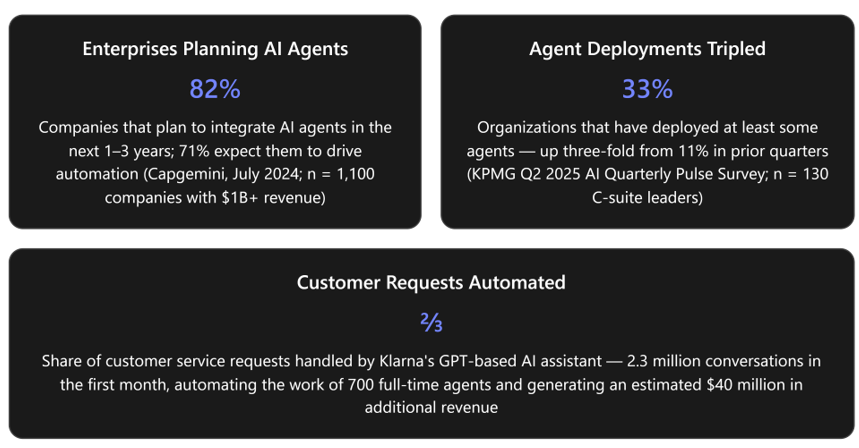
AI agents - autonomous systems that plan, reason, and act on behalf of users - are moving from experimentation to production at enterprise scale. A July 2024 Capgemini survey of 1,100 companies with over $1 billion in annual revenue found that 82% plan to integrate AI agents within the next one to three years, with only 7% reporting no plans at all Of those surveyed, 71% expect AI agents to drive automation, and 64% expect them to free human workers from repetitive tasks so they can focus on higher-value functions. Separately, KPMG’s Q2 2025 AI Quarterly Pulse Survey of 130 U.S.-based C-suite leaders (from organizations with $1 billion or more in revenue) reports that 33% of organizations have now deployed at least some agents - a three-fold increase after two consecutive quarters at 11%. The same survey found that 82% of leaders agree their industry’s competitive landscape will look fundamentally different within 24 months due to AI.
Yet deploying powerful language models alone does not guarantee business impact. Large language models ship with broad general knowledge but lack awareness of an organization’s current data, internal processes, contractual obligations, and human workflow patterns. The real differentiator is no longer how smart the model is, but how well it understands your organization. At Microsoft Ignite 2025, Microsoft addressed this gap by introducing a “Unified Context Layer” comprising three tightly connected intelligence systems: Work IQ, Fabric IQ, and Foundry IQ. Together, they form “Microsoft IQ” - a unified intelligence layer spanning productivity, data, and knowledge - designed to ground AI agents with deep enterprise context so they can make reliable decisions and continuously optimize operations.
Each IQ layer addresses a distinct dimension of organizational context:
| IQ Layer | Context Domain | Platform | Primary Function |
|---|---|---|---|
| Work IQ | User & work context | Microsoft 365 | Captures collaboration signals - emails, meetings, chats, documents, relationships - and builds persistent memory of how people and teams work |
| Fabric IQ | Business & data context | Microsoft Fabric | Unifies analytical, operational, and real-time data into a governed semantic model with ontologies, graphs, and business rules |
| Foundry IQ | Knowledge & reasoning context | Microsoft Foundry (Azure AI Foundry) | Creates multi-source, permission-aware knowledge bases with agentic retrieval for grounded, citation-backed answers |
Each workload is standalone, but they can be used together to provide a comprehensive organizational context for agents. For business decision-makers, these layers translate into faster time-to-insight, more trustworthy AI outputs, and the ability to deploy agents that act with the contextual awareness of experienced employees rather than generic assistants. For developers building with Microsoft Copilot Studio (low-code) or the Microsoft Agent Framework / Agent 365 (pro-code), the IQ layers provide ready-made intelligence services that eliminate the need to hand-build retrieval pipelines, semantic models, or user-context systems from scratch.
Work IQ - Personalizing AI with User & Collaboration Context
What It Is
Work IQ is the intelligence layer in Microsoft 365 that gives AI agents a real-time, permission-aware understanding of how people actually work. It is built on three tightly integrated layers - Data, Memory, and Inference - that work together to provide Microsoft 365 Copilot and custom agents with continuous contextual understanding of work:
- Data unifies signals from files, emails, meetings, chats, and business systems across Microsoft 365 to capture how work happens across the organization.
- Memory builds a persistent understanding of how people and teams work, enabling agents to stay aligned to priorities and remain consistent across tasks, apps, and sessions.
- Inference brings together models, skills, and tools so agents can reason and take action while the Agent 365 control plane ensures those actions remain observable, governed, and compliant.
Work IQ connects to organizational and personal data - SharePoint files, Outlook emails, Teams meetings - and builds personalized memory based on user preferences, habits, and workflows. Conversational memory in Microsoft 365 Copilot, powered by Work IQ, enables it to retain context and important details across sessions by drawing on a user’s work profile, instructions, preferences, and insights from past chats. Users stay in control and can review or delete these memories at any time.
Importantly, Work IQ does not merely retrieve information - it interprets context. This is why a Work IQ-enabled agent can answer questions like “What did we decide last week about the field project budget?” or “Summarise the latest customer escalations and draft a report”. It reasons over signals, patterns, and workflows rather than searching a document library.
Strategic Value for Business
For decision-makers, Work IQ delivers personalization at scale without sacrificing security. It enables AI agents to recognize who a user works with, what they focus on, and how they typically accomplish tasks. Microsoft is now exposing the power of Work IQ through APIs, allowing developers to build AI agents targeting specific enterprise scenarios beyond what the built-in Copilot offers.
Work IQ also surfaces workflow intelligence - for example, identifying that operations teams are overloaded handling exceptions manually, observing long email chains, or spotting recurring “delay review” meetings that consume capacity. This kind of insight goes beyond analytics into organizational awareness, helping leaders understand where human effort is being consumed and where agents can provide the most value.
Tradeoff consideration: Work IQ can only be as effective as the signals it can access. It is accessed primarily through Copilot and works best when collaboration data is well-structured and consistently captured in Microsoft 365 tools. Organizations with fragmented communication (e.g., heavy use of external email, shadow IT chat tools, or poorly organized SharePoint) will see diminished returns until information management improves.
Developer Integration - Copilot Studio
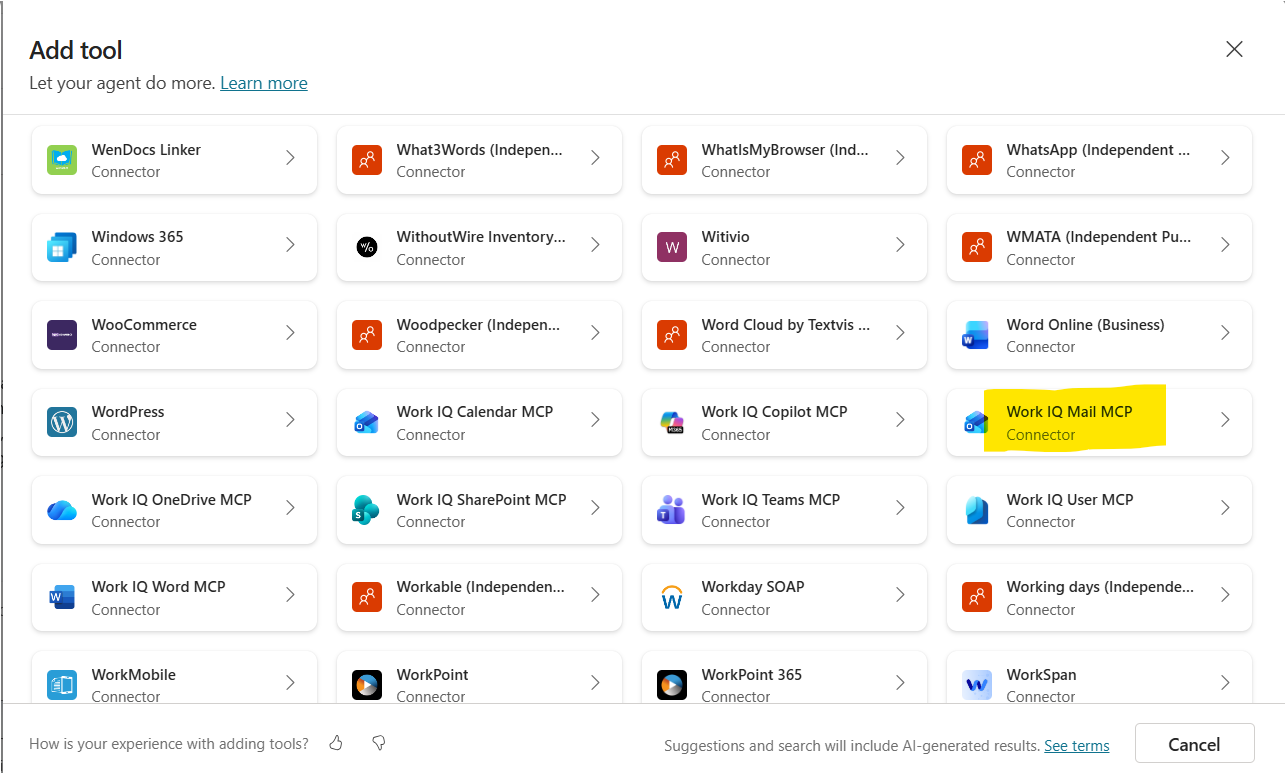
Work IQ is surfaced to developers as Model Context Protocol (MCP) tools that can be attached to agents in Copilot Studio. The following step-by-step process adds the Work IQ Mail server to an agent:
- Sign in to Copilot Studio and select or create your agent.
- Select the Tools tab and then Add Tool.
- On the Add tool page, select Model Context Protocol to see Work IQ MCP servers and other MCP servers.
- Type “mail” in the search box.
- Select Work IQ Mail and expand the connection dropdown to select Create New Connection.
- Select Create, provide credentials, and complete the sign-in process.
- Select Add and Configure to complete the process.
- Test the agent - for example, prompt: “Send an email to [name] and ask how the hands-on lab is going.”
- When asked to allow the Work IQ tool to connect and use services, select Allow.
After configuration, the agent can read email content, understand the context, and respond accordingly. Repeat these steps for Work IQ Calendar or Work IQ Teams to extend the agent’s capabilities with meeting insights, chats, and more>.
Prerequisite: A Microsoft 365 Copilot license is required to use Work IQ MCP servers.
Developer Integration - Microsoft Agent Framework (Agent 365)
For pro-code developers, the Work IQ tooling infrastructure is built into the Microsoft Agent 365 SDK and CLI, Microsoft Foundry, and Copilot Studio. Agent 365 provides a secure, centralized gateway for extending agents with enterprise-ready tools through Work IQ for Microsoft 365 services and custom tooling servers for specialized workflows. This means developers building agents programmatically - using the Agent 365 SDK in Python, C#, or other supported languages - can invoke Work IQ’s capabilities (querying recent communications, documents, or calendar entries) as part of an agent’s reasoning loop without manually calling Microsoft Graph APIs and interpreting raw data.
Governance and Security
IT administrators retain full control over Work IQ MCP tools through the Microsoft 365 admin center under the Agents and Tools section, where they can:
- View all activated Work IQ MCP servers (Work IQ Mail, Work IQ Calendar, Work IQ Teams, and any custom servers).
- Allow or block specific servers based on organizational policies.
- Apply scoped permissions so agents only access what they need.
If an admin blocks a Work IQ MCP tool or MCP server, it blocks access for every user and every agent. Permissions always take precedence over configuration.
Observability is built in via Microsoft Defender. Admins can run queries in Advanced Hunting to inspect trace logs of tool calls made by agents, monitor execution details (which tools were invoked, parameters passed, and outcomes), and detect anomalies or unauthorized usage patterns.
All Work IQ MCP servers also undergo continuous evaluationto measure accuracy, latency, and reliability, ensuring production-grade robustness.
Fabric IQ - Turning Enterprise Data into Business-Meaningful Intelligence
What It Is
Fabric IQ (preview) is a workload in Microsoft Fabric that unifies data across OneLake and organizes it in the language of your business. The unified data is then exposed to analytics, AI agents, and applications with consistent semantic meaning and context. While Work IQ understands work, Fabric IQ understands data - and specifically what data means in business terms.
Fabric IQ models business data through ontologies, semantic models, and graphs so agents can reason over analytics in OneLake and Power BI. It combines the following items into one semantic intelligence workload
| Fabric IQ Item | Description |
|---|---|
| Ontology (preview) | Enterprise vocabulary and semantic layer that defines entity types, relationships, properties, and condition-action rules (through Fabric Activator). Binds definitions to real data so downstream tools share the same language |
| Plan (preview) | Unified no-code platform for collaborative planning, reporting, analytics, data integration, and management on a single platform |
| Graph (preview) | Native graph storage and compute for nodes, edges, and traversals over connected data - suited to path finding, dependency analysis, and graph algorithms. Integrated with the ontology item |
| Data Agent (preview) | Conversational Q&A systems using generative AI that connect to the ontology to understand business concepts when answering questions |
| Operations Agent (preview) | AI agent to monitor real-time data and recommend business actions, aware of business terminology from the ontology |
| Power BI Semantic Models | Curated analytics models optimized for reporting and interactive analysis with measures, hierarchies, and relationships. Ontologies can be generated directly from them |
Several of these items are shared with other Fabric workloads (e.g., Graph and Operations Agent are also part of Real-Time Intelligence; Data Agent is shared with Data Science).
Strategic Value for Business
Fabric IQ delivers six key benefits identified by Microsoft:
- Unification of data - Combines data from various OneLake sources (lakehouses, eventhouses, Power BI semantic models) into a single consistent model. Can also unify external operational data using OneLake shortcuts without copying data or building ETL pipelines.
- Consistent language across tools - A single definition of a concept (like Customer, Material, or Asset) drives how Power BI, notebooks, and agents interpret data.
- Faster onboarding - Business concepts only need to be declared once, then new dashboards and AI experiences inherit that meaning automatically.
- Governance and trust - Reduces duplication and inconsistent definitions across teams by enforcing clear semantics, while constraints improve data quality.
- Cross-domain reasoning - Represents relationships between concepts with graph links, enabling traversals like Order → Shipment → Temperature Sensor → Cold Chain Breach to explain outcomes.
- AI readiness and decision-ready actions - Provides structured grounding for copilots and agents so answers reflect enterprise language. Rules defined in the ontology (via Fabric Activator) enable governed, real-time actions (e.g., alerts and notifications) when conditions are met.
For finance teams, this means an AI agent can answer questions like “Why did request volume spike in the North region last month?” or “Show anomalies in field service cycle time” - grounded in what the data means, not just where it lives. The semantic model ensures that metrics such as “net profit” and “customer churn” are calculated exactly as defined by the business, so CFOs can trust the AI’s output.
For operations teams, Fabric IQ’s ontology can model supply chain entities, inventory levels, delivery metrics, and their relationships. When an on-time delivery percentage dips below historical norms, a Fabric IQ-informed agent can detect the anomaly, correlate it with upstream bottlenecks, and surface the issue before it escalates.
Tradeoff consideration: Fabric IQ requires upfront investment in semantic modeling. Organizations must define ontologies and business rules, which demands collaboration between data engineers and domain experts. Once agents depend on business meaning, that meaning becomes production infrastructure - semantic models must be versioned, governed, deployed, and monitored with the same rigor applied to code. For organizations already using Power BI, existing data models provide a head start: they instantly serve as a catalyst, giving agents rich, business-specific context.
Developer Integration
Developers interact with Fabric IQ primarily through the Microsoft Fabric portal, where they can create ontologies, bind them to data sources, and build Data Agents or Operations Agents that reason over the unified data model. The recommended approach for choosing the right Fabric IQ item depends on the scenario:
| Item | When to Use |
|---|---|
| Ontology (preview) | Cross-domain consistency, governance, and AI/agent grounding; reasoning across processes |
| Graph (preview) | Relationship-heavy questions (impact chains, communities, shortest paths) dominate; GQL-style pattern matching needed |
| Power BI Semantic Model | Business users need trusted KPIs and fast visuals with dimensional modeling and governed datasets |
Several key item relationships support combined use:
- Ontology + Semantic Model: Generate or align Power BI semantic models so terminology and KPIs stay consistent across reports.
- Ontology + Graph: Ontology declares which things connect and why; Graph stores and computes traversals.
- Ontology + Data/Operations Agents: Ontology grounds agents in shared business semantics and rules, enabling them to retrieve context, reason across domains, and trigger governed actions.
- Plan + Semantic Model: Plan connects to existing semantic models, allowing dimensions and measures to be used in planning sheets for seamless plan-versus-actuals analytics.
Foundry IQ - Unified Knowledge Retrieval and Reasoning for AI Agents
What It Is
Foundry IQ (preview) is a managed knowledge layer in Microsoft Foundry that enables the creation of configurable, multi-source knowledge bases providing agents with permission-aware, citation-backed responses based on organizational data. It tackles what many architects consider the hardest challenge in agent design: knowledge retrieval and grounding.
A Foundry IQ knowledge base consists of knowledge sources (connections to internal and external data stores) and parameters that control retrieval behavior. Multiple agents can share the same knowledge base. When an agent queries the knowledge base, Foundry IQ uses agentic retrieval - a multi-query pipeline - to process the query, retrieve relevant information, enforce user permissions, and return grounded answers with citations.
Core Capabilities
Foundry IQ offers the following capabilities:
- Multi-source knowledge bases: Connect one knowledge base to multiple agents. Supported knowledge sources include Azure Blob Storage, SharePoint, OneLake, and public web data.
- Automated document processing: Automate document chunking, vector embedding generation, and metadata extraction for indexed knowledge sources. Schedule recurring indexer runs for incremental data refresh.
- Flexible query modes: Issue keyword, vector, or hybrid queries across indexed and remote knowledge sources.
- Agentic retrieval engine: Uses a large language model to plan queries, select sources, run parallel searches, and aggregate results. The retrieval reasoning effort can be configured at three levels: minimal, low, or medium for LLM processing.
- Extractive data with citations: Returns answers with source references so agents can reason over raw content and trace answers back to source documents.
- Permission-aware: Synchronizes access control lists (ACLs) for supported sources and honors Microsoft Purview sensitivity labels. Enforces permissions at query time so agents return only authorized content.
- Identity-based queries: Runs queries under the caller’s Microsoft Entra identity for end-to-end permission enforcement.
The underlying indexing and retrieval infrastructure is powered by Azure AI Search.
Components
| Component | Description |
|---|---|
| Knowledge base | Top-level resource that orchestrates agentic retrieval. Defines which knowledge sources to query and parameters that control retrieval behavior, including retrieval reasoning effort (minimal, low, or medium) |
| Knowledge sources | Connections to indexed or remote content. A knowledge base references one or more knowledge sources |
| Agentic retrieval | Multi-query pipeline that decomposes complex questions into subqueries, executes them in parallel, semantically reranks results, and returns unified responses. Uses an optional LLM from Azure OpenAI in Foundry Models for query planning |
Foundry IQ knowledge bases can be used in Foundry Agent Service, Microsoft Agent Framework, or any custom application by calling the knowledge base APIs from Azure AI Search.
Strategic Value for Business
Foundry IQ is the layer that makes AI enterprise-grade for knowledge work. It enables agents to understand contracts, policies, procedures, SLAs, regulatory constraints, and unstructured documents - and to reason across them safely. The combination of permission enforcement and source citations directly addresses the two most common executive concerns about enterprise AI: data leakage and hallucination. Every assertion the agent makes can be traced to a vetted document, supporting trust and auditability.
Foundry IQ serves as a single endpoint for high-quality organizational data to maximize context for AI applications. Its knowledge retrieval engine runs over multiple data sources including Work IQ, Fabric IQ, Azure data services, custom web applications, and the web.
Tradeoff consideration: Because Foundry IQ indexes and retrieves content automatically, the quality of the knowledge base depends heavily on the quality and curation of source content. Outdated, duplicated, or poorly written documents will produce lower-quality retrieval results. Organizations should invest in content hygiene (removing obsolete documents, standardizing formatting, clarifying ownership) before connecting sources to Foundry IQ. Additionally, Foundry IQ is currently in public preview without a production service-level agreement, which means production-critical workloads should be tested thoroughly and planned around the preview constraints.
Developer Integration - Setting Up via the Microsoft Foundry Portal
The typical portal-based workflow for Foundry IQ:
- Sign in to Microsoft Foundry at https://ai.azure.com. Ensure the “New Foundry” toggle is on.
- Create a project or select an existing project.
- From the top menu, select Build.
- On the Knowledge tab:
- Create or connect to an existing search service that supports agentic retrieval.
- Create a knowledge base by adding one knowledge source at a time.
- Configure knowledge base properties for retrieval behavior.
- On the Agents tab:
- Create or select an existing agent.
- Connect to your knowledge base.
- Use the playground to send messages and refine your agent.
For proof-of-concept testing, you can use the free tier for Azure AI Search and a free allocation of tokens for agentic retrieval.
Developer Integration - Connecting Foundry IQ to Agents Programmatically
For pro-code developers, the connection from an agent to a Foundry IQ knowledge base uses the Model Context Protocol (MCP) to facilitate tool calls. When invoked by the agent, the knowledge base orchestrates:
- Plans and decomposes the user query into subqueries.
- Processes the subqueries simultaneously using keyword, vector, or hybrid techniques.
- Applies semantic reranking to identify the most relevant results.
- Synthesizes the results into a unified response with source references.
SDK and API support (as of the documentation)>:
| Platform | Python SDK | C# SDK | JavaScript SDK | Java SDK | REST API |
|---|---|---|---|---|---|
| Microsoft Foundry | ✔️ | - | - | - | ✔️ |
Prerequisites for programmatic setup:
- An Azure AI Search service with a knowledge base containing one or more knowledge sources.
- A Microsoft Foundry project with an LLM deployment (such as gpt-4.1-mini).
- Authentication and permissions configured on the search service and project.
- Python SDK version 2.0.0 or later or the 2025-11-01-preview REST API version:
For role-based access control (RBAC):
- Azure AI User role on the parent resource to access model deployments and create agents.
- Azure AI Project Manager role on the parent resource to create a project connection for MCP authentication.
- A system-assigned managed identity on the project for interactions with Azure AI Search.
Microsoft provides an end-to-end Python sample on GitHub - the agentic-retrieval-pipeline-example - for integrating Azure AI Search and Foundry Agent Service for knowledge retrieval.
How the Three IQ Layers Work Together - A Practical Scenario
Understanding each IQ layer individually is important; understanding how they combine is what unlocks transformative use cases. As one analysis frames it: think of a three-layer stack - Fabric IQ at the foundation (structured data intelligence), Foundry IQ in the middle (reasoning and knowledge grounding), and Work IQ on top (human workflow intelligence).
Scenario: Supply Chain Delay Management (Operations)
Consider a company building an AI agent to help manage supply chain delays:
- Fabric IQ detects anomalies in delivery metrics. It observes that certain suppliers are trending late relative to historical norms, notices that on-time delivery percentages are dipping in specific regions, and correlates delays with upstream bottlenecks. This is data-driven awareness.
- Foundry IQ grounds the agent in supplier contracts, SLAs, penalty clauses, and internal policies. It understands what the agreement actually says about late deliveries, interprets escalation thresholds, and knows which suppliers have stricter terms. This is contextual reasoning.
- Work IQ observes that operations teams are overloaded handling these exceptions manually. It sees long email chains, recurring “delay review” meetings, and individuals spending hours each week tracking vendor updates. It identifies patterns of reactive work that consume capacity. This is workflow intelligence.
- The agent combines all three streams: it recommends which delays need escalation based on contractual impact, drafts communications to suppliers referencing the correct SLA language, suggests internal reprioritization, and surfaces issues before they become crises.
Scenario: Customer Service Knowledge Agent
A customer service team deploys an agent using:
- Foundry IQ as the primary knowledge source, indexing product manuals, troubleshooting guides, FAQs, and past support ticket resolutions. When a customer asks about error code E305, the agent retrieves the relevant section of the manual with a citation to the source document.
- Work IQ to access recent internal communications - for example, identifying that an engineering team discussed this exact error in a Teams conversation last week and already developed a workaround. The agent can surface this workaround alongside the official documentation.
- Fabric IQ to check whether the error is correlated with a particular product batch or region by querying the semantic model of manufacturing and logistics data, enabling the support agent to notify affected customers proactively.
Scenario: Financial Reporting and Analysis (Finance)
A finance team connects Fabric IQ to its consolidated financial data in OneLake and Power BI:
- The Ontology defines entities like Account, Transaction, Cost Center, and Region with standardized definitions for metrics like Operating Margin and Revenue Growth.
- A Data Agent in Fabric IQ allows analysts to ask natural-language questions such as “What are the top five cost centers by budget variance this quarter?” - grounded in the official semantic model, ensuring the answer uses Finance’s own calculation methodology.
- Foundry IQ supplements this with knowledge from internal accounting policies, audit findings, and regulatory guidance documents, so the agent can explain why a variance occurred and whether it triggers any policy-based escalation.
- Work IQ can surface the context of recent discussions among the finance team (e.g., “The CFO discussed this variance in Monday’s meeting and requested a root-cause analysis by Friday”), ensuring the AI’s recommendations are aligned with current priorities.
Practical Guidance for Copilot Studio and Agent Framework Developers
Choosing the Right Development Platform
Microsoft offers two primary paths for agent development, and both can leverage the IQ layers. The choice depends on the developer persona and scenario complexity:
| Criteria | Copilot Studio | Microsoft Agent Framework (Agent 365 SDK) |
|---|---|---|
| Target audience | Business users, makers, power users, fusion teams | Professional developers, IT teams |
| Approach | Low-code / no-code with visual design canvas | Pro-code (Python, C# SDKs) with full programmatic control |
| IQ integration | Work IQ via MCP tools (Add Tool > Model Context Protocol); Foundry IQ via MCP connection; Fabric IQ via Fabric Data Agent | Work IQ via Agent 365 SDK; Foundry IQ via knowledge base APIs and Python SDK; Fabric IQ via APIs |
| Governance | Built-in through Agent 365 control plane + M365 admin center | Same Agent 365 governance + Azure RBAC |
| Best for | FAQ bots, task-specific assistants, business-process agents with moderate complexity | Multi-agent orchestration, complex retrieval pipelines, custom reasoning logic, enterprise-grade production agents |
Copilot Studio is aimed at low-code builders, while Azure AI Foundry serves pro-code developers. Agent 365 delivers a consistent, developer-friendly experience, backed by rigorous evaluation of accuracy, latency, and reliability across both paths.
These platforms are not mutually exclusive. A common pattern is to use Foundry to build and fine-tune the agent’s reasoning backend (including Foundry IQ knowledge bases) and Copilot Studio for the conversational front-end and deployment to Microsoft 365 channels. Microsoft also supports connecting a Foundry agent directly into Copilot Studio for organizations that want pro-code control over the backend with low-code deployment.
Additional Developer Resources
Microsoft provides a hands-on learning experience called the IQ Series - an official GitHub repository (microsoft/iq-series) that includes video episodes, Jupyter notebooks, and Azure deployment templates spanning Foundry IQ, Work IQ, and Fabric IQ. This is a valuable starting point for developers exploring integration patterns.
For Copilot Studio, the Copilot-Studio-and-Azure GitHub repository includes a lab on Microsoft Foundry agentic retrieval (labs/2.4-microsoft-foundry-agentic-retrieval) with a notebook (foundry-IQ-agents.ipynb) that demonstrates how to connect Copilot Studio agents to Foundry IQ.
Key Best Practices
1. Curate your knowledge sources deliberately. For Foundry IQ, prioritize high-quality, authoritative content - official policy libraries, product documentation, and knowledge articles that customer service reps already use. Remove outdated or duplicated material before indexing. Please use scheduled indexing for incremental data refresh so agents always use the current information.
2. Invest in semantic modeling. For Fabric IQ, collaborate with business domain experts to design ontologies that capture actual business rules, relationships, and terminology. Start from existing Power BI semantic models when possible - they can be used as a bootstrap for ontologies, keeping language consistent across Fabric experiences.
3. Clean up collaboration data. For Work IQ, ensure that the organization’s SharePoint structures are tidy, file ownership is clear, and key processes are documented. Reduce duplication and align Dataverse models with real business logic. As noted in an analysis by VisualLabs, “Copilot cannot infer intent from SharePoint chaos” - AI amplifies what already exists.
4. Combine IQ layers for maximum impact. Foundry IQ can incorporate Work IQ and Fabric IQ as data sources, enabling custom agents to unify all three context dimensions through a single retrieval interface.
5. Govern and monitor rigorously. Use the M365 admin center for Work IQ tool governance and Azure RBAC for Foundry IQ permissions. Use Microsoft Defender’s Advanced Hunting to audit all tool calls your agents make in production. For Foundry IQ, enforce permissions at query time by passing user tokens to filter results based on identity.
6. Use the “Bring Your Own Model” capability strategically. Copilot Studio supports connecting models from Microsoft Foundry’s model catalog (including GPT 4.5, Llama, DeepSeek, and 11,000+ more models) to specific prompt actions within an agent. This allows you to pick the best-performing model for each task - not just use a single model globally. Governance for these model connections is managed through Power Platform admin center policies under the “Microsoft Foundry” connector.
Use Case Summary
The following table consolidates practical use cases across three domains, illustrating which IQ layers contribute and how:
| Domain | Use Case | Work IQ Contribution | Fabric IQ Contribution | Foundry IQ Contribution |
|---|---|---|---|---|
| Customer Service | Intelligent support agent that resolves complex tickets | Surfaces recent internal discussions about the issue (Teams chats, email threads) | Correlates the issue with product batch data, defect rates, or regional patterns | Retrieves official troubleshooting guides, product manuals, and policy documents with citations |
| Finance | Automated financial analysis and variance reporting | Identifies which finance team members have been discussing a variance and surfaces meeting action items | Provides a governed semantic model of financial KPIs, ensuring consistent definitions (e.g., how “operating margin” is calculated) | Grounds the agent in accounting policies, audit findings, and regulatory guidance documents |
| Operations | Supply chain delay advisor | Detects that ops teams are overloaded with manual exception handling (long email chains, recurring meetings) | Identifies anomalies in delivery metrics, correlates delays with upstream bottlenecks, and detects regional performance dips | Retrieves supplier contracts, SLAs, and penalty clauses to determine contractual obligations and escalation thresholds |
| HR / Onboarding | New employee onboarding assistant | Understands who the new hire’s team members are and what projects are active | N/A | Retrieves onboarding guides, IT setup instructions, benefits documentation |
| Compliance | Regulatory compliance advisor | Tracks which compliance officers have been communicating about a specific regulatory change | Monitors regulatory metrics and flags anomalies against defined thresholds | Retrieves the latest regulatory texts, internal policies, and past audit reports with citations |
Addressing the Runtime and Governance Layer: Agent 365
No discussion of enterprise agent deployment is complete without addressing who monitors these agents and who is accountable for them. Microsoft’s answer is Agent 365 - the runtime and governance layer that sits over all IQ workloads and agent interactions.
Agent 365 monitors agent decisions, tracks accuracy over time, enforces compliance boundaries, and provides deep observability into how agents behave in the real world. It gives visibility into what the agent is doing, why it is doing it, and whether it is staying within defined guardrails. This is not just logging - it is operational control: knowing when performance drifts, when policies change, and when human override is required. Without this layer, as one analysis notes, “you have experiments - clever, promising, but fragile. With it, you have enterprise-grade systems that can scale responsibly.”.
For organizations evaluating AI agent initiatives, the presence of Agent 365 as a centralized governance layer is a critical factor in the build-versus-buy decision. It combines extensibility, security, and compliance to help organizations confidently scale AI agents across productivity and business systems.
Conclusion: Turning Enterprise Context into Competitive Advantage
Work IQ, Fabric IQ, and Foundry IQ represent a structural shift in how enterprises build AI agents. Rather than bolting generic AI onto existing workflows, these intelligence layers embed organizational understanding directly into the agent’s reasoning process - from user collaboration patterns (Work IQ) to governed business semantics (Fabric IQ) to secure, multi-source knowledge retrieval (Foundry IQ).
For business decision-makers evaluating AI investments, the implication is clear: the value of enterprise AI is proportional to the quality and depth of context it can access. Organizations that invest in structuring their work data (M365), defining business semantics (Fabric), and curating knowledge bases (Foundry) will extract far more value from AI agents than those relying on generic models. KPMG’s survey found that among organizations scaling AI, the top ROI metrics are productivity (cited by 98% of leaders), profitability (97%), and improved performance and work quality (94%) - all outcomes that depend on context-rich, trustworthy AI rather than raw model capability.
For developers, the three IQ layers provide a clear architecture and integration path - whether through Copilot Studio’s visual MCP tool integration or through the Agent 365 SDK’s programmatic APIs. The key is to start with well-defined data foundations (clean SharePoint, governed Fabric models, curated knowledge sources) and progressively layer in IQ capabilities as agent scenarios mature.
The organizations that will lead in the agentic era are those that recognize deployment is only the beginning - and that contextual intelligence, not model size, is the true differentiator.