

Table of Contents
On October 21, 2026, Microsoft added a third runtime to Copilot Studio. This one is built for the customers who call or chat with your company. In this article I explain what the Customer Conversation harness is and how it compares to the Microsoft Copilot and standard harnesses. I also share what I would decide about memory, biometrics, escalation, and cost before a real caller ever talks to it.
Introduction
For most of the past year, lots of Copilot Studio related discussions started with questions around the model. Which one should we use, how fast is it, and what does it cost? That question is still there, but it now comes second. Everything in Copilot Studio runs on a harness. Microsoft’s Learn article describes it as “a runtime that exists between the two”, meaning between your agent design and the model. Since October 21, 2026 there are three of them: the Microsoft Copilot harness, the standard harness, and the new Customer Conversation harness.
My view is that the third harness is a sensible split. A customer on the phone does not need an agent that plans its own way through ten tools. They need a reliable answer, a quick identity check, and an easy way to reach a person. Building that on a runtime made for open-ended reasoning never fit very well. But a separate harness also comes with its own memory model, its own billing, and its own controls. So the first decision is now “which harness”, and in my experience that choice is much harder to undo than a model choice.
There is also a business reason to care. For many companies, the contact center is where cost pressure is felt most. It is also where an agent’s mistakes are seen by customers, not by colleagues. Microsoft puts this harness inside its contact center products, next to what the documentation calls the Microsoft Contact Center Intelligence portal. So this topic matters for customer service leaders and finance, not only for makers.
What Microsoft announced
Omar Aftab’s post on the Copilot Studio blog, “Introducing the customer conversation harness in Microsoft Copilot Studio”, describes a harness that “connects voice, chat, business knowledge, and contact data”. The Learn documentation gives the details. All of it is marked as preview and was updated on October 21, 2026.
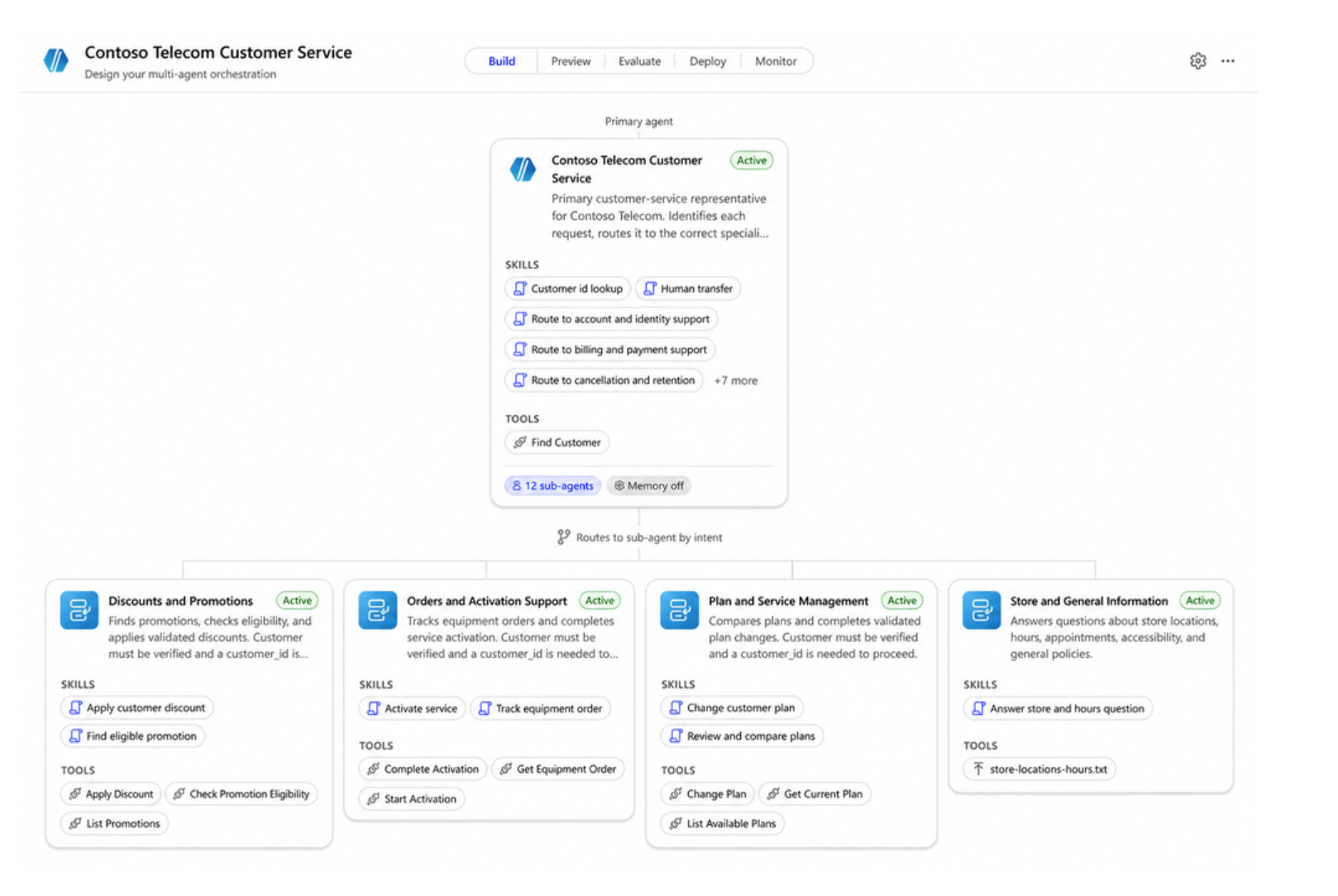
An agent on this harness is called a Customer Assist Agent. Microsoft says the harness is best when an agent “needs predictable responses for defined topics while still providing a fluid, natural-language conversation over voice or chat.” It uses a multi-agent design: a primary agent plus specialized sub-agents, each with its own escalation path to a human representative. It can call tools through connectors, knowledge, MCP (Model Context Protocol, the open standard for connecting agents to tools), and connected agents, and it supports skills and memory. Every agent supports Speech and Chat by default. The authoring surface has five tabs: Build, Preview, Evaluate, Deploy, and Monitor.
Two prebuilt tools are specific to contact centers. Escalate passes the conversation to Teams Phone, to Email, or to Customer Engagement. For the live agent route, Microsoft says the agent “sends the entire conversation to the engagement hub”, so the human picks up with full context. Biometric Authentication verifies voice callers. Learn calls it the integration point for the biometric authentication and fraud detection capabilities in the Contact Center Intelligence portal.
Memory on this harness is its own feature, separate from memory on the Microsoft Copilot harness. It stores structured context in a fixed schema. It covers short-term context only, keeps it for 30 days, and is turned on or off with one switch at the agent level. When a shared contact identifier is configured, context from a phone call is available in the customer’s next chat, and the other way around.
Billing is usage-based in Copilot Credits, and building, testing, and evaluating can consume credits too. The Power Platform admin documentation says consumption depends on complexity and modality (digital, GenAI voice, or premium voice). It also states that this usage “isn’t covered by a user’s Microsoft 365 Copilot license.” Voice Biometrics adds 6 credits per enrollment or authentication interaction, and Microsoft’s estimator assumes two such interactions per voice conversation, so 12 extra credits.
All of this is in preview, and the documentation says it “is prerelease documentation and is subject to change.” I would not tie a production contact center roadmap to specific behaviors until Microsoft publishes general availability terms.
Why it matters
For me, voice support is not the main news. The main news is that Microsoft now treats customer service as its own kind of work, with its own runtime. Internal agents can be clever and sometimes wrong, because a colleague will catch the mistake. A customer-facing agent has to be predictable where it counts. It should state the refund policy the same way every time, check identity before it shares an account balance, and hand over to a person without fail.
I would push back on one part of Microsoft’s framing, though. The harness promises both “predictable responses” and “fluid, natural-language conversation”. In my projects those two goals pull in different directions. Most of the real design work is deciding, for each intent, how much is fixed and how much is free. The harness helps, because skills can be deterministic (topics) or generative. But it cannot make that decision for you. If a team reads the promise as “we no longer need to design conversation flows”, the first week of live calls will show them otherwise.
The cost model also changes the business discussion. In a classic contact center, cost follows staff minutes. Here every conversation, short or long, consumes Copilot Credits. The admin documentation adds a detail that I expect many organizations will miss: capacity used by Copilot Studio “reduces the prepaid capacity available to supported Microsoft 365 experiences, such as Cowork and Work IQ.” So a busy voice agent in customer service can use up credits that knowledge workers in other parts of the company rely on. The service director, finance, and IT should talk about this together before launch, not after the first invoice.
One last point is naming. The Copilot Studio articles refer to the Microsoft Contact Center Intelligence portal, while the Power Platform cost article talks about “Microsoft Contact Center AI” and a “Self-Service/Customer Assist Agent”. That is normal for a preview. But it tells me that the lines between Copilot Studio, Dynamics 365 Customer Engagement, and the contact center tools are still moving. Keep that in mind in any licensing discussion.
Architecture implications
Choosing a harness is now the first architecture decision, and it affects much more than how the agent reasons. This is the decision table I use with customers. It is based on Microsoft’s own comparison, and the last row adds my own rule of thumb.
| Criterion | Microsoft Copilot harness | Customer Conversation harness | Standard harness |
|---|---|---|---|
| Built for | Complex, multi-step business processes | Customers over voice and chat | Rule-based agents and structured conversations |
| How it works | Reasons through a goal step by step | Primary agent with sub-agents that escalate | Follows the topics and rules you define |
| When things go wrong | Retries and finds other paths | Escalates to a human through a defined path | Follows the paths you built |
| Files | Creates and edits Office and PDF files | Not a focus | Not a focus |
| Memory | Yes, its own memory model | Structured schema, short-term, 30 days | Not a focus |
| Publishing | Internal teams or external customers | Website chat or a phone number | Internal teams or external customers |
| Billing | Copilot Credits, own billing overview | Copilot Credits by complexity and modality | Standard harness licensing |
| Pick it when | The work is a process, not a dialogue | A customer needs a resolution or a person | The requests are known and stable |
The table leads to three practical points.
First, the multi-agent setup fits how contact centers already work. Most service teams route calls by topic, such as billing, orders, or technical issues. One sub-agent per topic, each with its own escalation path, follows the same logic. The documentation makes a useful distinction here. A sub-agent shares configuration, deployment, and ALM with its primary agent. A connected agent, for example one hosted in Azure AI Foundry, keeps its own configuration and ALM. I would choose between them based on who owns what. If one team owns the whole service experience, use sub-agents. If the billing department wants to own and release its own agent, connect it.
Second, voice works differently from chat. Learn states that “Speech channels don’t support end-user sign-in”, so knowledge sources that require the end user’s credentials only work in chat. In practice, any answer that depends on who the caller is must come from a tool that runs after an identity check. It cannot come from knowledge sources that check user permissions. Plan for this from day one.
Third, treat the harness choice as permanent. I have not found anything in Microsoft’s material about moving an agent between harnesses, so I treat a change as a rebuild. One related point I get asked about: the Microsoft Copilot harness is a Copilot Studio framework, not the Microsoft Copilot service, and Microsoft states that customer data is not sent to that service.
Governance implications
Memory and privacy. On paper, 30 days of structured, short-term memory sounds good for privacy, and it is better than free-form recall. The schema is small on purpose. You get built-in fields such as the customer name, past open intents, and a conversation summary, plus up to five custom parameters with a fixed list of allowed values. I see that limit as a good thing, because it forces you to store only what you need. The harder questions are about the customer. Will a customer welcome the agent remembering last week’s complaint, or find it intrusive? How is the customer told that memory exists? How is one customer’s context deleted on request before the 30 days run out? The documentation I read describes the mechanism. It does not describe customer-facing disclosure or deletion requests, so put those questions to Microsoft and to your data protection officer before you switch memory on.
Using memory across channels needs a closer look too. According to Learn, chat channels authenticate the user first, while “Speech relies on the caller’s phone number.” A phone number is an identifier, not proof of identity. Shared family lines exist, and numbers can be spoofed. If memory surfaces anything sensitive, I would only use it over voice after a real authentication step.
Biometrics. Voice biometrics makes sense where fraud risk is real and repeat contact is frequent: payment changes, address changes, high-value accounts. It is hard to justify for opening hours or parcel tracking. The credit cost is documented: 6 credits per interaction, or 12 per voice conversation in Microsoft’s estimate. Whatever you decide, plan an alternative path for customers who decline enrollment.
Escalation and honest containment. Containment rate is the number vendors like to show. I would challenge it as a success measure on its own. A conversation that ends without escalation is not necessarily resolved. The customer may have given up or switched to email. An honest measure counts a contact as contained only when the same customer does not come back on the same issue within a defined window. The memory feature actually helps here, because the list of past open intents is exactly the signal you need. The Monitor tab shows recent and live conversation activity, but I have not seen Microsoft document a resolution metric, so plan to build one.
Cost controls. The admin documentation offers environment allocations, a setting to stop drawing from tenant capacity, and an agent-level monthly limit with Stop usage. It is also clear that Azure budgets and alerts “don’t stop usage”. In a contact center, a hard stop on a customer-facing agent is an outage. If the limit is reached on a Monday morning, callers still need to reach someone.
Never enable Stop usage on a voice agent without a tested fallback route to human agents. Decide in advance what a caller hears when the credit limit is reached.
Practical recommendations
These are the steps I would take to get started with the Customer Conversation harness.
- Classify your agent backlog by harness. Use the decision table above for every planned customer-facing agent. Record the choice and the reason in the design document.
- Build a credit estimate before the pilot. Classify expected conversations as light, medium, or heavy, split by modality, and add 12 credits per voice conversation if biometrics is on. Review the result together with the Microsoft 365 admin center, since the prepaid pool is shared.
- Give the agent its own environment and limits. Allocate credits, turn off drawing from the tenant pool, set a monthly agent limit with a notification threshold, and test what happens at the limit.
- Run a data protection review for memory and biometrics. Keep custom parameters to the minimum, decide whether voice memory requires authentication, and document how customers are informed and how deletion works.
- Design one escalation path per sub-agent and test it. Build test sets in the Evaluate tab that include explicit requests for a person, implicit frustration, and failed authentication. If you never test an escalation path, you do not know whether it works.
- Define containment honestly. Agree on a repeat contact window and report contained, escalated, and abandoned conversations side by side.
- Start with one intent in chat, then add voice. Chat supports sign-in and is cheaper to get wrong. Move to voice once identity, escalation, and cost behave as expected.
- Keep a preview log. Track documentation changes, product naming, and licensing terms every month, and avoid committing to customer SLAs on preview features.
Conclusion
I think the Customer Conversation harness is the right idea. Customer service has different needs than internal knowledge work, and Microsoft has now given it a runtime of its own, connected to its contact center tools. But I would not assume the harness solves the hard parts for you. You still decide where fixed answers end and free conversation begins. You still decide how to confirm a caller’s identity, what a customer expects the agent to remember, and how you measure success. Make these decisions on purpose, and treat the harness choice as an architecture decision with a budget attached. Run a small pilot while it is in preview, and expect some details to change before general availability.
Sources
- Microsoft Copilot Blog, Copilot Studio blog, “Introducing the customer conversation harness in Microsoft Copilot Studio” by Omar Aftab, October 21, 2026: the announcement and its summary of connecting voice, chat, business knowledge, and contact data
- Microsoft Learn, Agents powered by the Customer Conversation harness overview (preview), updated October 21, 2026: Customer Assist Agent, multi-agent design, sub-agents and connected agents, tabs, Speech and Chat, sign-in limits on speech channels, usage-based billing
- Microsoft Learn, Prebuilt contact center tools (Customer Conversation) (preview), updated October 21, 2026: Escalate to Teams Phone, Email, or Customer Engagement, Biometric Authentication, Microsoft Contact Center Intelligence portal
- Microsoft Learn, Memory (Customer Conversation) (preview), updated October 21, 2026: structured schema, custom parameter limits, 30-day retention, agent-level switch, cross-channel continuity, phone number identification on speech
- Microsoft Learn, Manage costs for agents powered by the Customer Conversation harness, updated October 21, 2026: modalities, Voice Biometrics credits, estimator assumptions, cost controls, shared prepaid capacity with Microsoft 365 experiences
- Microsoft Learn, Harnesses in Copilot Studio, updated October 22, 2026: definition of a harness, the three harnesses and their comparison, Microsoft Copilot harness data handling


