
Table of Contents
- What changed, in one paragraph
- From conversation design to agent design
- The new authoring experience
- The agentic orchestrator: the real innovation
- Planning instead of branching
- Skills: the most important new capability
- What is a SKILL.md?
- How the orchestrator loads behavior
- Why SKILL.md changes enterprise architecture
- One open format, many runtimes
- Skills versus tools versus knowledge
- The naming trap: two different meanings of “skills”
- Connected agents and agent specialization
- Memory and Microsoft IQ
- Convergence with Microsoft IQ and Microsoft Foundry
- Governance implications
- What architects should do now
- Choosing between the new experience and classic — a decision guide
- Ready-made behavior — the CAT Agent Skills gallery
- Getting started — CAT’s three on-ramps
- Conclusion
- Sources
Summary lede Microsoft’s 2026 rebuild of Copilot Studio is far more than a coat of paint. Beneath the reduced tab count and the natural-language authoring surface sits a fundamental shift in how agents are designed, orchestrated, and maintained.
The classic model centered on topics, triggers, and conversation paths. The rebuilt experience introduces a new agentic orchestrator, reusable Skills authored in Markdown, Memory as a first-class capability, a redesigned workflow experience, and tighter alignment with Microsoft IQ and Microsoft Foundry (formerly Azure AI Foundry).
The result is a platform that increasingly resembles an agent engineering environment rather than a chatbot builder.
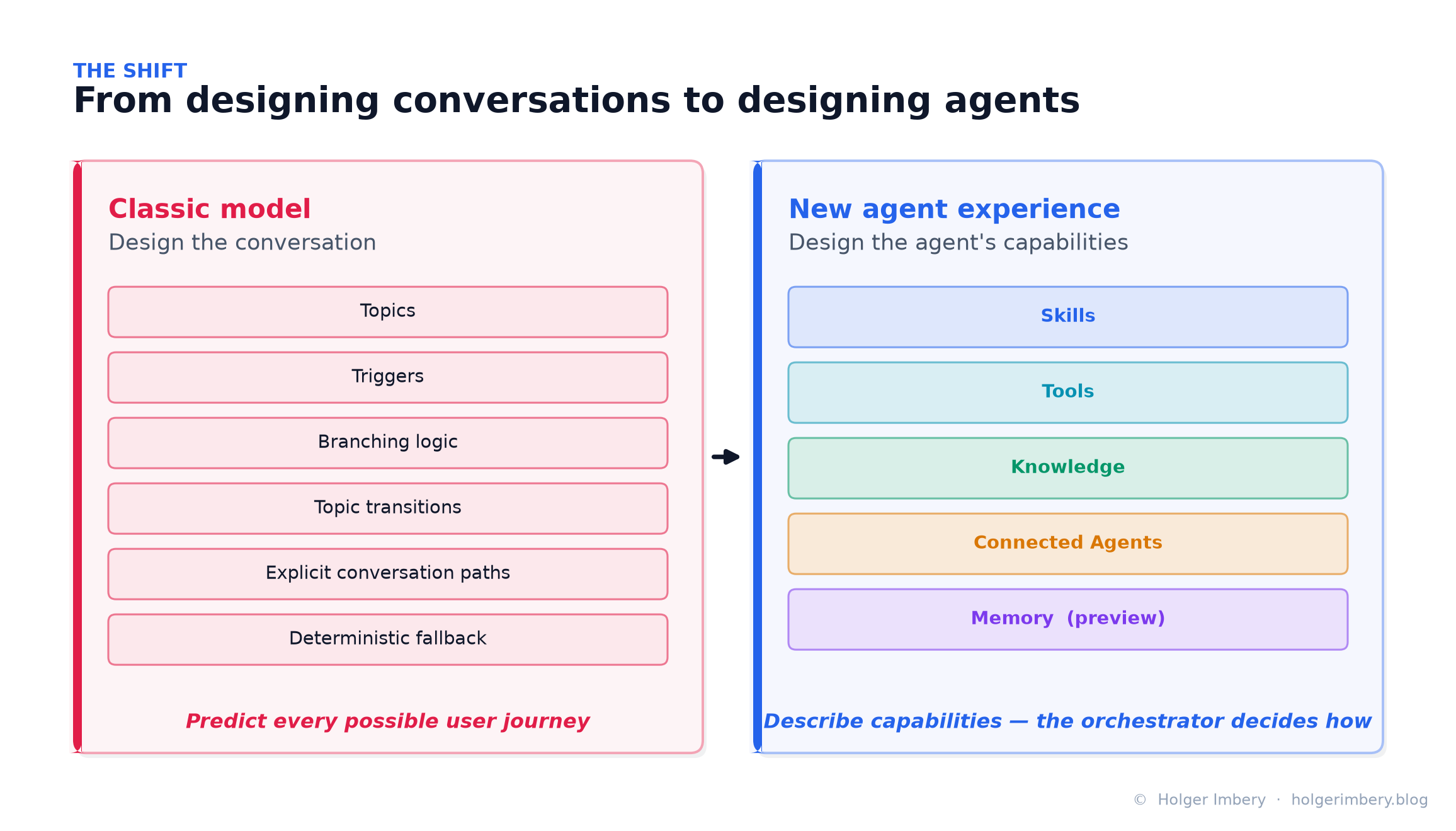 Figure 1 — The core shift: from predicting every conversation path to describing an agent’s capabilities and letting the orchestrator decide how to combine them.
Why read this:
- Read this if you opened Copilot Studio after Build 2026 and wondered where the familiar tabs, topics, and configuration surfaces went.
- Read it if you spent the last year designing agents around generative orchestration, child agents, and topic structures, and want to understand Microsoft’s new direction.
- And read it if the phrase SKILL.md keeps appearing in discussions about Copilot Studio, GitHub Copilot, Claude, and modern agent architectures — because it is now the same idea in all of them.
This article examines the architecture behind the new experience, explains what the orchestrator changes in practice, and explores why reusable Markdown-based skills may become one of the most important design patterns for enterprise AI agents.
What changed, in one paragraph
The rebuilt Copilot Studio replaces the classic, conversation-centric architecture with an agent-centric model. Instead of authoring explicit topics, flows, and branching logic, you describe the agent in natural language and the system generates the underlying configuration. The agent is assembled from a small set of capability components — Skills, Tools, Knowledge, and Connected Agents, complemented by Memory (preview) — and a new agentic orchestrator decides at runtime how to combine them. Reusable SKILL.md files let behavior be modularized and shared across many agents.
The short version:
Old Copilot Studio:  Design the conversation.
New Copilot Studio:  Design the agent's capabilities.
One important nuance the marketing sometimes blurs: the new agent experience runs alongside the classic experience, and the two are not convertible in either direction. This is a parallel platform, not an in-place upgrade.
From conversation design to agent design
For years, Copilot Studio inherited concepts from its chatbot origins. A typical implementation included topics, triggers, branching logic, topic transitions, explicit conversation paths, and deterministic fallback behavior. Designing an agent often meant predicting every possible user journey.
That model worked well for structured support bots, FAQ scenarios, guided intake flows, and transactional assistants. But it became hard to maintain when agents needed to do more complex work — interpret ambiguous goals, work across multiple systems, select tools dynamically, call specialized agents, handle large documents, recover from partial failure, or execute multi-step tasks without a hand-authored branch for every path.
The new model moves responsibility away from hand-authored conversation paths and toward the orchestrator. Instead of modeling every branch, makers define:
- what the agent knows,
- what actions it can perform,
- what expertise it should apply,
- which agents it can collaborate with,
- and what constraints it must obey.
The orchestrator determines how these components combine to accomplish the user’s objective. This is a different engineering mindset. In the classic model, the maker designs the dialog. In the new model, the maker designs the operating environment of the agent.
The new authoring experience
One of the most visible changes is the simplified authoring surface. Microsoft reduced the workspace from nine configuration tabs to four:
Build · Preview · Evaluate · Monitor
It’s worth being precise here, because it is easy to conflate two different things:
- The four tabs above are the workspace — where you build, test, evaluate, and monitor an agent.
- The five capability components below are what you actually assemble inside the Build tab.
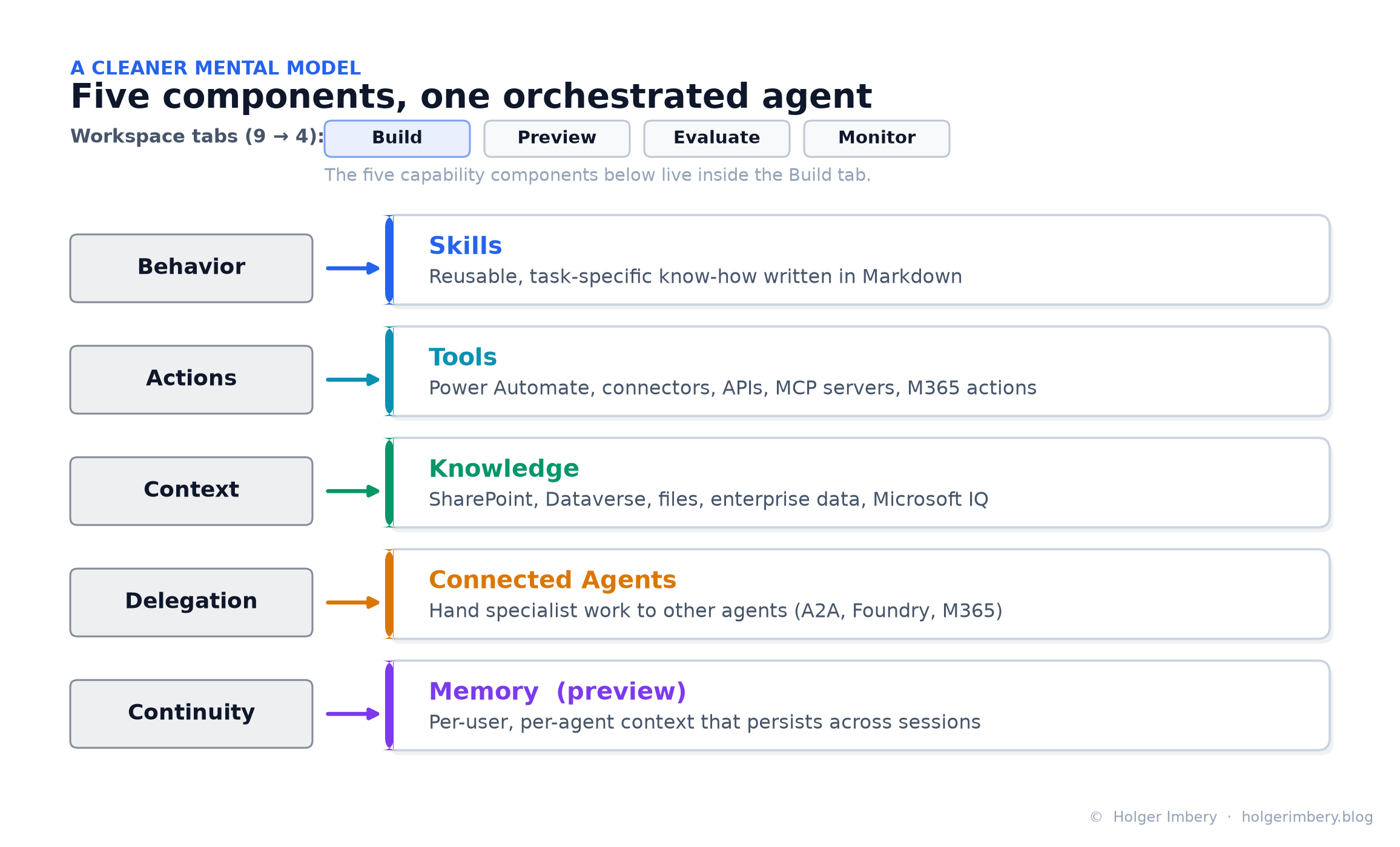 Figure 2 — The four workspace tabs are distinct from the five capability components. Behavior maps to Skills, actions to Tools, context to Knowledge, delegation to Connected Agents, and continuity to Memory.
Skills — reusable behavior
Skills define how an agent should approach a specific type of task. They are self-contained sets of instructions written in Markdown, and they can be created, uploaded, reused, exported, and shared across agents.
Tools — external actions
Tools let the agent do something outside the language model itself: Power Automate flows, connectors, APIs, MCP servers, and Microsoft 365 or business-system actions.
Knowledge — grounding
Knowledge gives the agent trusted context: SharePoint, Dataverse, uploaded files, enterprise data, and organizational data through Microsoft IQ.
Connected Agents — delegation
Specialized agents that can be delegated work. This enables multi-agent patterns where one agent acts as a front door, router, supervisor, or coordinator while others provide domain-specific capabilities.
Memory (preview) — continuity
Persistent, per-user context that survives across sessions. Memory is a maker-toggled capability that lets an agent remember details from prior interactions and apply them later. It does not replace durable business state in systems such as Dataverse — more on that distinction in §14.
The most important architectural consequence: behavior is no longer trapped inside one giant instruction block or hidden across many conversation branches. It can be factored into reusable, named capabilities.
Behavior    ->  Skills
Actions     ->  Tools
Context     ->  Knowledge
Delegation  ->  Connected Agents
Continuity  ->  Memory
The agentic orchestrator: the real innovation
The interface redesign is visible. The orchestrator redesign is transformative.
Microsoft describes the new experience as being built on a new agentic orchestrator — its words: built on “a new coding harness and CLI layer,” with “stronger instruction adherence and long-horizon task execution.” It supports recursive task execution, can “process large volumes of content,” and can “produce rich file outputs.” Microsoft Learn frames it as an enhanced orchestration runtime that improves reasoning quality and response quality, particularly over Microsoft 365 data — and, unlike the classic experience, this enhanced model is not configurable; every agent in the new experience uses it.
Unlike earlier models that leaned on predefined flows, the new orchestrator behaves like a modern AI agent runtime. Its responsibilities include:
- interpreting user intent,
- selecting relevant skills,
- choosing appropriate tools,
- combining grounding sources,
- delegating work to connected agents,
- validating intermediate results,
- and generating the final answer or artifact.
This matters because modern enterprise agents rarely operate as simple question-answering bots. They need to perform work, plan, and decide when to retrieve information, call a tool, delegate, or ask for what’s missing. The orchestrator is the layer where that decision-making happens.
A note on the model. Copilot Studio’s model picker surfaces multiple frontier models (including Claude models). You will see community posts describing the orchestrator as powered by Claude but there is no official orchestrator product name beyond “the agentic orchestrator”, and the model is selectable rather than a fixed brand. Treat “powered by Claude” as shorthand for Claude models are available not as an official label.
Planning instead of branching
The difference is easiest to see side by side.
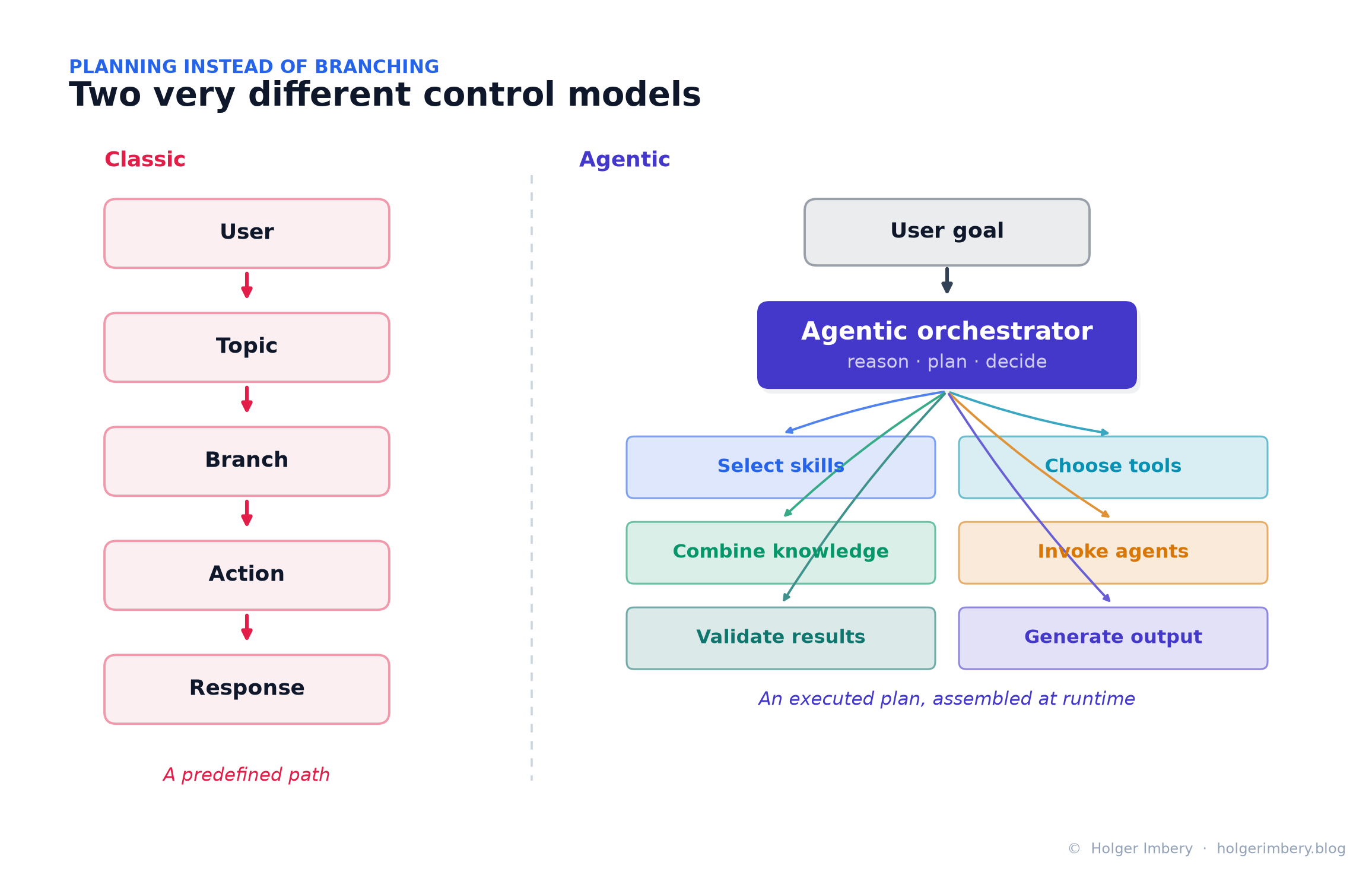 Figure 3 — The classic model walks a predefined path (User → Topic → Branch → Action → Response). The agentic model hands a user goal to an orchestrator that reasons, plans, and assembles the work at runtime.
This seemingly subtle change introduces a completely different way of thinking. The agent is no longer navigating a predefined conversation — it is executing a plan.
That does not mean deterministic workflows disappear. They remain essential for approvals, state transitions, compliance checks, and business-critical processes. But their role changes. In the classic model, deterministic logic often carried the conversation. In the new model, deterministic logic becomes the guardrail, workflow backbone, or execution layer around an agentic core.
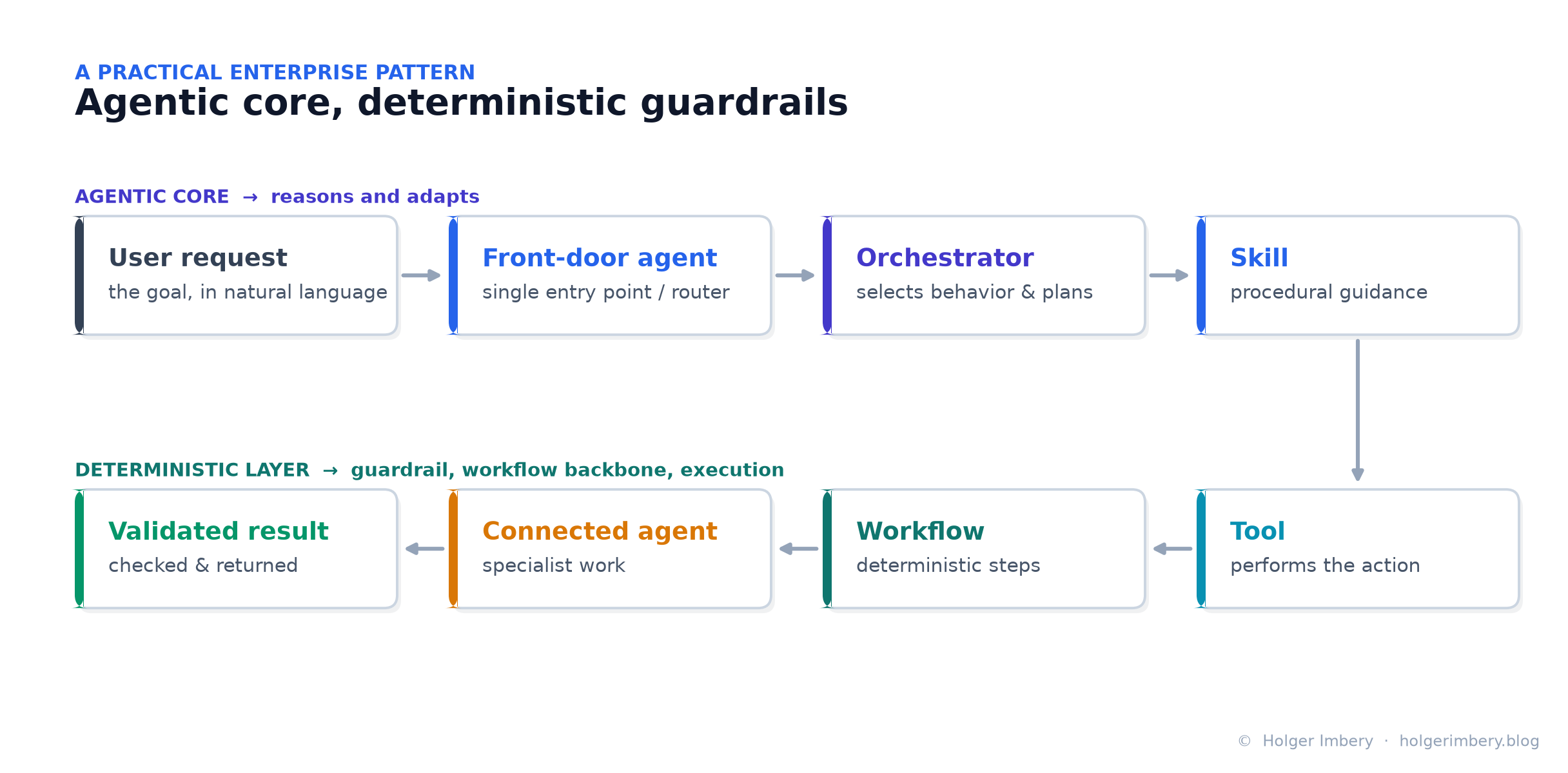 Figure 4 — A practical enterprise pattern: an agentic core reasons and adapts, while a deterministic layer (workflows, connected agents, validation) provides the guardrails and executes the controlled steps.
This is much closer to how modern agent systems are being built across the wider AI ecosystem.
Skills: the most important new capability
Among all the new features, Skills may prove the most strategically important.
Microsoft defines skills as reusable capabilities that extend what an agent can do. Crucially:
- Unlike tools, they do not connect to external services.
- Unlike knowledge, they do not provide reference material.
- Skills provide procedural expertise and reusable behavior — they tell the agent how to approach a class of tasks.
Examples:
- how to review an enterprise architecture proposal,
- how to classify an incoming support request,
- how to write a customer-facing incident summary,
- how to create a governance-compliant project document,
- how to evaluate whether a process should be automated,
- how to prepare a Power Platform solution review.
Previously, this kind of procedural guidance lived in one of three places: the main instruction block, topic-specific prompts, or undocumented maker knowledge. Skills give it a dedicated, reusable home.
What is a SKILL.md?
At its simplest, a skill contains a name, a description, and a set of instructions written in Markdown. Copilot Studio’s format is deliberately standard: YAML front matter (name, description) plus a Markdown body, packaged — when you need to ship more than instructions — as a ZIP that contains a SKILL.md file and optional supporting files such as scripts, templates, and reference documents.
The orchestrator examines the description to decide whether the skill is relevant to a request. If it is, the instructions are loaded into context. If it is not, they stay out of the active context window. This solves one of the most persistent problems in enterprise agent design: instruction bloat. Instead of thousands of lines of always-active instructions, behavior is separated into focused, reusable modules.
A typical SKILL.md looks like this:
---
name: architecture-review
description: Reviews solution designs for compliance with enterprise
  architecture standards. Use this skill when the user asks for architecture
  validation, design critique, platform fit, or governance review.
---

# Objective
Review a solution architecture and identify risks, gaps, and recommendations.

# Process
1. Identify the business goal.
2. Extract the proposed architecture.
3. Check integration, security, data, and governance concerns.
4. Identify missing decisions.
5. Produce a concise review with risks and recommendations.

# Rules
- Do not assume undocumented requirements.
- Separate facts from recommendations.
- Highlight open questions.
- Prefer enterprise platform standards where applicable.
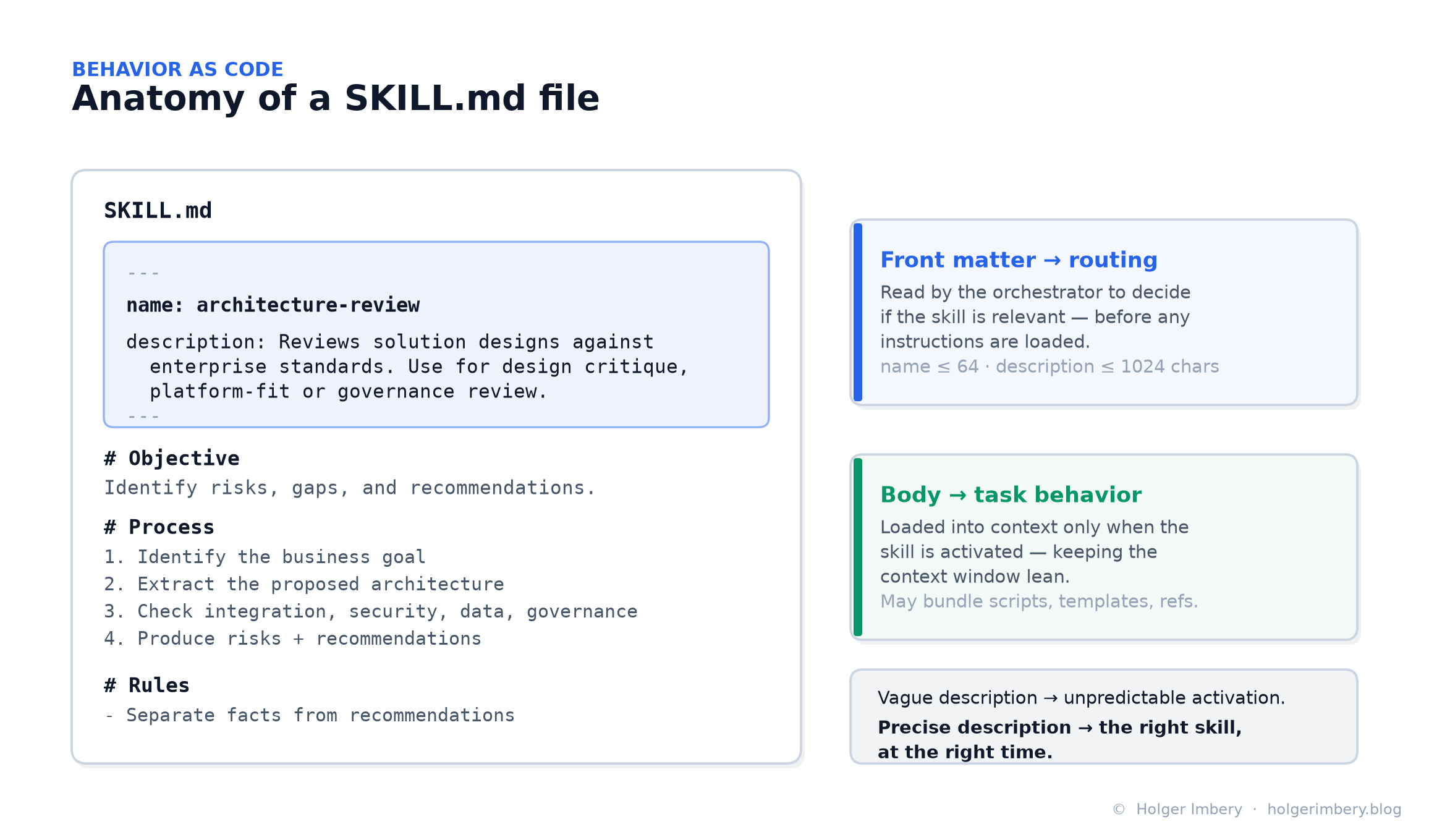 Figure 5 — The front matter is not documentation for humans; it is routing metadata for the runtime. The body is the task behavior, loaded only when the skill activates.
The consequence is important: the description is routing metadata for the agent runtime, not a human-facing comment. A vague description produces unpredictable activation. A precise one — stating what the skill does and when to use it — helps the orchestrator select the right capability at the right time. (In the wider open format, the practical limits are a name of ≤64 characters and a description of ≤1024 characters.)
How the orchestrator loads behavior
Skills are only half the story. The other half is how they reach the model — and this is where the design earns its keep.
Copilot Studio registers knowledge, tools, and skills the same way: only their metadata — names and descriptions — sits in context by default. The full content is pulled in on demand, when a prompt matches. The agent’s own top-level instructions are the exception: those are always loaded in full.
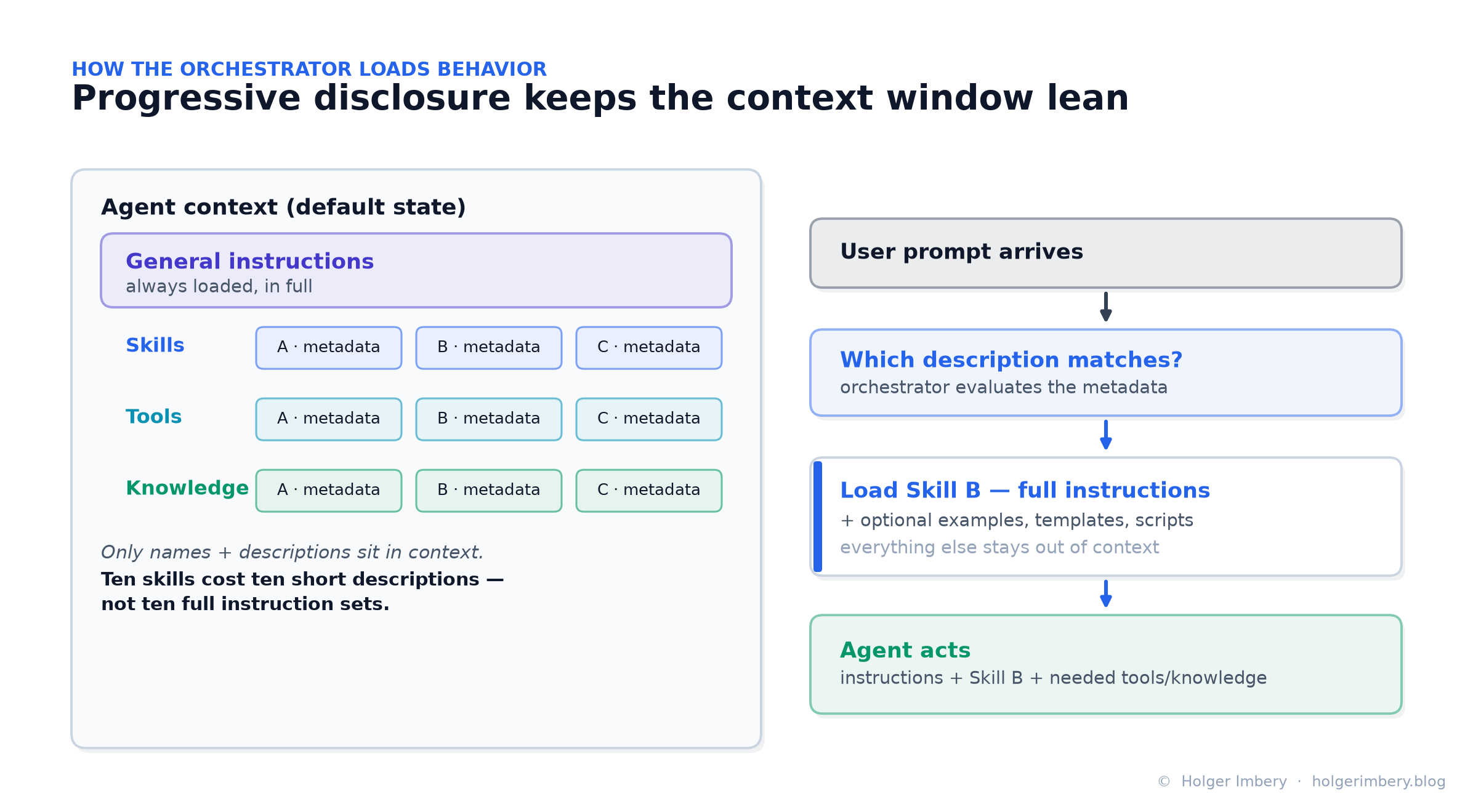 Figure 6 — Progressive disclosure: the orchestrator keeps only names and descriptions in view, then loads a skill’s full instructions (and any bundled resources) when its description matches the request.
This pattern — often called progressive disclosure or dynamic loading — is what keeps large agents manageable. As one Microsoft community write-up puts it, ten skills cost you ten short descriptions, not ten full sets of instructions, in every turn. The practical benefits:
- Manageability — each skill is a focused unit you can review and version on its own.
- Context economy — the context window stays lean no matter how many skills exist.
- Accuracy — a skill can carry precise tool-use guidance, brought into context only when relevant (validate this per agent rather than assuming it).
- Speed and cost — nudging the agent toward the right approach cuts round-trips (again, measure it).
Why SKILL.md changes enterprise architecture
The significance of the format extends beyond Copilot Studio. Because skills are Markdown files, they become version-controlled, Git-native, reviewable through pull requests, shareable across teams, portable between agents, and maintainable as long-lived enterprise assets.
This is what some now call Behavior as Code. Instead of embedding organizational know-how inside prompts, teams maintain curated repositories of reusable capabilities:
/skills
  /architecture-review          SKILL.md
  /power-platform-governance     SKILL.md
  /customer-incident-summary     SKILL.md
  /proposal-quality-check        SKILL.md
  /brand-voice                   SKILL.md
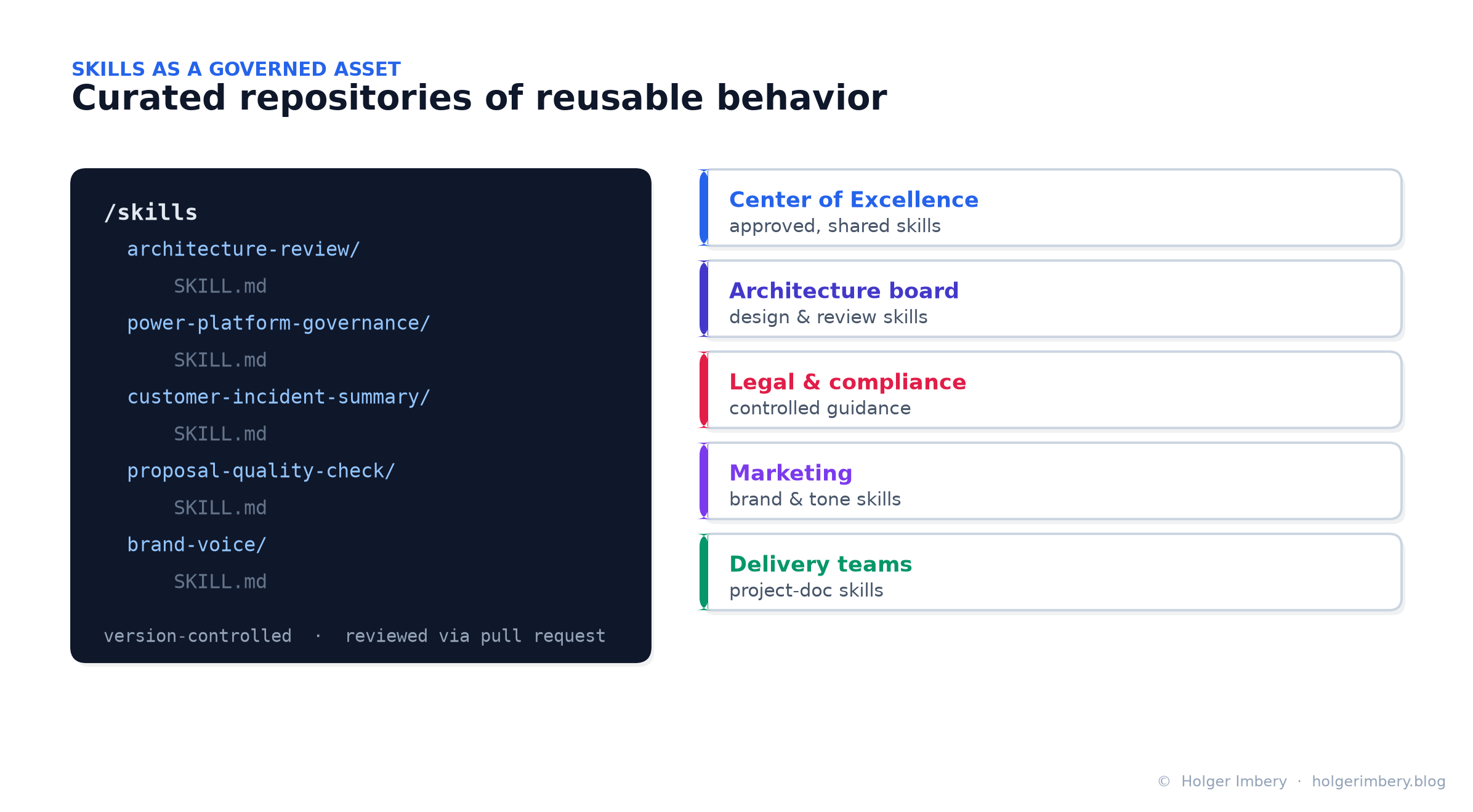 Figure 7 — A new operating model: a Center of Excellence maintains approved skills, an architecture board owns review skills, legal publishes controlled guidance, marketing owns brand voice, and delivery teams own project-documentation skills — all version-controlled and reviewed.
This enables a new operating model. A Center of Excellence can maintain approved skills. Architecture boards can define review skills. Legal and compliance can publish controlled guidance. Marketing can own brand and tone. Delivery teams can create reusable documentation skills. Once authored, these capabilities are reused across many agents — turning agent behavior into a governed, reusable, inspectable asset.
One open format, many runtimes
Here is the part that makes SKILL.md more than a Copilot Studio feature: it is not a Microsoft invention. Microsoft states plainly that Copilot Studio skills are “based on the Agent Skills open format, an open standard originally developed by Anthropic,” and that you can “import skills you already have, including existing GitHub Copilot or Claude Code skills.”
That means the same anatomy now appears across vendors:
- Anthropic Claude — Agent Skills: a
SKILL.mdwith YAML front matter (name,description) and a Markdown body, plus optional bundled resources, loaded via three-level progressive disclosure. - GitHub Copilot / Visual Studio 2026 — skills follow the
agentskills.iospecification: a directory containing aSKILL.mdwith the same required front matter, discovered from paths such as.github/skills/,.claude/skills/, and.agents/skills/. - Microsoft Copilot Studio — the new-experience Skills described throughout this article.
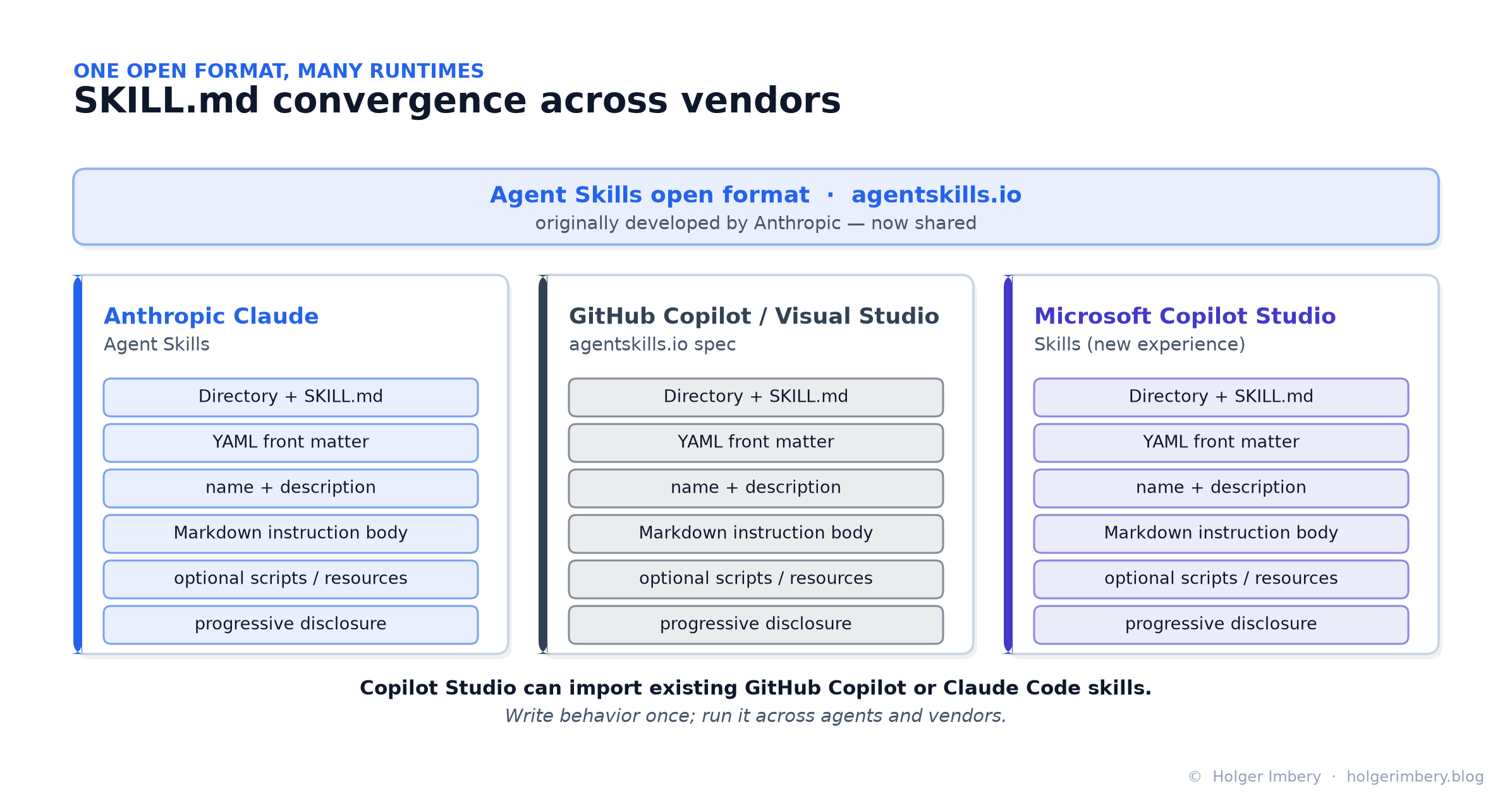 Figure 8 — The same open format across three runtimes: a directory plus SKILL.md, YAML front matter (name + description), a Markdown body, optional resources, and progressive disclosure. Behavior written once can travel between agents and vendors.
The strategic implication is large. For the first time, a piece of behavior — not code, not a model, but the procedural know-how of how your organization does something — can be written once and run across multiple agent runtimes. Skills become portable enterprise assets in the same way that container images or OpenAPI specs are.
Reality check. Convergence is real, but maturity varies. Visual Studio 2026 ships built-in Microsoft skills but keeps them off by default while it measures whether their token cost is justified — a reminder that “portable” does not mean “free,” and that every skill you load has a context window and cost footprint worth evaluating.
Skills versus tools versus knowledge
The distinction is worth internalizing, because clean separation is one of the most important architecture disciplines in the new model.
| Component | Purpose | Example |
|---|---|---|
| Instructions | Overall identity and behavior | “You are a procurement support agent.” |
| Knowledge | Information retrieval and grounding | SharePoint policies, Dataverse records, product docs |
| Tools | Performing actions | Create ticket, update CRM, send approval request |
| Skills | Task-specific expertise | “How to review a vendor onboarding request” |
A tool might create a SharePoint document. A skill explains how that document should be created according to organizational standards. Knowledge provides the policy that should be referenced. Instructions define the agent’s overall role. The orchestrator combines all of these at runtime.
A mature design therefore does not ask, “Should this be a prompt, a tool, or a knowledge source?” It asks a more precise question:
- General behavior? → Instructions
- Task-specific procedure? → Skill
- Reference information? → Knowledge
- External action? → Tool
- Specialist ownership? → Connected agent
The naming trap: two different meanings of “skills”
There is one real source of confusion. Copilot Studio has used the word skills before, and the two meanings are unrelated.
| Term | Classic meaning | New-experience meaning |
|---|---|---|
| Skill | An externally registered bot capability (Bot Framework / Microsoft 365 Agents SDK), added via a manifest URL | A Markdown-based reusable instruction module (SKILL.md) |
| Purpose | Connect to a pro-code bot capability | Provide task-specific behavior |
| Format | Manifest / registration-based | SKILL.md / Markdown package |
| Primary value | Integration with external bot logic | Modular behavior and instruction reuse |
The classic sense is still documented: you can “convert those bots into a skill and register that skill” via a manifest, and Copilot Studio supports skills built on Bot Framework SDK 4.12.0+ and Microsoft 365 Agents SDK v1.0.0+. When reading documentation or community posts, check which meaning is intended. In this article, skill means the new Markdown-based format unless stated otherwise.
Connected agents and agent specialization
The new experience also strengthens agent collaboration. An orchestrator can understand a request, select relevant skills, use appropriate tools, and delegate to connected agents. (Support for connecting to other agents — via the open A2A / Agent2Agent protocol, Microsoft Foundry agents, and the Microsoft 365 Agents SDK — actually predates the Build 2026 rebuild, arriving around Ignite in late 2025, and now folds cleanly into the new model.)
This creates a natural architecture for enterprises with specialized agents: HR, finance, procurement, architecture, IT support, governance, and customer-operations agents. Skills become the reusable expertise layer shared across those ecosystems. Multiple agents might use the same Executive Summary skill, the same Risk Classification skill, or the same Policy Compliance Review skill.
The separation is clean:
- Connected agents define ownership boundaries.
- Skills define reusable behavioral patterns.
- Tools define system actions.
- Knowledge defines grounding.
That separation makes multi-agent architectures easier to reason about and to govern.
Memory and Microsoft IQ
Memory adds another dimension. Classic agents required makers to explicitly persist every piece of state that needed to survive a conversation. For business state, that is still the right approach: a case status, approval decision, contract value, or onboarding step should live in a durable business system such as Dataverse.
But not every form of continuity is business state. Some context is about preferences, patterns, and how work tends to happen. That is where Memory becomes interesting. Microsoft’s Memory (preview) maintains a separate memory store for each user, per agent, in a tenant-scoped store; it captures useful signals, saves them, and applies them on future interactions. (Notably, a user’s memories for an agent are deleted after 28 days of inactivity — Memory is a continuity aid, not a system of record.)
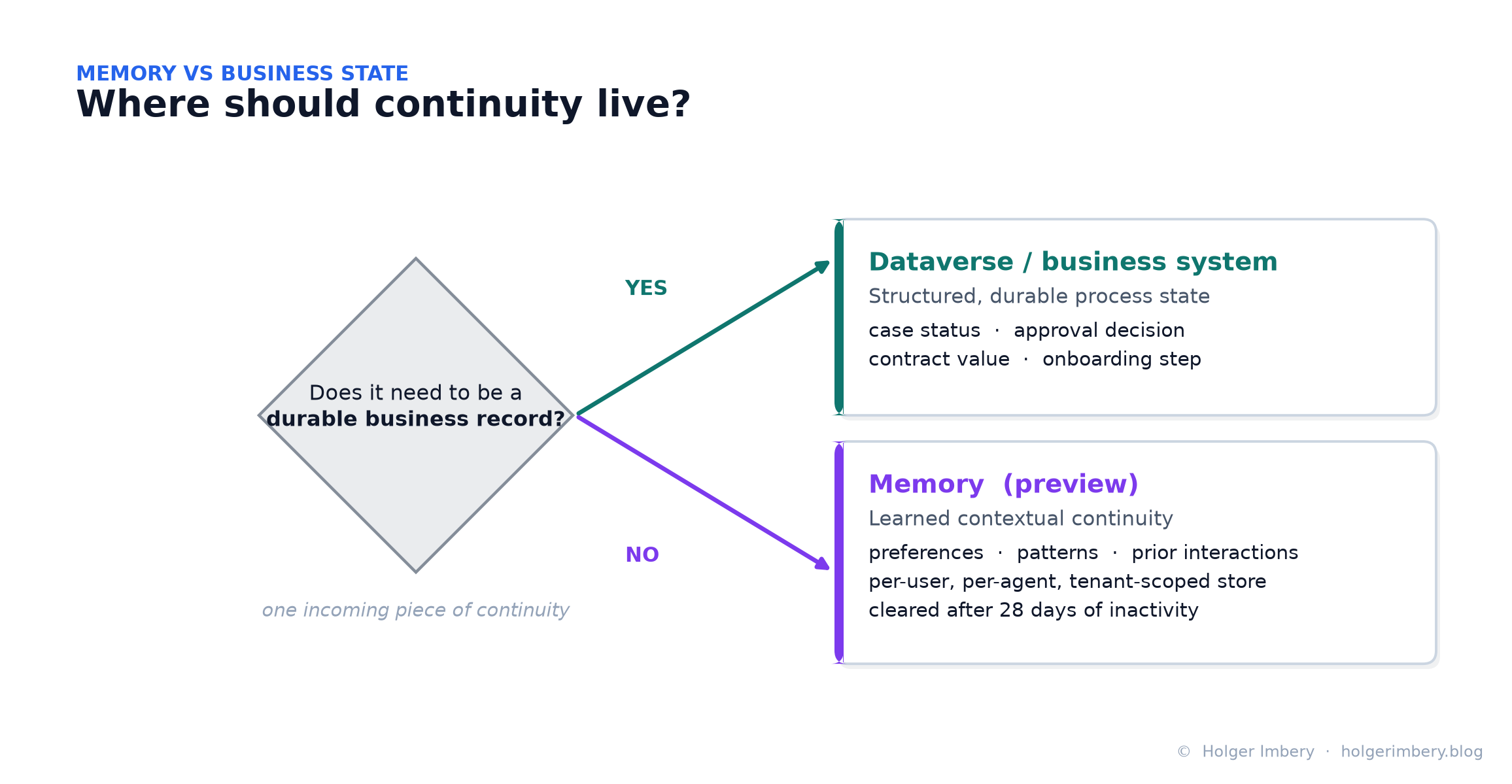 Figure 9 — A simple routing rule: durable business records belong in Dataverse or a business system; learned, contextual continuity belongs in Memory (per-user, per-agent, tenant-scoped).
A useful rule of thumb:
Structured process state       ->  Dataverse or business system
Learned contextual continuity  ->  Memory
Accuracy note. The official Memory documentation describes a per-user, per-agent, tenant-scoped file store. It does not describe Memory as being backed by Dataverse. Dataverse remains the place for durable business records and is reachable as a knowledge/tool source — but it is not the Memory backing store. Keep the two mentally separate.
Microsoft IQ then provides the broader grounding layer. It is best understood as an umbrella: a set of capabilities — Work IQ (how people work), Foundry IQ (an organization’s policies and authoritative documents), Web IQ (context from the web), and Fabric IQ (business entities and data) — that form the enterprise intelligence layer of the Microsoft stack. Copilot Studio consumes Microsoft IQ as a grounding source. The design center moves from individual bots to shared agent infrastructure:
From:  One bot with its own topics and data
To:    Many agents · shared governance · shared knowledge ·
       shared tools · shared skills · shared protocols
Convergence with Microsoft IQ and Microsoft Foundry
Perhaps the most strategic development is neither the orchestrator nor the UI. It is platform convergence.
Microsoft is aligning Copilot Studio, Microsoft Foundry (the rebranded Azure AI Foundry, positioned at Build 2026 as “the platform for building, hosting, and governing long-running AI agents”), Microsoft IQ, MCP, A2A, Microsoft 365 Copilot, and multi-agent architectures around a common foundation.
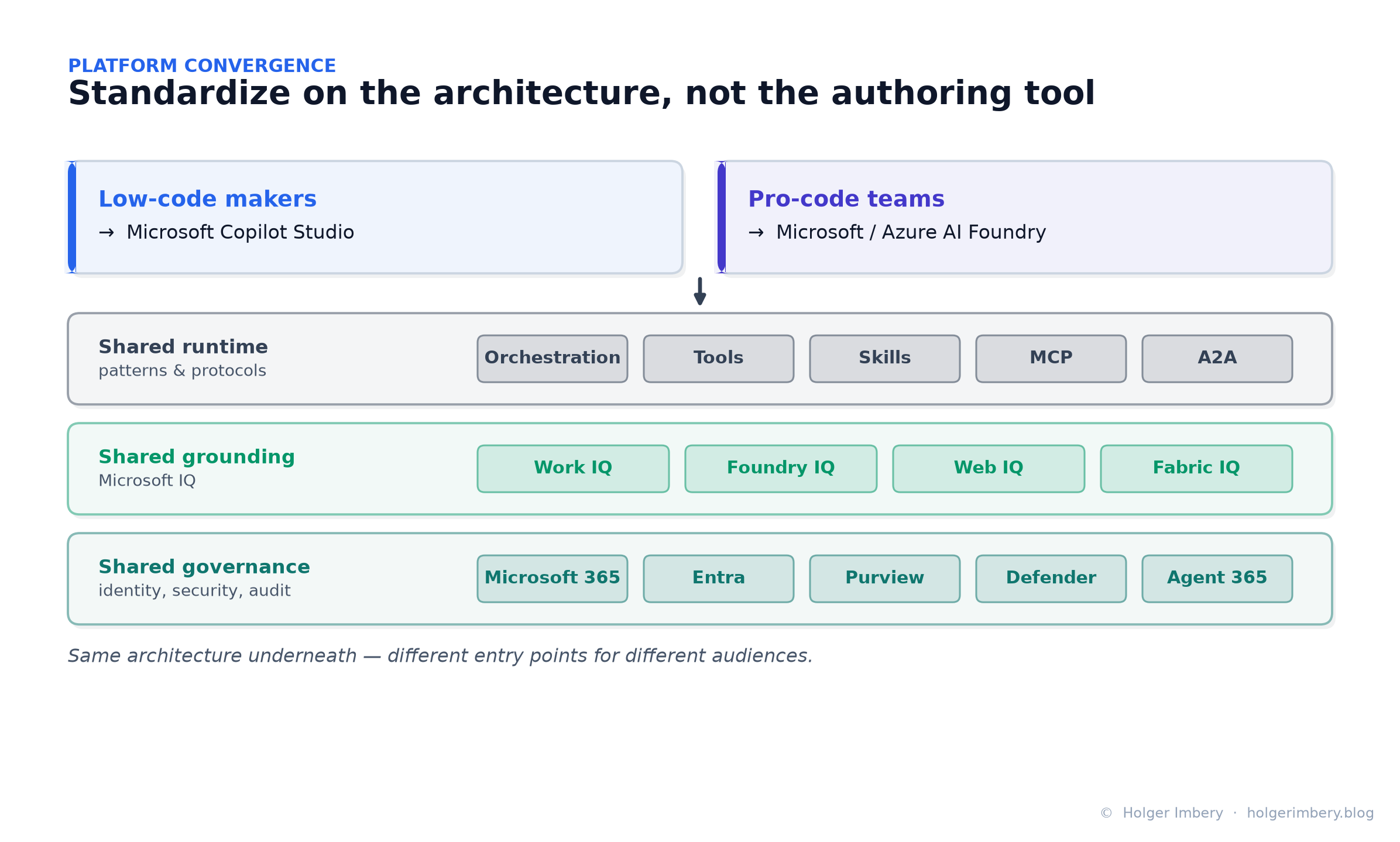 Figure 10 — Low-code and pro-code remain distinct entry points, but they increasingly share a runtime (orchestration, tools, skills, MCP, A2A), a grounding layer (Microsoft IQ), and a governance layer (Microsoft 365, Entra, Purview, Defender, Agent 365).
This does not mean low-code and pro-code become the same thing. They remain different entry points for different audiences. But the gap narrows:
Low-code makers      ->  Copilot Studio
Pro-code teams       ->  Microsoft Foundry
Shared runtime       ->  Orchestration, tools, skills, MCP, A2A
Shared grounding     ->  Microsoft IQ  (Work / Foundry / Web / Fabric IQ)
Shared governance    ->  Microsoft 365, Entra, Purview, Defender, Agent 365
On governance, the pieces are real and named. Microsoft Defender, Entra, and Intune provide visibility and runtime protection for agents; Microsoft Purview logs agent activity for traceability; and Agent 365 introduces agent-management capabilities — including an agent registry that surfaces unmanaged local agents. (Precision matters: the Agent 365 SDK is generally available, but several surrounding capabilities are still in preview — don’t blanket-label all of Agent 365 as GA.)
The instruction for platform teams is simple:
Do not standardize only on the authoring tool. Standardize on the architecture.
Organizations don’t have to choose between low-code and pro-code. They can pick the most appropriate authoring environment while sharing common principles: governed access, reusable skills, clear ownership, connected agents, auditable tool use, and enterprise grounding.
Governance implications
The new model increases flexibility — which increases the need for discipline. Skills especially need governance. If a skill can define how an agent behaves, it should be treated as an enterprise asset.
Recommended practices:
- Store shared skills in version-controlled repositories.
- Use pull requests for changes to important skills.
- Define owners for each skill.
- Keep skill descriptions precise and testable (they are routing metadata — see §7).
- Avoid broad, overlapping skills that compete for activation.
- Separate policy knowledge from procedural skill guidance.
- Test skills with realistic user requests.
- Maintain a changelog for production-relevant skills.
- Review high-impact skills with security, compliance, legal, or architecture stakeholders.
The same skill may influence many agents. That makes reuse powerful — but it also means a poorly written skill can propagate flawed behavior across many agents. In the classic world, bad logic was often trapped inside one topic or one bot. In the new world, reusable behavior scales quickly — so review and governance must scale with it.
What architects should do now
The rebuild does not mean every classic agent should migrate immediately. A more nuanced approach:
For new agents
Start with the new experience where the required capabilities are available. Design around Skills (task-specific behavior), Tools (actions), Knowledge (grounding), Connected Agents (delegation), Memory (continuity), and Workflows (deterministic process control). Remember that agents built here cannot be converted back to the classic experience.
For existing classic agents
Do not migrate reflexively. Classic agents still matter, especially where topic structures are stable, tested, and operationally reliable. Consider migration when:
- the agent needs a significant redesign,
- instruction complexity has grown too large,
- topic branching has become hard to maintain,
- multi-agent delegation is required,
- or reusable skills would clearly simplify the design.
For platform teams
Begin building a skills strategy now. Ask:
- Which procedural behaviors are repeated across agents?
- Which review processes should be standardized?
- Which skills require central ownership, and which can be team-owned?
- How should skills be tested?
- Where should
SKILL.mdfiles live, and how are they versioned and released?
The earlier this discipline is established, the easier it will be to scale agent development responsibly.
Choosing between the new experience and classic — a decision guide
Because the two experiences run in parallel and are not convertible, the practical question isn’t “when do I migrate everything?” — it’s “which experience fits this workload?” Here is a concrete way to decide.
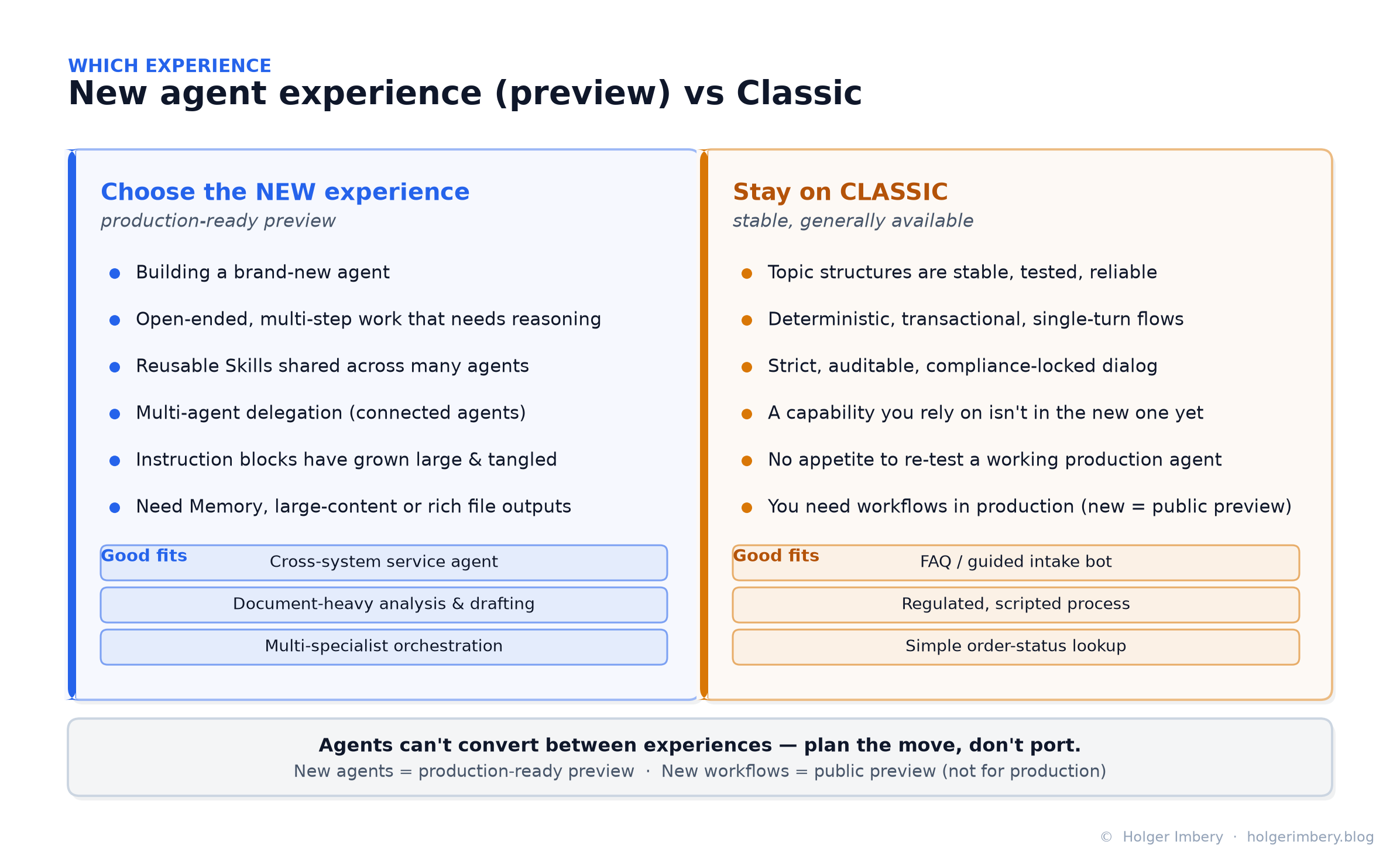 Figure 11 — A side-by-side decision guide: choose the new experience when the value comes from reasoning and adaptivity; keep classic when it comes from predictability and a fixed script.
Reach for the new agent experience (production-ready preview) when:
- You are building a brand-new agent and can design it natively.
- The work is open-ended and multi-step — the agent must reason, plan, and adapt rather than follow a script.
- You want reusable Skills shared across several agents.
- You need multi-agent delegation to specialists (connected agents).
- A single agent’s instructions have grown large and tangled, and modular Skills would simplify it.
- You need Memory, large-content processing, or rich file outputs.
Good fits: a cross-system service agent that triages a request and acts across CRM, ticketing, and SharePoint; a document-heavy analysis-and-drafting agent; a front-door agent that orchestrates HR, finance, and procurement specialists.
Stay on (or keep building in) the classic experience when:
- Existing topic structures are stable, tested, and operationally reliable — don’t fix what isn’t broken.
- The interaction is deterministic, transactional, and single-turn (place an order, check status).
- You need strict, auditable, compliance-locked dialog where every path is scripted on purpose.
- A capability you depend on isn’t available in the new experience yet — some classic features haven’t carried over.
- You have no appetite to re-test a working production agent right now.
- You need workflows in production today — the new workflows experience is public preview, which Microsoft says is not for production, even though the new agent experience is a production-ready preview.
Good fits: an FAQ or guided-intake bot; a regulated, scripted process where deviation is a defect; a simple order-status lookup.
The rule of thumb: choose the new experience when the value comes from reasoning and adaptivity; keep classic when it comes from predictability and a fixed script. And when you do move an agent, plan the redesign — don’t port the old topic tree one-for-one.
Ready-made behavior — the CAT Agent Skills gallery
You don’t have to author every skill from scratch. Microsoft’s Customer Advisory Team (CAT) publishes CAT Agent Skills, described as “the gallery of skills for your AI agents”: community-contributed, drop-in instruction and script bundles you can download as Markdown (and scripts) and add to Cowork, Copilot Studio, or Scout.
The gallery filters by platform (Copilot Studio, Cowork, Scout) and by content type (Skills, Plugins, Automations), with tags such as productivity, content, documents, automation, and marketing. A few representative entries — useful both as ready-made building blocks and as worked examples for authoring your own:
| Skill | What it does | Why it’s a useful example |
|---|---|---|
| Iterative File Editing | Gives each edited file a version-numbered name (report_v1.docx, report_v2.docx…) so every update actually lands in the chat |
A tiny skill that fixes one specific, real Copilot Studio behavior — the ideal narrow scope |
| PowerPoint Deck Designer | Builds polished decks from a JSON spec with python-pptx, running natively in the agent’s Python container (no Azure Function needed) |
Shows a skill that bundles a script and runs code in the sandbox |
| Knowledge Source Router | Routes knowledge searches to the right region-specific source (Americas, EMEA, APAC, Global) so answers stay locally accurate | A pure procedural skill — behavior, not data or actions |
| Brand Voice Pass / Brand Template Enforcer | Rewrites drafts to a house style; ensures decks and docs start from the approved brand template | Classic center-of-excellence governance skills, reused across agents |
| Meeting Analyzer | Extracts decisions, action items, persona profiles, and hidden insights (unspoken tensions, implicit risks) from a transcript | A rich, opinionated skill with a clear output contract |
| Universal Document Converter | Converts between Markdown, HTML, PDF, Word, PowerPoint, Excel/CSV, and text — fully offline, using only sandbox libraries | Demonstrates self-contained, no-external-dependency packaging |
| Microsoft AI Platform Advisor | Interviews a customer and recommends the right platform (M365 Copilot, Agent Builder, Copilot Studio, Foundry, or Agent 365 as the governance layer) | A decision-framework skill — a good template for advisory agents |
| Skill Authoring Coach | Helps makers design concise, reusable skills with clear triggers, instructions, resources, and packaging | A meta-skill: use it to write better skills |
The point isn’t the individual entries — it’s the operating model. Because these are just Markdown packages on the open Agent Skills format (§7, §10), a gallery like this behaves like a package registry for behavior: browse, download, drop in, and adapt. Treat an imported skill the way you’d treat any third-party dependency — read it, test it, and version it before trusting it in production (§16).
Getting started — CAT’s three on-ramps
Moving to modern agents is “a different mental model, not just a new UI,” and Microsoft’s CAT team packaged the on-ramp into three resources, each answering a different question.
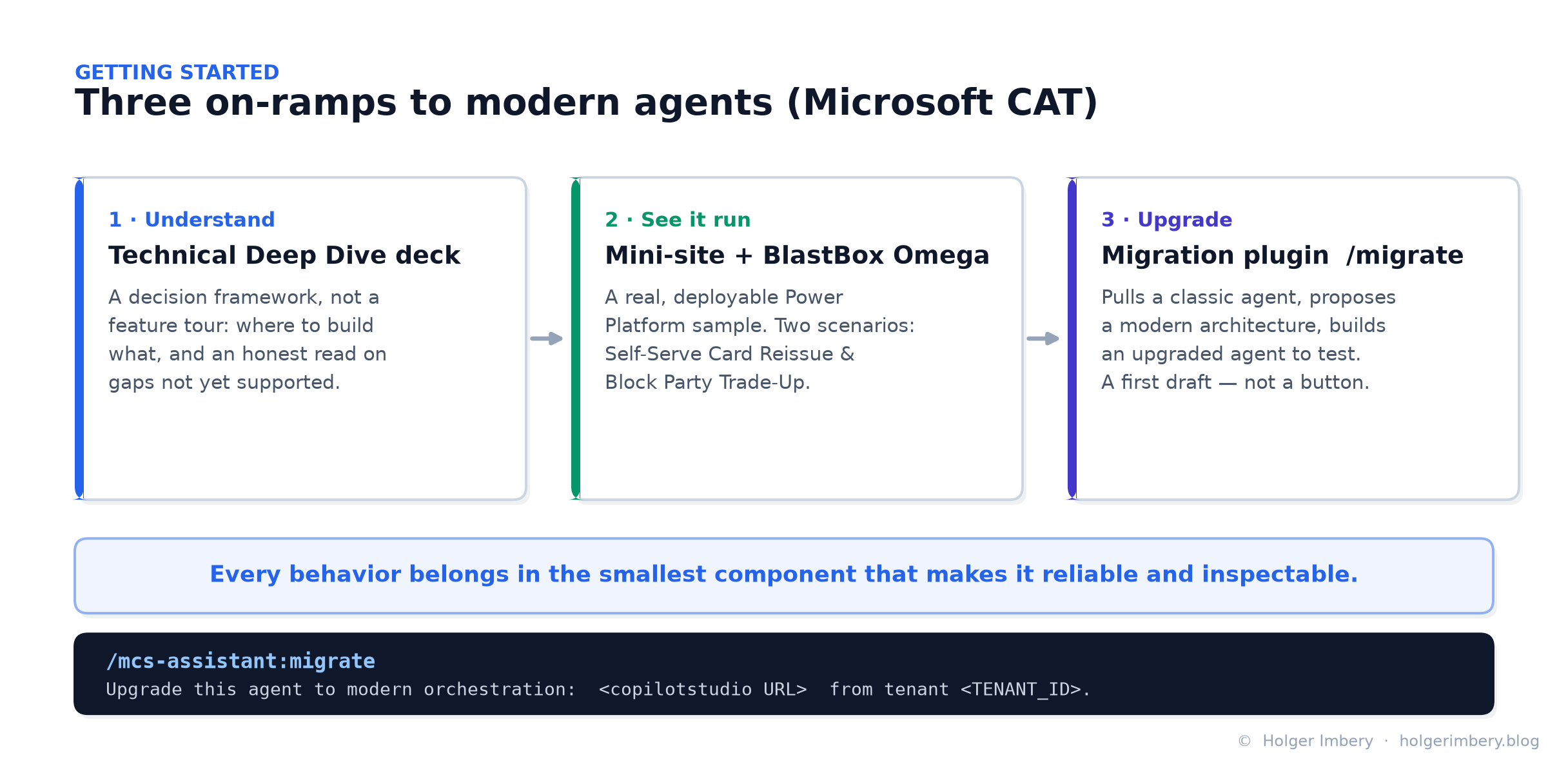 Figure 12 — CAT’s three resources: a deep-dive deck to grasp the concepts, a deployable mini-site to see them run, and a migration plugin to try them on a real agent.
- Understand it — the Technical Deep Dive deck. Built for builders and architects as a decision framework, not a feature tour. It covers where to build what (agent vs. workflow, and which piece belongs where), how to build modern agents and workflows, how to upgrade without simply porting the old design, and an honest read on what’s improved and what isn’t supported yet.
- See it run — the mini-site and sample. A real, deployable Power Platform solution (not screenshots with a story), built around BlastBox Omega, a retro-future game store “run by agents.” Two scenarios make it concrete:
- Self-Serve Card Reissue — an agent handles a member request end to end, gating a real write action behind an identity check and handing back a generated file.
- Block Party Trade-Up — the flagship, where a parent agent coordinates specialist agents to untangle a messy, multi-part request and settle it with a downloadable document.
- Upgrade it — the migration plugin. Install the Copilot Studio plugin for AI coding agents and send
/migratewith your agent’s environment, tenant, and URL. It pulls the classic agent, analyzes its structure, proposes a modern architecture, and builds an upgraded agent to test:
/mcs-assistant:migrate Upgrade this agent to modern orchestration:
https://copilotstudio.microsoft.com/environments/<ENV_ID>/bots/<BOT_ID>
from tenant <TENANT_ID>. Use a capable AI model.
The guiding principle behind all three is worth pinning above your desk:
Every behavior belongs in the smallest component that makes it reliable and inspectable. Instructions carry what’s always true, Knowledge the searchable facts, Tools the system actions, Memory the persistent context, Skills the situational procedures, and connected agents the real specialist domains.
Or, as the CAT team puts it more bluntly: “a modern agent shouldn’t be one instruction blob with 43 tools and a prayer.”
On migration, mind the word propose. The plugin is “a fast assistant, not a ‘make my architecture correct’ button.” The anti-pattern to avoid is turning “every topic into a Skill and every variable into memory just because they existed — that’s archaeology with YAML.” Instead: understand the task, keep the outcomes that must work, map each responsibility to the smallest right component, then run evals against the core journeys and treat the generated agent as a first draft to inspect and compare against your old tests.
Conclusion
The new Copilot Studio is not simply a modernized interface. It represents a transition from conversation design to agent engineering.
The combination of an agentic orchestrator, modular Skills, SKILL.md portability, Connected Agents, Memory, Microsoft IQ, and stronger alignment with Microsoft Foundry creates a fundamentally different development model than the one that defined Copilot Studio for the last several years.
For architects, the most important takeaway is not the reduced tab count. It is the emergence of reusable behavioral assets — versioned, shared, governed, and loaded dynamically by an increasingly capable orchestrator. The long-term significance of Build 2026 may be summarized in a single sentence:
Microsoft is transforming Copilot Studio from a chatbot builder into an enterprise agent engineering platform.
And because it rests on an open Agent Skills format shared with Claude and GitHub Copilot, SKILL.md may become one of the key building blocks of that transition — not just inside Copilot Studio, but across the industry.
Sources
- Microsoft Learn — Agents overview (preview): Microsoft Copilot Studio (new experience)
- Microsoft Learn — Skills overview for agents (preview)
- Microsoft Learn — Memory (preview) for agents
- Microsoft Learn — Configure skills for use in Copilot Studio agents (classic Bot Framework / M365 Agents SDK skills)
- Microsoft Learn — Connect to another agent over A2A
- Microsoft Learn — Add other agents to an agent (overview)
- Microsoft Learn — Fabric IQ overview (Microsoft IQ: Work IQ, Foundry IQ, Web IQ, Fabric IQ)
- Microsoft Learn — Agent Skills in Visual Studio (agentskills.io spec)
- Microsoft Copilot Studio Blog — Meet the new Copilot Studio: rebuilt for more complex, multi-step work
- The Custom Engine (Microsoft) — Modern Agents Have Skills Now — How They Work in Copilot Studio
- The Custom Engine (Microsoft) — New Orchestrator, New Rules? CAT’s Got You (migration, samples, deep-dive deck)
- Microsoft CAT — CAT Agent Skills gallery
- Microsoft Security Blog — Microsoft Build 2026: securing code, agents, and models (Agent 365, Entra, Purview, Defender)
- Anthropic — Agent Skills overview (SKILL.md, YAML frontmatter, progressive disclosure)
- GitHub Docs — Custom skills in the Copilot SDK
- Microsoft Build 2026 — Event dates (June 2–3, 2026)