
Table of Contents
Summary Lede
Organizations implementing Microsoft Copilot Studio often ask about the machine structure and how to monitor and analyze resource use across their deployed agents. This article addresses these common questions by examining the foundational principles of Copilot Studio’s billing methodology. Specifically, the platform employs a usage-based billing model that operates through Copilot Credits, a standardized measurement unit that quantifies billable computational resources. Microsoft Copilot Studio gives you comprehensive visibility into consumption and costs through integrated Analytics. You get real-time visibility into billing metrics, consumption attribution, and capacity planning, without needing external tools or manual reconciliation.
Usage-based billing with Copilot Credits
Microsoft Copilot Studio employs a consumption-based billing model centered on Copilot Credits, a standardized unit of measurement that quantifies the billable computational resources your agent uses. We add up each agent’s operational costs by summing all Copilot Credits used across your organizational tenant, providing a transparent, predictable billing framework. The volume of Copilot Credits your agent consumes is determined by multiple contributing factors, including the frequency and intensity of user interactions, the specific AI capabilities invoked during those interactions (such as natural language responses, backend action execution, or business process flows), and the overall complexity of the scenarios the agent must handle. This approach lets your costs scale with your actual usage and feature use across your organization.
Where to see billing and consumption
Copilot Studio provides a dedicated Analytics page at the agent level that shows billing‑relevant data for a selected time period. This includes:
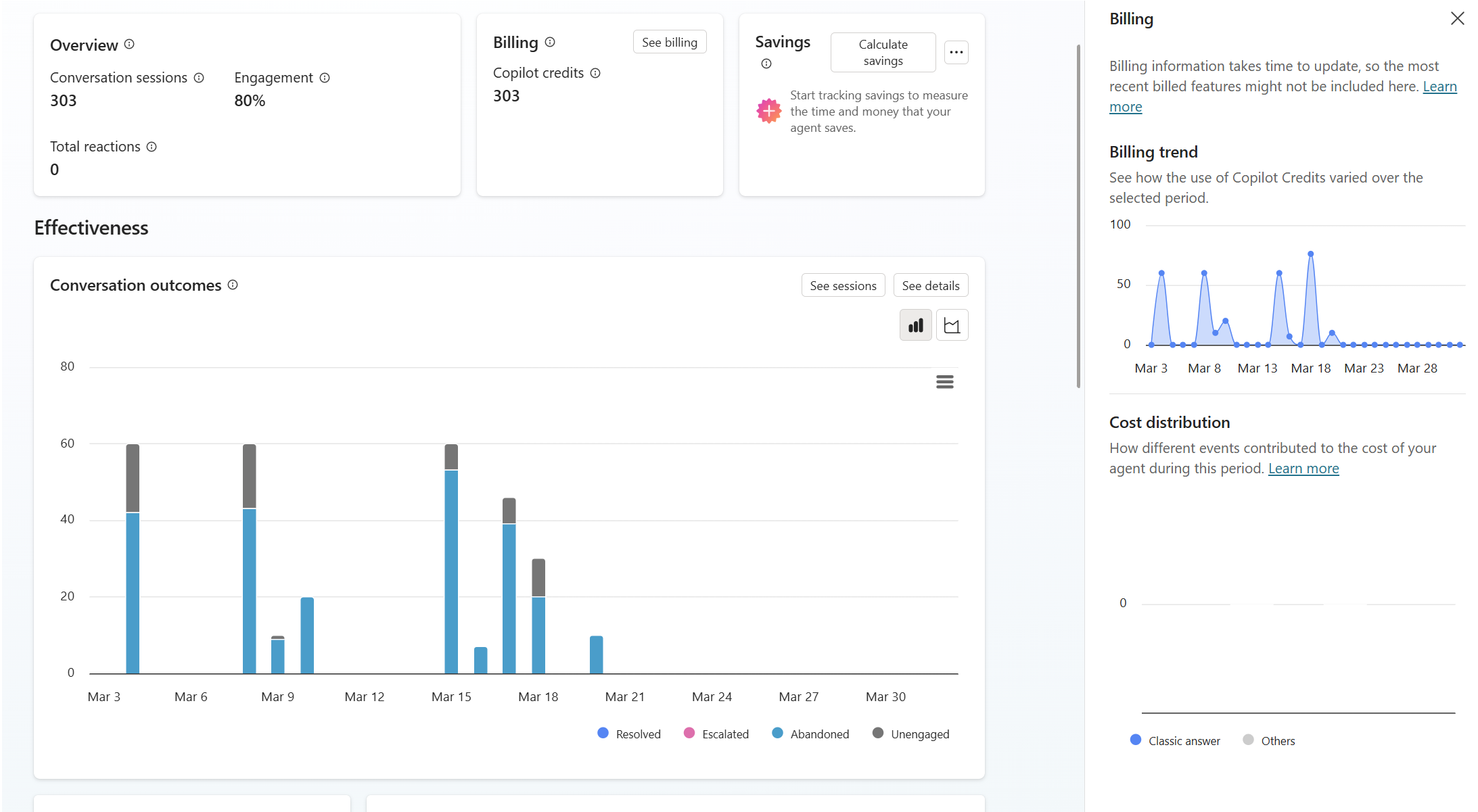
Total billed Copilot Credits for the agent
The Analytics dashboard provides comprehensive visibility into your agent’s billing metrics through several key components:
-
Billing trend visualization: A temporal representation of Copilot Credit consumption plotted over your selected time period, enabling stakeholders to identify consumption patterns, peak usage intervals, and seasonal fluctuations in agent utilization.
-
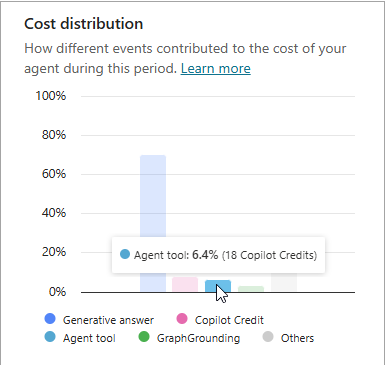
Activity-based consumption breakdown: A detailed attribution analysis that segments credit consumption by interaction type and feature category. This granular view helps identify which capabilities—such as natural language processing, action executions, or business process integrations—are the primary drivers of your organization’s computational costs.
-
Credit allocation and remaining capacity: A dashboard element that displays your monthly credit allocation alongside actual consumption to date, providing clear visibility into remaining available credits within the current billing cycle and helping prevent unexpected cost overruns.
This analytical approach helps makers and administrators go beyond simple cost visibility to understand the factors and user behaviors that drive consumption patterns in their agents.
Near‑real‑time visibility
Please note that consumption data in the Analytics experience isn’t reflected immediately. Because data collection and aggregation are distributed across Microsoft’s infrastructure, there is a deliberate processing interval between when an interaction occurs in your agent and when the corresponding credit consumption metrics appear in the Analytics dashboard. Specifically, recent user activity and associated Copilot Credit charges typically require several hours to propagate through the telemetry pipeline and surface in the analytics interface. This temporal lag between actual consumption and reported metrics is a critical consideration when conducting performance monitoring, particularly in scenarios involving new agent deployments, recent architectural modifications, or optimization initiatives. Organizations implementing consumption tracking during these periods should account for this delay when interpreting analytics data and making operational decisions based on observed billing trends.
Why this matters
The relationship between billing metrics and agent design decisions is a core principle in building and running Microsoft Copilot Studio deployments. Organizations that recognize and leverage this connection are better positioned to make informed architectural decisions that balance functional requirements with cost efficiency. The Analytics experience provided within Copilot Studio serves a dual purpose that extends well beyond simple billing transparency. As a primary governance tool, it enables organizations to establish consumption baselines, define and enforce cost budgets, and implement optimization strategies at both the agent and organizational levels. This comprehensive analytical framework becomes increasingly critical as agents transition from the experimentation and proof-of-concept phases to production environments, where operational costs accumulate rapidly, and optimization opportunities become more constrained. By establishing clear visibility into consumption patterns during early development stages, teams can identify inefficient architectural patterns, optimize interaction flows, and refine AI capabilities—all before deploying agents at scale. Furthermore, the transparency provided by the Analytics dashboard facilitates organizational governance by empowering stakeholders to establish accountability for resource utilization, track consumption trends against budgetary targets, and make data-driven decisions regarding agent expansion, feature prioritization, and technology investments.
Links and resources
Conclusion
Microsoft Copilot Studio’s billing model, centered on usage-based Copilot Credits, provides a transparent and scalable framework for managing the costs associated with AI agent deployment. By leveraging the built-in Analytics experience, organizations can gain comprehensive insights into their agents’ consumption patterns, enabling informed decision-making around agent design, optimization, and cost management. As organizations continue to adopt and scale their use of AI agents, understanding the nuances of billing and consumption visibility will be essential for maximizing the value of their investments in Microsoft Copilot Studio while maintaining control over operational costs.